async/await and Task.Run both involve tasks, but they solve entirely different problems. Mixing them up leads to code that either starves the thread pool or blocks threads unnecessarily. The distinction comes down to one question: is your work I/O-bound or CPU-bound?
Every claim here is asserted by
samples/async-await-vs-task-run
— 13 checks that make the difference observable through thread ids and task state, not prose (see Verify It Yourself).
The Fundamental Difference
I/O-bound work waits for something external: a database response, an HTTP call, a file read. The CPU sits idle during this wait. async/await handles this by suspending the method and freeing the thread.
CPU-bound work performs actual computation: image processing, cryptography, complex calculations. The CPU is busy the entire time. Task.Run handles this by offloading to a thread pool thread, keeping the calling thread free.
// I/O-bound — use async/await directly (no Task.Run needed)
public async Task<User> GetUserAsync(int id)
{
    return await _db.Users.FindAsync(id); // Waiting for DB, no CPU usage
}

// CPU-bound — use Task.Run to offload to thread pool
public async Task<byte[]> ResizeImageAsync(byte[] imageData, int width, int height)
{
    return await Task.Run(() => DoResizeWork(imageData, width, height));
}

private byte[] DoResizeWork(byte[] imageData, int width, int height)
{
    // Actual CPU work happens here — heavy computation
    using var image = Image.Load(imageData);
    image.Mutate(x => x.Resize(width, height));
    using var ms = new MemoryStream();
    image.Save(ms, JpegFormat.Instance);
    return ms.ToArray();
}
Why You Don't Need Task.Run for I/O
A common mistake is wrapping async I/O calls in Task.Run:
// WRONG — double-wrapping, wastes a thread pool thread for no benefit
public async Task<List<Order>> GetOrdersAsync(int userId)
{
    return await Task.Run(async () =>
    {
        return await _db.Orders
            .Where(o => o.UserId == userId)
            .ToListAsync();
    });
}

// CORRECT — async/await handles I/O natively without thread blocking
public async Task<List<Order>> GetOrdersAsync(int userId)
{
    return await _db.Orders
        .Where(o => o.UserId == userId)
        .ToListAsync();
}
The Task.Run version takes a thread pool thread, which then immediately parks itself waiting for the database. You've consumed a thread just to... wait. That defeats the entire purpose of async I/O.
When Task.Run Is the Right Tool
CPU-Bound Work in ASP.NET Core
In a web application, calling CPU-heavy code directly on the request thread blocks that thread from handling other requests:
// BAD — blocks the request thread for seconds
[HttpPost("process")]
public async Task<IActionResult> ProcessData([FromBody] DataRequest request)
{
    var result = PerformHeavyCalculation(request.Data); // Blocks for 2+ seconds
    return Ok(result);
}

// GOOD — offloads CPU work, request thread is freed
[HttpPost("process")]
public async Task<IActionResult> ProcessData([FromBody] DataRequest request)
{
    var result = await Task.Run(() => PerformHeavyCalculation(request.Data));
    return Ok(result);
}
Integrating Legacy Synchronous Code
When you must call synchronous blocking code from an async context:
// Legacy synchronous library you can't change
public string LegacyBlockingOperation(string input)
{
    Thread.Sleep(2000); // Simulates blocking work
    return $"processed: {input}";
}

// Integrate it without blocking the calling thread
public async Task<string> ProcessAsync(string input)
{
    return await Task.Run(() => LegacyBlockingOperation(input));
}Using Task.Run to wrap synchronous code is acceptable as a workaround, but it's not free — each Task.Run uses a thread pool thread. For high-throughput scenarios, rewrite the underlying code to be truly async.
Parallel CPU Processing
public async Task<IReadOnlyList<ReportResult>> GenerateReportsAsync(
    IEnumerable<ReportRequest> requests)
{
    var tasks = requests.Select(req =>
        Task.Run(() => GenerateReport(req)));  // Each on a separate thread

    return await Task.WhenAll(tasks);
}
Async All the Way
The "async all the way" principle means that once you go async, every caller in the chain should also be async. Mixing sync and async causes problems.
// Service layer — async
public class OrderService
{
    private readonly AppDbContext _db;

    public async Task<Order> CreateOrderAsync(CreateOrderRequest request)
    {
        var order = new Order { /* ... */ };
        _db.Orders.Add(order);
        await _db.SaveChangesAsync();
        return order;
    }
}

// Controller — async (calling async service)
[HttpPost]
public async Task<IActionResult> CreateOrder([FromBody] CreateOrderRequest request)
{
    var order = await _orderService.CreateOrderAsync(request);
    return CreatedAtAction(nameof(GetOrder), new { id = order.Id }, order);
}
If you stop the chain midway and use .Result:
// BAD — breaks the async chain
[HttpPost]
public IActionResult CreateOrder([FromBody] CreateOrderRequest request)
{
    var order = _orderService.CreateOrderAsync(request).Result; // BLOCKS + potential deadlock
    return CreatedAtAction(nameof(GetOrder), new { id = order.Id }, order);
}
Fire-and-Forget Dangers
Sometimes you genuinely want to start an async operation and not wait for it. This is "fire-and-forget" and it has serious risks:
// DANGEROUS fire-and-forget
public IActionResult SubmitOrder([FromBody] OrderRequest request)
{
    _ = SendConfirmationEmailAsync(request.Email); // NOT awaited
    return Ok("Order received");
}
Problems with this pattern:
- Exceptions are silently swallowed — if
SendConfirmationEmailAsyncthrows, you'll never know - The operation may be cancelled — in ASP.NET Core, if the request ends, background operations may be aborted
- No visibility — you can't track whether it succeeded
Safer Fire-and-Forget Alternatives
// Option 1: Log exceptions explicitly
public IActionResult SubmitOrder([FromBody] OrderRequest request)
{
    _ = SendConfirmationEmailAsync(request.Email)
        .ContinueWith(t =>
        {
            if (t.IsFaulted)
                _logger.LogError(t.Exception, "Failed to send confirmation email");
        }, TaskScheduler.Default);

    return Ok("Order received");
}

// Option 2: Use IHostedService / BackgroundService for reliable background work
public class EmailBackgroundService : BackgroundService
{
    private readonly Channel<EmailMessage> _queue;

    protected override async Task ExecuteAsync(CancellationToken stoppingToken)
    {
        await foreach (var message in _queue.Reader.ReadAllAsync(stoppingToken))
        {
            try
            {
                await SendEmailAsync(message);
            }
            catch (Exception ex)
            {
                _logger.LogError(ex, "Failed to send email to {Email}", message.To);
            }
        }
    }
}For reliable background processing, use System.Threading.Channels to queue work and a BackgroundService to process it. This survives exceptions, runs reliably, and is observable.
Common Mixing Mistakes
Mistake 1: Async over sync (the fake async)
// MISLEADING — looks async, is actually synchronous
public Task<int> CountProductsAsync()
{
    var count = _db.Products.Count(); // Synchronous — blocks thread
    return Task.FromResult(count);
}

// CORRECT
public async Task<int> CountProductsAsync()
{
    return await _db.Products.CountAsync();
}
Mistake 2: Task.Run in library code
// BAD library code — steals thread pool threads from the consumer
public static class ProductCalculator
{
    public static Task<decimal> CalculateTotalAsync(List<Product> products)
    {
        return Task.Run(() => products.Sum(p => p.Price)); // Imposes threading on consumers
    }
}

// BETTER — let callers decide about threading
public static class ProductCalculator
{
    // Synchronous — simple, no threading decisions made
    public static decimal CalculateTotal(List<Product> products)
        => products.Sum(p => p.Price);
}

// Caller uses Task.Run if they need it
var total = await Task.Run(() => ProductCalculator.CalculateTotal(products));
Mistake 3: ConfigureAwait on Task.Run
// Task.Run has no SynchronizationContext, so ConfigureAwait(false) is redundant here
var result = await Task.Run(() => HeavyWork()).ConfigureAwait(false); // Harmless but pointless

// ConfigureAwait(false) matters on I/O awaits in library code
var data = await httpClient.GetStringAsync(url).ConfigureAwait(false); // Meaningful
Quick Decision Guide
| Scenario | Use |
|---|---|
| Database query | await dbContext.SomeAsync() |
| HTTP call | await httpClient.GetAsync(url) |
| File read | await File.ReadAllTextAsync(path) |
| Image processing | await Task.Run(() => ProcessImage(...)) |
| Heavy math | await Task.Run(() => Calculate(...)) |
| Legacy sync library | await Task.Run(() => legacyLib.Do(...)) |
| Parallel I/O | await Task.WhenAll(tasks) |
| Parallel CPU | await Task.WhenAll(tasks.Select(t => Task.Run(() => ...))) |
The rule is simple: if you're waiting for I/O, async/await without Task.Run. If you're doing CPU work that would block a thread, Task.Run.
Verify It Yourself
samples/async-await-vs-task-run
turns each claim above into an assertion that throws if it's ever false. Running it prints
13 passing checks:
- A direct synchronous call runs the CPU work on the caller's own thread;
Task.Runmoves the identical work to a different thread-pool thread — the whole reason it exists. - The "fake async" anti-pattern (
Task.FromResultafter synchronous work) returns an already-completed task whose body ran synchronously on the calling thread — it never freed anything. A method that awaitsTask.Yield()returns before completing. - A fire-and-forget task can fault while the caller carries on with no idea; the exception is only surfaced when something finally awaits it.
ContinueWith(TaskScheduler.Default)is the observation hook. - The Channel +
BackgroundService-style loop delivers on its promise: one message throws mid-stream, and the other two are still processed. Task.WhenAll(Task.Run(...))genuinely spreads eight CPU tasks across eight distinct pool threads, none of them the caller's.
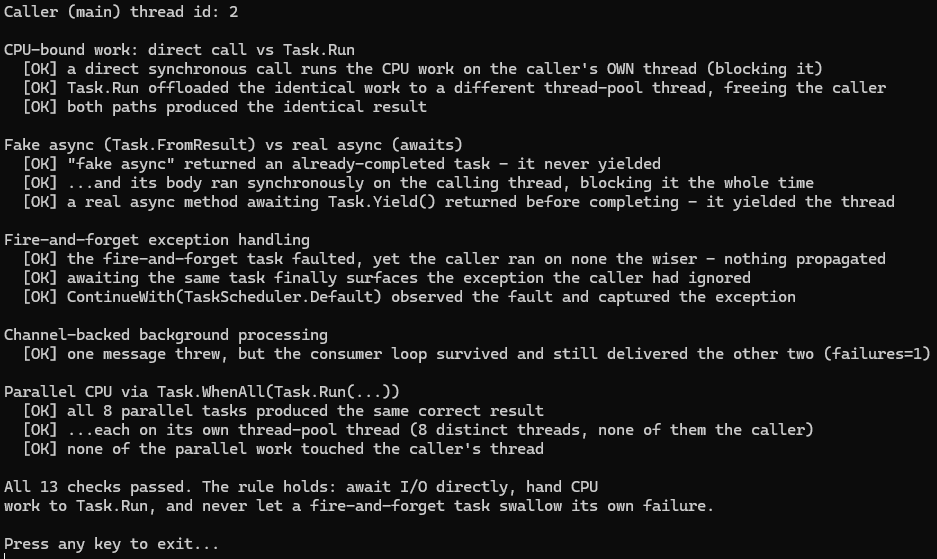
dotnet run — no database, no setup, fully deterministic. The parallelism check raises the
pool's minimum thread count and uses a Barrier so the eight tasks are forced to run at
once; without that, the pool could quietly serialize them onto one reused thread and the
distinct-thread count would be a lie rather than a demonstration.
Two follow-on topics matter once you have the I/O-vs-CPU distinction straight. The first
is what happens when someone blocks on an async call anyway — see
async deadlocks in C# for why .Result and .Wait()
turn a working method into a hung one. The second is
ConfigureAwait(false), which controls where your
continuation resumes and is the usual fix once a deadlock has been diagnosed.