Async deadlocks are one of the most confusing bugs in C#. The app hangs. No exception. No error. The request just never responds. Understanding why they happen — and more importantly, why they don't happen in certain contexts — is essential knowledge for every .NET developer.
The Deadlock Scenario
This code deadlocks in classic ASP.NET and in UI apps (WinForms, WPF):
// In a classic ASP.NET controller or WinForms event handler
public ActionResult GetData()
{
    // .Result blocks the current thread and waits for the task
    var data = FetchDataAsync().Result;
    return View(data);
}

private async Task<string> FetchDataAsync()
{
    // This await captures the current SynchronizationContext
    var result = await httpClient.GetStringAsync("https://api.example.com/data");
    return result;
}
The app hangs indefinitely. Here's exactly why.
This is not a hand-waved scenario: the hang is reproduced deterministically in
samples/async-deadlocks-csharp
— a console app that installs a ~40-line UI-like SynchronizationContext (the same
one-thread rule WinForms and WPF impose), triggers the deadlock, observes it with a
timeout instead of hanging, and then asserts that every escape hatch in this article
actually escapes it.
Why the Deadlock Happens
The deadlock requires two conditions to occur simultaneously:
- There is a
SynchronizationContexton the calling thread - The calling thread is blocked with
.Resultor.Wait()
The sequence:
GetData()runs on the ASP.NET request thread (which has aSynchronizationContext)FetchDataAsync()starts and hitsawait httpClient.GetStringAsync(...)awaitcaptures the currentSynchronizationContext— it notes "when this completes, resume on the ASP.NET request context"- Control returns to
GetData(), which calls.Result— this blocks the ASP.NET request thread - The HTTP call completes and tries to resume
FetchDataAsync()on the ASP.NET request context - But the request context is occupied by the blocked
.Resultcall - Deadlock. The task waits for the thread; the thread waits for the task.
Thread (blocked on .Result)
  └── waiting for FetchDataAsync to complete
        └── waiting to resume on THIS thread
              └── but this thread is blocked
                    └── DEADLOCK
The sample proves that mutual wait is really what's happening, not just a plausible
story: when its timed-out Wait finally releases the blocked thread, the queued
continuation runs and the task completes on its own, immediately. The task was never
stuck — it was only waiting for the thread that was waiting for it.
Why ASP.NET Core Doesn't Deadlock
ASP.NET Core does not have a SynchronizationContext. This is a deliberate design decision. When await completes in ASP.NET Core, it resumes on any available thread pool thread — it doesn't try to get back to a specific thread.
// This doesn't deadlock in ASP.NET Core (but it's still bad practice!)
[HttpGet]
public IActionResult GetData()
{
    var data = FetchDataAsync().Result; // No deadlock in Core — but still wastes a thread
    return Ok(data);
}Even though .Result doesn't deadlock in ASP.NET Core, it still blocks a thread pool thread while waiting. Under load, this starves the thread pool. Never use .Result or .Wait() in ASP.NET Core request handlers.
The SynchronizationContext Problem
SynchronizationContext is an abstraction that controls where code runs after an async operation completes. Different frameworks have different contexts:
| Context | Where code resumes after await |
|---|---|
| ASP.NET Classic | Original request thread |
| WinForms | UI thread |
| WPF | UI thread (Dispatcher) |
| ASP.NET Core | Any thread pool thread (no SynchronizationContext) |
| Console app | Any thread pool thread (no SynchronizationContext) |
| xUnit tests | Custom context (can deadlock!) |
ConfigureAwait(false) as the Solution
ConfigureAwait(false) tells await not to capture the SynchronizationContext:
private async Task<string> FetchDataAsync()
{
    // ConfigureAwait(false) — resume on any thread pool thread
    var result = await httpClient.GetStringAsync("https://api.example.com/data")
                                 .ConfigureAwait(false);
    return result;
}
Now the deadlock chain is broken. When the HTTP call completes, it resumes on a thread pool thread (not the captured request context), so the blocked .Result call is no longer in the way.
ConfigureAwait(false) in Library Code
Library code should always use ConfigureAwait(false). Libraries don't control the calling environment — your library might be called from WinForms, classic ASP.NET, or anywhere with a SynchronizationContext.
// Good library code — safe to call from anywhere
public static async Task<ApiResponse> GetApiDataAsync(string url)
{
    var response = await httpClient.GetAsync(url).ConfigureAwait(false);
    response.EnsureSuccessStatusCode();
    var content = await response.Content.ReadAsStringAsync().ConfigureAwait(false);
    return JsonSerializer.Deserialize<ApiResponse>(content)!;
}
The Real Fix: Go Async All the Way
ConfigureAwait(false) is a band-aid. The real solution is to never block on async code:
// WRONG
public ActionResult GetData()
{
    var data = FetchDataAsync().Result; // Blocking
    return View(data);
}

// CORRECT — async all the way down
public async Task<ActionResult> GetDataAsync()
{
    var data = await FetchDataAsync(); // Non-blocking
    return View(data);
}
This requires making the entire call chain async. Every method that calls an async method should itself be async. This is the "async all the way" principle.
Common Deadlock Patterns
Pattern 1: .Result in a constructor
// DEADLOCK — constructors can't be async
public class DataCache
{
    private readonly List<Item> _items;

    public DataCache(IDataService service)
    {
        _items = service.GetItemsAsync().Result; // Deadlocks in sync context
    }
}

// FIX — use a factory method
public class DataCache
{
    private readonly List<Item> _items;
    private DataCache(List<Item> items) => _items = items;

    public static async Task<DataCache> CreateAsync(IDataService service)
    {
        var items = await service.GetItemsAsync();
        return new DataCache(items);
    }
}
Pattern 2: .Wait() in a property getter
// DEADLOCK
public string CurrentUserName
{
    get => GetCurrentUserAsync().Result; // Deadlocks in UI apps
}

// FIX — don't make async calls in property getters
// Use async methods instead, or cache the value
public async Task<string> GetCurrentUserNameAsync()
{
    return await _userService.GetCurrentUserAsync();
}
Pattern 3: async void with .Wait()
// PROBLEMATIC
private async void LoadData()
{
    var data = await FetchAsync(); // Fine
    Display(data);
}

// Calling it and waiting
void OnButtonClick()
{
    LoadData();
    // Can't await async void — no way to know when it's done
    UpdateUI(); // Runs before LoadData completes
}
Pattern 4: Task.Run to work around deadlocks
// Workaround (not ideal, but avoids deadlock)
public string GetData()
{
    // Task.Run runs on a thread pool thread — no SynchronizationContext
    var data = Task.Run(() => FetchDataAsync()).Result;
    return data;
}
This works because Task.Run executes on a thread pool thread that has no SynchronizationContext. The await inside FetchDataAsync has nothing to capture, so the completion posts to the thread pool instead of trying to return to the blocked thread.
Task.Run as a deadlock workaround is a code smell. It works but uses extra threads unnecessarily. Fix the root cause by making the caller async.
When Deadlocks Can't Happen
Deadlocks only occur when BOTH conditions are true:
- A SynchronizationContext is present
- The thread with that context is blocked
No deadlock possible in:
- ASP.NET Core (no SynchronizationContext)
- Console applications (no SynchronizationContext)
- Thread pool threads (no SynchronizationContext)
- Code that uses ConfigureAwait(false) at every await point
Deadlock possible in:
- Classic ASP.NET (.aspx handlers, Web API 2)
- WinForms event handlers
- WPF event handlers
- Any context where
SynchronizationContext.Currentis non-null AND you block the thread
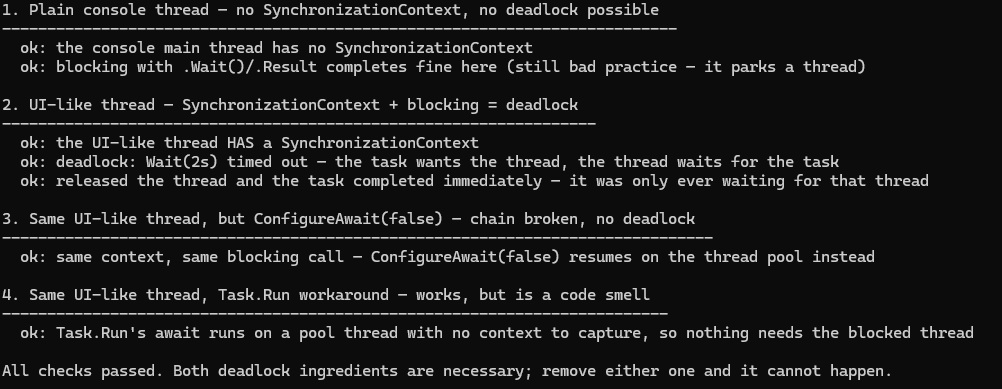
The sample runs this table as four assertions — same async method, same blocking call, one ingredient toggled at a time:
| Demo | Context? | Blocking? | Measured outcome |
|---|---|---|---|
| Plain console thread | no | yes | completes |
| UI-like thread | yes | yes | deadlock (observed via 2s timeout) |
UI-like thread + ConfigureAwait(false) | yes | yes | completes |
UI-like thread + Task.Run | yes | yes | completes |
Detecting Deadlocks
When an app hangs with no exception, check:
- Thread dump — look for threads waiting on
WaitOne,WaitAll, orMonitor.Waitwhile other threads are queued waiting to post to them - Visual Studio Parallel Stacks — shows thread dependencies, making deadlocks visible
- Add a timeout —
.Wait(TimeSpan.FromSeconds(5))returnsfalseafter the timeout instead of hanging forever, letting you throw and make the bug visible
// Diagnostic version — throws after timeout instead of hanging
if (!FetchDataAsync().Wait(TimeSpan.FromSeconds(5)))
{
    throw new TimeoutException("FetchDataAsync timed out — possible deadlock");
}
This timeout pattern is exactly how the sample observes its deliberate deadlock without
ever hanging — and it has a diagnostic bonus: after the timed-out Wait releases the
thread, a deadlocked-on-context task completes immediately, which distinguishes this
deadlock from a genuinely stuck dependency.
How I tested this
A deadlock is the one async bug you cannot demonstrate with a timing table, so I did not try. The sample in samples/async-deadlocks-csharp is a console project on the .NET 10 SDK that installs a roughly 40-line UI-like SynchronizationContext, one that forces every posted continuation back onto a single thread the way WinForms and WPF do. It then runs the same async method with the same blocking call four times, changing one ingredient each time.
The trick that makes it a test rather than a hang is a two-second timeout on the blocking Wait. When the deadlock happens, Wait times out, the sample records that as the observed result, and then releases the thread, at which point the task completes immediately. That last part matters: it proves the work was finished and only the continuation was stuck, which is the whole mechanism this article describes.
The four rows in the table above are that run. The plain console thread completes because there is no context to capture. The UI-like thread deadlocks. ConfigureAwait(false) and Task.Run both complete on the same UI-like thread. Nothing is timed, nothing depends on the machine, and the output should be identical on yours.
To reproduce:
git clone https://github.com/jorgenhoc-org/dotnet-samples
cd dotnet-samples/samples/async-deadlocks-csharp
dotnet run
Summary
| Scenario | What to Do |
|---|---|
| Library code | Always use ConfigureAwait(false) |
| ASP.NET Core | Go async all the way (.Result won't deadlock but wastes threads) |
| Classic ASP.NET | Go async all the way OR use ConfigureAwait(false) throughout |
| WinForms/WPF | Go async all the way; don't block the UI thread |
| Constructors | Use static factory methods instead |
| Property getters | Don't make async calls from property getters |
The golden rule: never block on async code. If you find yourself reaching for .Result, .Wait(), or .GetAwaiter().GetResult(), make the caller async instead.