Both AWS Elastic Beanstalk and Azure App Service are managed PaaS platforms that take a .NET application and run it without you managing servers. But they have very different approaches to configuration, pricing, and the deployment experience. Here's a head-to-head comparison.
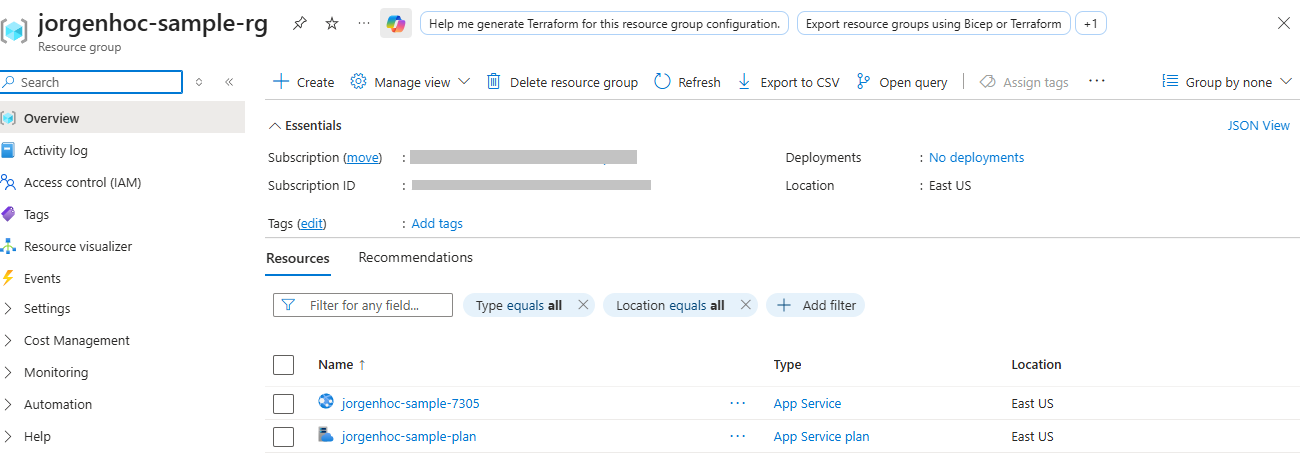
Transparency note: the Azure commands below are the exact path used to deploy the real sample in samples/azure-app-service-dotnet. The Elastic Beanstalk side is based on AWS documentation and public pricing — EB was not deployed for this article.
Setup Complexity
Azure App Service
Three commands to a running app:
az group create --name myapp-rg --location eastus
az appservice plan create --name myapp-plan --resource-group myapp-rg --sku B1 --is-linux
az webapp create --name myapp-12345 --resource-group myapp-rg --plan myapp-plan --runtime "DOTNETCORE:10.0"
Deploy:
dotnet publish -c Release -o ./publish
# az webapp deploy wants a zip FILE — pointing --src-path at the folder fails
cd ./publish && zip -r ../app.zip . && cd ..   # Windows: tar.exe -a -cf app.zip -C publish *
az webapp deploy --resource-group myapp-rg --name myapp-12345 --src-path ./app.zip --type zip
Total time to running app: ~5 minutes — measured while deploying the sample, and most of it is the "Starting the site" phase after the zip upload, not the upload itself:
AWS Elastic Beanstalk
More involved — EB manages EC2 instances, load balancers, and autoscaling groups:
# Install EB CLI
pip install awsebcli

# Initialize project
eb init myapp \
  --platform "dotnet-core-on-al2023" \
  --region us-east-1

# Create environment (provisions EC2, LB, security groups)
eb create myapp-prod \
  --instance-type t3.small \
  --single  # Skip load balancer for dev/small apps
Deploy — EB zips your project directory by default, so point it at the publish output instead:
dotnet publish -c Release -o ./publish
cd ./publish && zip -r ../deploy.zip . && cd ..
# .elasticbeanstalk/config.yml — deploy the artifact, not the source tree
deploy:
artifact: deploy.zipeb deployTotal time to running app: ~10-15 minutes (EC2 provisioning takes longer).
Verdict: Azure App Service wins on setup simplicity. EB has more moving parts.
Pricing
Azure App Service
| Tier | Linux/month | Windows/month | Notes |
|---|---|---|---|
| F1 Free | $0 | $0 | Dev only, CPU limits |
| B1 Basic | ~$13 | ~$20 | Production-viable |
| S1 Standard | ~$69 | ~$73 | Slots, autoscale |
| P1v3 Premium | ~$124 | ~$143 | Best performance/$ |
Predictable flat rate — you pay for the tier regardless of actual usage.
AWS Elastic Beanstalk
EB itself is free; you pay for underlying resources:
| Resource | Cost |
|---|---|
| t3.micro EC2 | ~$8.50/month |
| t3.small EC2 | ~$17/month |
| t3.medium EC2 | ~$34/month |
| Application Load Balancer | ~$18/month (required for multi-instance) |
| EBS storage (8 GB gp3) | ~$0.64/month |
| CloudWatch logs | ~$0.50/GB |
A production EB environment (t3.small + ALB): ~$36/month.
Comparable Azure App Service S1: ~$69/month but includes more features.
Verdict: AWS wins on raw price for equivalent compute, but Azure includes more in the base price (deployment slots, better DX tools).
.NET Runtime Support
Azure App Service
- First-party .NET support — Microsoft maintains the runtimes
- New .NET versions available day one of release on Linux/Windows
- Side-by-side runtime versions per app
- Native support for .NET Framework (Windows plan) and .NET Core/8+ (Linux or Windows)
# List available runtimes
az webapp list-runtimes --os linux | grep DOTNET
AWS Elastic Beanstalk
- .NET support via AL2023 (Amazon Linux 2023) platform
- New .NET versions available weeks to months after release (waiting for EB platform update)
- Windows Server option available for .NET Framework
- The runtime version is tied to the EB platform branch you pick at
eb init— there is no per-app runtime setting; check the EB platform history for what each branch ships. Self-contained publishing (--self-contained) sidesteps the delay by bundling the runtime in your artifact, at the cost of a much larger zip.
Verdict: Azure wins on .NET runtime support. Day-one .NET releases and deeper Microsoft integration.
Scaling
Azure App Service
# Manual scale-out (Basic tier)
az appservice plan update --name myapp-plan --resource-group myapp-rg --number-of-workers 3

# Autoscale (Standard+)
az monitor autoscale create \
  --resource-group myapp-rg \
  --resource myapp-plan \
  --resource-type Microsoft.Web/serverFarms \
  --name myapp-autoscale \
  --min-count 1 --max-count 5 --count 1

# Scale rule — add instance when CPU > 70%
az monitor autoscale rule create \
  --resource-group myapp-rg \
  --autoscale-name myapp-autoscale \
  --condition "CpuPercentage > 70 avg 5m" \
--scale out 1- Scale out time: 3–5 minutes
- Max instances: up to 30 (Standard), 100+ (Premium)
- HTTP-based autoscaling available (scale on request queue depth)
AWS Elastic Beanstalk
# .ebextensions/autoscaling.config
option_settings:
  aws:autoscaling:asg:
    MinSize: 1
    MaxSize: 10
  aws:autoscaling:trigger:
    MeasureName: CPUUtilization
    Unit: Percent
    UpperThreshold: 70
    LowerThreshold: 30
    UpperBreachScaleIncrement: 1
    LowerBreachScaleIncrement: -1
    BreachDuration: 5
  aws:elasticbeanstalk:environment:
EnvironmentType: LoadBalanced # Required for autoscaling- Scale out time: 3–7 minutes (EC2 provisioning)
- More scaling options via CloudWatch metrics
- Predictive scaling available with additional configuration
Verdict: Azure wins on scaling DX. Azure's scaling rules are simpler to configure. EB has more flexibility but more complexity.
CI/CD Integration
Azure App Service
GitHub Actions: First-class integration with the azure/webapps-deploy action:
- name: Deploy to Azure App Service
  uses: azure/webapps-deploy@v3
  with:
    app-name: myapp-12345
    publish-profile: ${{ secrets.AZURE_PUBLISH_PROFILE }}
    package: ./publish
Azure DevOps: Native integration, one-click pipeline setup from the portal.
Deployment slots: Blue/green deploys built in — deploy to staging, swap to production:
az webapp deployment slot swap --name myapp-12345 --resource-group myapp-rg --slot stagingAWS Elastic Beanstalk
GitHub Actions:
- name: Deploy to EB
  uses: einaregilsson/beanstalk-deploy@v21
  with:
    aws_access_key: ${{ secrets.AWS_ACCESS_KEY_ID }}
    aws_secret_key: ${{ secrets.AWS_SECRET_ACCESS_KEY }}
    application_name: myapp
    environment_name: myapp-prod
    version_label: ${{ github.sha }}
    region: us-east-1
    deployment_package: deploy.zip
CodePipeline: AWS-native CI/CD, more powerful but more configuration.
Blue/green: More complex on EB — requires creating a new environment, swapping CNAMEs, then terminating old environment.
Verdict: Azure wins on CI/CD. Deployment slots make zero-downtime deploys trivial. EB blue/green is achievable but requires more effort.
Monitoring
Azure App Service
- Application Insights: One-click integration from the portal. Full distributed tracing, performance monitoring, exceptions, and custom metrics.
- Log stream:
az webapp log tailfor real-time logs - Diagnostic tools: Built-in profiler, memory dumps, CPU profiling via Portal
- Alerts: Native Azure Monitor integration
// Program.cs — enable Application Insights
builder.Services.AddApplicationInsightsTelemetry();
AWS Elastic Beanstalk
- CloudWatch: Metrics and logs, requires configuration
- X-Ray: Distributed tracing (requires SDK integration and IAM setup)
- EB Health Dashboard: Instance health, deployment history
- Log streaming: Requires enabling CloudWatch Logs integration
// Add AWS X-Ray for distributed tracing
dotnet add package AWSXRayRecorder.Handlers.AspNetCore

// Startup configuration
app.UseXRay("MyApp");
Verdict: Azure wins on monitoring DX. Application Insights is significantly easier to set up and more developer-friendly than the CloudWatch/X-Ray combination.
Environment Configuration
Azure App Service
# App settings (environment variables)
az webapp config appsettings set \
  --resource-group myapp-rg \
  --name myapp-12345 \
  --settings KEY=value

# Reference Key Vault secrets
az webapp config appsettings set \
  --resource-group myapp-rg \
  --name myapp-12345 \
  --settings "Secret=@Microsoft.KeyVault(VaultName=myvault;SecretName=MySecret)"
AWS Elastic Beanstalk
# .ebextensions/env-vars.config
option_settings:
  aws:elasticbeanstalk:application:environment:
    ASPNETCORE_ENVIRONMENT: Production
    ConnectionString: "Server=..."

# Or via EB CLI
eb setenv KEY=value ANOTHER_KEY=value2
For secrets, use AWS Systems Manager Parameter Store or Secrets Manager:
// Read from SSM Parameter Store
var config = new AmazonSimpleSystemsManagementClient();
var param = await config.GetParameterAsync(new GetParameterRequest
{
    Name = "/myapp/prod/database-password",
    WithDecryption = true
});
var password = param.Parameter.Value;
Side-by-Side Summary
| Feature | Azure App Service | AWS Elastic Beanstalk |
|---|---|---|
| Setup time | 5 min | 10–15 min |
| Pricing (small app) | ~$13–69/month | ~$17–36/month |
| .NET day-one support | Yes | No (weeks delay) |
| DX quality | Excellent | Good |
| Deployment slots | Yes (S1+) | Manual workaround |
| Autoscale | Yes (S1+) | Yes (LoadBalanced env) |
| Monitoring | Application Insights | CloudWatch + X-Ray |
| CI/CD | GitHub Actions, ADO | CodePipeline, GitHub Actions |
| Windows .NET Framework | Yes | Yes (Windows platform) |
| Configuration management | App Settings, Key Vault refs | Parameter Store, Secrets Manager |
| Free tier | Yes (F1, limited) | No permanent free tier — new AWS accounts get time-limited credits, credit card required |
Verdict
Choose Azure App Service if:
- Your team is primarily .NET/Microsoft-focused
- You want the best day-one .NET runtime support
- You need simple zero-downtime deploys (slots)
- You want Application Insights integration
- Monitoring and DX matter more than raw cost
Choose AWS Elastic Beanstalk if:
- Your organization is deep in AWS
- You need tighter integration with AWS services (RDS, ElastiCache, SQS)
- You want more control over the underlying EC2 configuration
- Cost optimization is critical and you're willing to spend time on configuration
For most greenfield .NET projects in 2026, Azure App Service offers a better developer experience at comparable or slightly higher cost. Elastic Beanstalk makes sense when AWS is already your primary cloud provider.