Async programming in C# is deceptively simple to write and deceptively easy to get wrong. The async/await keywords handle most of the complexity, but understanding what's happening underneath separates code that works from code that performs well, handles errors correctly, and doesn't deadlock under load.
Each topic here has a dedicated article with a runnable console project where every behavioural claim is an assertion that fails loudly if a future runtime changes — collected in Runnable Samples for This Guide at the end. Writing those samples was humbling: several things I had believed for years turned out to be wrong when a program had to prove them (the ValueTask allocation numbers below are the clearest example). Where this guide states a number, it was measured on my machine with the linked sample, so you can re-run it rather than trust it.
Step 1 — Synchronous entry
The caller invokes the async method. Execution begins synchronously on the caller's thread until the first await is reached.
// Caller thread
var result = await GetDataAsync();  // ← call starts here

async Task<string> GetDataAsync()
{
    Console.WriteLine("Before await"); // ← runs synchronously
    // ... not yet at an await
}Why Async Exists
The core problem: a web server handling 1,000 concurrent requests can't afford 1,000 blocked threads waiting for database responses. Threads are expensive — each one uses ~1 MB of stack space.
Async I/O solves this. When your code awaits a database call, the thread returns to the thread pool to handle other requests. When the database responds, a thread picks up your method and continues. The result: dramatically higher throughput with fewer threads.
// Synchronous — blocks a thread for the entire duration of the DB call
public Product GetProduct(int id)
{
    return _db.Products.Find(id)!; // Thread is stuck here waiting for DB
}

// Asynchronous — thread is freed while waiting for DB
public async Task<Product?> GetProductAsync(int id)
{
    return await _db.Products.FindAsync(id); // Thread returns to pool here
}
The async/await Basics
Any method that contains await must be marked async. The return type shifts:
| Sync return type | Async return type |
|---|---|
void | async Task (or async void for event handlers only) |
T | async Task<T> |
| (hot path) | async ValueTask<T> |
// Async method returning a value
public async Task<string> FetchUserNameAsync(int userId)
{
    var user = await _db.Users.FindAsync(userId);
    return user?.Name ?? "Unknown";
}

// Async method with no return value
public async Task SendWelcomeEmailAsync(string email)
{
    var message = BuildMessage(email);
    await _emailService.SendAsync(message);
}

// Calling async methods
var name = await FetchUserNameAsync(42);
await SendWelcomeEmailAsync("user@example.com");
How await Actually Works
await is syntactic sugar for a state machine. The compiler transforms your async method into a class that implements IAsyncStateMachine. When the awaited operation completes, the state machine resumes at the point after the await.
The key insight: await suspends the current method, not the current thread. The thread is free to do other work.
Task vs Task<T>
Task represents an asynchronous operation with no return value. Task<T> represents one that returns a value of type T.
// Task — no return value
public async Task ProcessOrderAsync(int orderId)
{
    var order = await _db.Orders.FindAsync(orderId)
        ?? throw new ArgumentException($"Order {orderId} not found");

    order.Status = OrderStatus.Processing;
    await _db.SaveChangesAsync();
    await _notificationService.NotifyAsync(order.UserId, "Order is processing");
}

// Task<T> — returns a value
public async Task<OrderSummary> GetOrderSummaryAsync(int orderId)
{
    var order = await _db.Orders
        .Include(o => o.Items)
        .FirstOrDefaultAsync(o => o.Id == orderId)
        ?? throw new KeyNotFoundException($"Order {orderId} not found");

    return new OrderSummary(order.Id, order.Items.Sum(i => i.Price), order.Status);
}
Running Multiple Tasks Concurrently
// Sequential — each awaits before the next starts (slow)
var user = await GetUserAsync(userId);         // Wait for this...
var orders = await GetOrdersAsync(userId);     // Then wait for this
var recommendations = await GetRecsAsync(userId); // Then this

// Concurrent — all start immediately, then wait for all (fast)
var userTask = GetUserAsync(userId);
var ordersTask = GetOrdersAsync(userId);
var recsTask = GetRecsAsync(userId);

await Task.WhenAll(userTask, ordersTask, recsTask);

var user = await userTask;
var orders = await ordersTask;
var recommendations = await recsTask;Use Task.WhenAll when multiple independent async operations can run in parallel. If three database calls each take 50ms, sequential execution takes 150ms; concurrent takes ~50ms.
Task.WhenAny
// Complete when any task finishes — useful for timeouts
var dataTask = FetchDataAsync();
var timeoutTask = Task.Delay(TimeSpan.FromSeconds(5));

var completed = await Task.WhenAny(dataTask, timeoutTask);

if (completed == timeoutTask)
    throw new TimeoutException("Data fetch timed out after 5 seconds");

var data = await dataTask; // Safe to await — already completed
ValueTask
ValueTask<T> is an allocation-saving alternative to Task<T> for methods that frequently complete synchronously (without actually waiting).
// Using Task<T> — always allocates a Task on the heap
public async Task<string?> GetCachedValueAsync(string key)
{
    if (_cache.TryGetValue(key, out var cached))
        return cached;  // Synchronous path still allocates a Task

    var value = await _redis.GetAsync(key);
    _cache.Set(key, value);
    return value;
}

// Using ValueTask<T> — no allocation on the synchronous (cache hit) path
public ValueTask<string?> GetCachedValueAsync(string key)
{
    if (_cache.TryGetValue(key, out var cached))
        return ValueTask.FromResult(cached);  // Zero allocation

    return FetchAndCacheAsync(key);  // Async path still uses Task internally
}

private async ValueTask<string?> FetchAndCacheAsync(string key)
{
    var value = await _redis.GetAsync(key);
    _cache.Set(key, value);
    return value;
}Don't use ValueTask everywhere. It's only beneficial on hot paths where the synchronous path is the common case (e.g., cache hits, already-completed operations). For most application code, Task<T> is simpler and the allocation cost is negligible.
ValueTask Restrictions
ValueTask has important constraints compared to Task:
// WRONG — ValueTask can only be awaited once
var vt = GetCachedValueAsync("key");
var result1 = await vt;  // OK
var result2 = await vt;  // UNDEFINED BEHAVIOR

// WRONG — Cannot await the same ValueTask from multiple places
// WRONG — Cannot .Result on a ValueTask safely

// RIGHT — Await immediately, or convert to Task if you need to reuse
var task = GetCachedValueAsync("key").AsTask();
var result1 = await task;
var result2 = await task;  // Safe with Task
What ValueTask Actually Saves — Measured
The pitch for ValueTask is "no allocation", so I benchmarked exactly that with BenchmarkDotNet on .NET 10 x64, using the cache shape above. The result changed how I use it:
| Path | Task<T> allocated | ValueTask<T> allocated |
|---|---|---|
| Cache hit (completes synchronously) | 72 B | 0 B |
| Cache miss (genuinely awaits) | 195 B | 229 B |
The synchronous row is the promise delivered: Task<T> pays 72 bytes per call, ValueTask<T> pays nothing. The asynchronous row is the part nobody puts in the pitch: when the method actually suspends, ValueTask<T> allocated more than Task<T>, because its builder still has to heap-allocate state for the suspension. So ValueTask is a trade, not a free upgrade — it wins exactly in proportion to how often your method completes synchronously, and a method that usually suspends is slightly worse off with it.
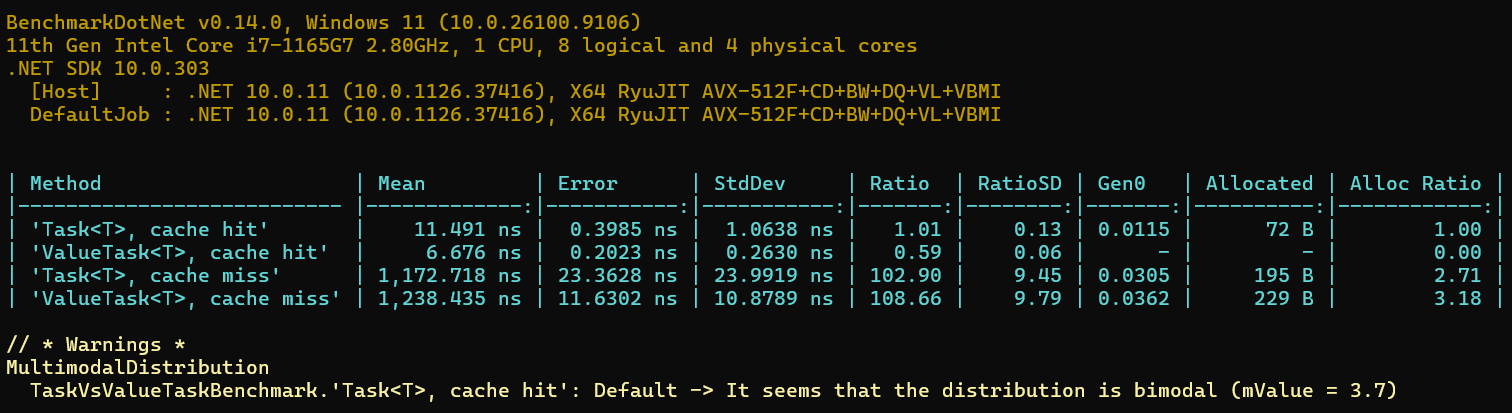
One methodology note worth stealing: across three runs on the same machine, the timing columns moved by up to 4% while the allocation columns came back byte-identical every time. When two candidates differ by nanoseconds, allocations are the reproducible signal. The ValueTask vs Task article has the full BenchmarkDotNet output with environment header and StdDev, plus the same comparison run against a real EF Core query.
ConfigureAwait(false)
By default, when code resumes after an await, it tries to resume on the original SynchronizationContext (e.g., the UI thread in WinForms, or the ASP.NET Classic request context).
ConfigureAwait(false) tells the runtime "don't capture the context — resume on any thread pool thread."
// Without ConfigureAwait — captures and restores the synchronization context
public async Task<Data> GetDataAsync()
{
    var result = await httpClient.GetFromJsonAsync<Data>("/api/data");
    return result!;
}

// With ConfigureAwait(false) — no context capture, slightly faster
public async Task<Data> GetDataAsync()
{
    var result = await httpClient.GetFromJsonAsync<Data>("/api/data")
                                 .ConfigureAwait(false);
    return result!;
}
When to Use ConfigureAwait(false)
Library code: Always use ConfigureAwait(false). Libraries don't own the SynchronizationContext and shouldn't try to resume on it. This prevents deadlocks when library consumers use .Result or .Wait().
ASP.NET Core application code: Generally not needed. ASP.NET Core doesn't have a SynchronizationContext, so there's nothing to capture. Adding ConfigureAwait(false) everywhere in ASP.NET Core code is harmless but unnecessary noise.
WinForms/WPF application code: Use carefully. If you need to update UI after an await, you must be on the UI thread, so don't use ConfigureAwait(false) before UI updates.
// NuGet library — always use ConfigureAwait(false)
public static class MyLibrary
{
    public static async Task<string> FetchAsync(string url)
    {
        using var client = new HttpClient();
        var response = await client.GetAsync(url).ConfigureAwait(false);
        var content = await response.Content.ReadAsStringAsync().ConfigureAwait(false);
        return content;
    }
}
.NET 8: ConfigureAwaitOptions
.NET 8 turned the boolean into a flags enum — ConfigureAwait(ConfigureAwaitOptions) — and two of the four options do things the boolean never could:
// None == ConfigureAwait(false); ContinueOnCapturedContext == ConfigureAwait(true)
await task.ConfigureAwait(ConfigureAwaitOptions.None);

// SuppressThrowing — await completes without throwing even if the task
// faulted or was canceled. Useful for "wait for cleanup, ignore its errors".
await task.ConfigureAwait(ConfigureAwaitOptions.SuppressThrowing);

// ForceYielding — never continue synchronously, even if already complete.
await task.ConfigureAwait(ConfigureAwaitOptions.ForceYielding);

// They compose:
await task.ConfigureAwait(
    ConfigureAwaitOptions.SuppressThrowing | ConfigureAwaitOptions.ForceYielding);
SuppressThrowing is the one to know about because it's the single exception to a rule you can otherwise rely on: exceptions propagate through await identically whether or not you used ConfigureAwait(false) — the ConfigureAwait sample asserts this by catching a post-ConfigureAwait(false) exception with an ordinary try/catch at the call site. That sample also measures what ConfigureAwait actually does, by installing a counting SynchronizationContext and comparing Post calls with and without it — a much more honest demonstration than "it's slightly faster". The full article walks through the counts.
Common Pitfalls
1. async void
// DANGEROUS — exceptions are unobserved and crash the process
public async void LoadData()
{
    var data = await FetchAsync(); // Exception here kills the app
    Process(data);
}

// CORRECT — return Task so callers can observe exceptions
public async Task LoadDataAsync()
{
    var data = await FetchAsync();
    Process(data);
}

// async void is ONLY acceptable for event handlers
button.Click += async (sender, e) =>
{
    await DoWorkAsync(); // Event handlers must be void
};
2. .Result and .Wait() Deadlocks
// DEADLOCK in ASP.NET Classic / WinForms / WPF
public string GetData()
{
    return FetchDataAsync().Result;  // Blocks the current thread
    // FetchDataAsync tries to resume on this thread — DEADLOCK
}

// CORRECT — go async all the way
public async Task<string> GetDataAsync()
{
    return await FetchDataAsync();
}Never use .Result, .Wait(), or .GetAwaiter().GetResult() on a Task from a context that has a SynchronizationContext (UI apps, classic ASP.NET). It causes deadlocks. In ASP.NET Core it won't deadlock but it still blocks a thread unnecessarily.
This deadlock is often described but rarely demonstrated, which lets people believe it's theoretical. It isn't: the deadlock sample installs a ~40-line single-threaded SynchronizationContext — the same shape WinForms and WPF use — and hangs on demand, every run, then un-hangs the identical code by adding ConfigureAwait(false) at the right await. Reproducing it deterministically also demonstrates why ASP.NET Core is immune: no SynchronizationContext, nothing to fight over. The deadlock article traces the cycle step by step.
3. Forgetting to Await
// BUG — fire-and-forget, exceptions are silently swallowed
public async Task ProcessAsync()
{
    SaveToDatabase();  // Not awaited! Runs but errors are lost
    LogActivity();     // Also not awaited
}

// CORRECT
public async Task ProcessAsync()
{
    await SaveToDatabaseAsync();
    await LogActivityAsync();
}
4. Async in Constructors
Constructors can't be async. Use a factory method pattern:
// WRONG — can't await in constructor
public class DataService
{
    public DataService()
    {
        _data = await LoadDataAsync(); // Compile error
    }
}

// CORRECT — static factory method
public class DataService
{
    private readonly Data _data;

    private DataService(Data data) => _data = data;

    public static async Task<DataService> CreateAsync()
    {
        var data = await LoadDataAsync();
        return new DataService(data);
    }
}

// Usage
var service = await DataService.CreateAsync();
Error Handling
Basic try/catch
Exceptions in async methods propagate naturally through await:
public async Task ProcessOrderAsync(int orderId)
{
    try
    {
        var order = await _db.Orders.FindAsync(orderId)
            ?? throw new KeyNotFoundException($"Order {orderId} not found");

        await _paymentService.ChargeAsync(order.TotalAmount);
        await _emailService.SendConfirmationAsync(order.CustomerEmail);
    }
    catch (PaymentException ex)
    {
        _logger.LogError(ex, "Payment failed for order {OrderId}", orderId);
        throw; // Re-throw to let the caller handle it
    }
    catch (Exception ex)
    {
        _logger.LogError(ex, "Unexpected error processing order {OrderId}", orderId);
        throw;
    }
}
Exceptions with Task.WhenAll
await Task.WhenAll(...) re-throws only the first exception, even when several tasks fail. The combined task's Exception property holds them all as an AggregateException — so to log every failure, inspect the tasks rather than relying on the thrown exception:
public async Task ProcessMultipleOrdersAsync(int[] orderIds)
{
    // Materialize with ToList() — this is load-bearing. Select is lazy, so
    // re-enumerating `tasks` in the catch block would call ProcessOrderAsync
    // AGAIN, starting every order a second time and inspecting fresh tasks that
    // haven't faulted yet. Enumerate once, here.
    var tasks = orderIds.Select(id => ProcessOrderAsync(id)).ToList();

    try
    {
        await Task.WhenAll(tasks);
    }
    catch (Exception)
    {
        // await threw only the first exception. Inspect the same materialized
        // task list to collect ALL of them.
        var allExceptions = tasks
            .Where(t => t.IsFaulted)
            .SelectMany(t => t.Exception!.InnerExceptions)
            .ToList();

        foreach (var ex in allExceptions)
            _logger.LogError(ex, "Order processing failed");

        throw;
    }
}The .ToList() is not cosmetic. orderIds.Select(id => ProcessOrderAsync(id)) is a deferred query — each enumeration re-invokes ProcessOrderAsync. Awaiting Task.WhenAll(tasks) enumerates it once; re-enumerating tasks in the catch would start every operation a second time and inspect brand-new, not-yet-faulted tasks. Materialize the sequence exactly once. The async exception handling deep dive asserts the first-exception-vs-AggregateException behaviour end to end.
Cancellation
public async Task<List<Product>> GetProductsAsync(CancellationToken cancellationToken = default)
{
    return await _db.Products
        .Where(p => p.IsActive)
        .ToListAsync(cancellationToken);
}

// With timeout
using var cts = new CancellationTokenSource(TimeSpan.FromSeconds(10));
try
{
    var products = await GetProductsAsync(cts.Token);
}
catch (OperationCanceledException)
{
    _logger.LogWarning("GetProducts timed out after 10 seconds");
}
One distinction worth memorizing because it changes what your catch blocks can know: when HttpClient.Timeout fires, you get a TaskCanceledException with an inner TimeoutException (since .NET 5); when your token cancels the same request, there's no inner TimeoutException and the exception carries your token. That's the difference between "the server was slow" and "we gave up on purpose", and it's catchable:
catch (TaskCanceledException ex) when (ex.InnerException is TimeoutException)
{
    // HttpClient.Timeout fired — not your caller's cancellation
}
The CancellationToken article asserts this against a deliberately stalled local server — along with 15 other cancellation behaviours, including the ones I got wrong for years (linked token sources, which token an OperationCanceledException actually carries, and cooperative checking in tight loops).
Canceled vs Faulted — They Are Different States
An OperationCanceledException doesn't fault a task — it cancels it, and the asymmetry is sharper than most people expect. The exception handling sample (36 assertions) pins down the exact rule: an async method that throws OperationCanceledException ends Canceled even if the token it carries was never cancelled — but a synchronous delegate passed to Task.Run that throws the same exception ends Faulted unless the token matches the one given to Task.Run. Monitoring code that only watches IsFaulted silently ignores canceled tasks, and code that treats every OperationCanceledException as "user pressed cancel" misattributes genuine timeouts. The async exception handling article covers this plus the Task.WhenAll first-exception rule demonstrated above.
Async Streams (IAsyncEnumerable)
For streaming large result sets without buffering everything in memory:
// Producing an async stream
public async IAsyncEnumerable<Order> GetOrdersStreamAsync(
    [EnumeratorCancellation] CancellationToken cancellationToken = default)
{
    await foreach (var order in _db.Orders.AsAsyncEnumerable().WithCancellation(cancellationToken))
    {
        yield return order;
    }
}

// Consuming an async stream
await foreach (var order in GetOrdersStreamAsync(cancellationToken))
{
    await ProcessOrderAsync(order);
}
The memory difference is not subtle. I measured both shapes over 100,000 rows with an in-memory producer to isolate the buffering effect: the buffered List<T> holds 18.5 MB live — the whole object graph at once — while the streaming version's peak rounds to 0 MB, because each row becomes garbage before the next one exists. Heavier rows scale the buffered figure linearly; the streaming peak stays flat. Two more facts from the IAsyncEnumerable sample that contradict common advice: ASP.NET Core controller actions can return async iterators (asserted against a live in-process server), and as of .NET 10 the LINQ operators for IAsyncEnumerable ship in the BCL — you no longer need the System.Linq.Async package. The full article covers chunked transfer, backpressure with Channel, and which operators silently buffer anyway (OrderBy has no choice).
Performance Patterns
Parallel with Degree of Parallelism
// Process up to 10 items at a time
var semaphore = new SemaphoreSlim(10);

var tasks = orderIds.Select(async id =>
{
    await semaphore.WaitAsync();
    try
    {
        return await ProcessOrderAsync(id);
    }
    finally
    {
        semaphore.Release();
    }
});

await Task.WhenAll(tasks);
Caching with Lazy<Task>
// Initialize once, share across requests
public class ConfigService
{
    private readonly Lazy<Task<AppConfig>> _config;

    public ConfigService(IConfigLoader loader)
    {
        _config = new Lazy<Task<AppConfig>>(loader.LoadAsync);
    }

    public Task<AppConfig> GetConfigAsync() => _config.Value;
}
Runnable Samples for This Guide
Each section above is expanded in a focused article with a console project you can clone and run — every one turns its claims into assertions that fail loudly if the behaviour ever changes. All live in jorgenhoc-org/dotnet-samples.
| This guide's section | Deep dive | Sample |
|---|---|---|
ValueTask and its await-once rule | ValueTask vs Task | valuetask-vs-task-csharp |
ConfigureAwait(false) | ConfigureAwait(false) explained | configureawait-false-csharp |
.Result / .Wait() deadlocks | How to avoid async deadlocks | async-deadlocks-csharp |
Error handling, Task.WhenAll exceptions | Async exception handling | async-exception-handling-csharp |
| Cancellation | CancellationToken patterns | cancellationtoken-csharp |
Async streams (IAsyncEnumerable) | IAsyncEnumerable — streaming data | iasyncenumerable-csharp |
Summary
The mental model for async/await in C#:
asyncmarks a method as a state machine;awaitsuspends it until the awaited operation completes- Use
Taskfor fire-and-forget,Task<T>for results,ValueTask<T>only on proven hot paths - Go async all the way — don't block async code with
.Resultor.Wait() - Use
ConfigureAwait(false)in library code; ASP.NET Core apps generally don't need it - Always pass and check
CancellationTokenfor long-running operations - Handle
AggregateExceptionfromTask.WhenAllif you need all failure details