Railway has become the go-to platform for developers who want Heroku-level simplicity with modern infrastructure. For .NET developers, it's the fastest path from a GitHub repo to a running production URL. This guide walks through a complete, real deployment — the app, Dockerfile, and railway.json used here live in
samples/dotnet-hosting, a minimal .NET 10 API you can deploy yourself — including the failure you'll hit if your app doesn't sit at the repo root, and the two settings that fix it.
What You Need
- A .NET ASP.NET Core project on GitHub (any supported version — the sample uses .NET 10)
- A Railway account (free trial at railway.app)
- Railway CLI (optional but recommended)
Setting Up the Dockerfile
Railway can auto-detect .NET projects with its Railpack builder, but a Dockerfile gives you full control over the build process. This is the one the sample deploys with:
# Dockerfile — multi-stage: SDK image builds, smaller ASP.NET image runs
FROM mcr.microsoft.com/dotnet/sdk:10.0 AS build
WORKDIR /src
COPY ["JorgenHoc.DotnetHosting.csproj", "."]
RUN dotnet restore
COPY . .
RUN dotnet publish -c Release -o /app/publish

FROM mcr.microsoft.com/dotnet/aspnet:10.0 AS final
WORKDIR /app
COPY --from=build /app/publish .
EXPOSE 8080
ENTRYPOINT ["dotnet", "JorgenHoc.DotnetHosting.dll"]Railway injects the listen port as a PORT environment variable at runtime. The tempting Dockerfile line ENV ASPNETCORE_URLS=http://+:${PORT:-8080} does NOT work — Docker resolves ${...} when the image is built, so 8080 gets baked in and Railway's injected value is silently ignored. Read PORT in Program.cs instead.
// Program.cs — pick up Railway's runtime-injected PORT
var port = Environment.GetEnvironmentVariable("PORT");
if (!string.IsNullOrEmpty(port))
{
    builder.WebHost.UseUrls($"http://+:{port}");
}
// Without PORT, the aspnet base image default (8080) applies.
The railway.json Config File
Railway is configurable entirely from the dashboard, but a checked-in config file keeps the settings versioned with the code. This is the sample's deploy/railway.json:
{
  "$schema": "https://railway.app/railway.schema.json",
  "build": {
    "builder": "DOCKERFILE",
    "dockerfilePath": "Dockerfile"
  },
  "deploy": {
    "healthcheckPath": "/health",
    "healthcheckTimeout": 300,
    "restartPolicyType": "ON_FAILURE",
    "restartPolicyMaxRetries": 3
  }
}
No startCommand is needed — the Dockerfile's ENTRYPOINT already covers it. The health check path needs a matching endpoint in your app:
// Program.cs
app.MapGet("/health", () => Results.Ok(new { status = "healthy" }));
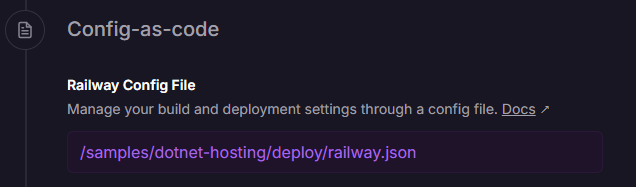
Railway only auto-detects railway.json at the service root. The sample keeps it under deploy/ instead, so the walkthrough below points Railway at it explicitly — one settings field.
Deploying from GitHub (No CLI)
- Go to railway.app and sign in (GitHub login also handles repo authorization)
- Click New Project → Deploy from GitHub repo
- Select your repository and Railway starts building immediately
If your repository is a single app with the Dockerfile at the root, that's it — in ~2 minutes you have a live URL and you can skip to generating the domain.
When the App Isn't at the Repo Root
The sample lives in a monorepo (samples/dotnet-hosting inside dotnet-samples), and the first build fails exactly the way yours will: Railpack scans the repo root, finds solution files but no buildable app, and gives up.
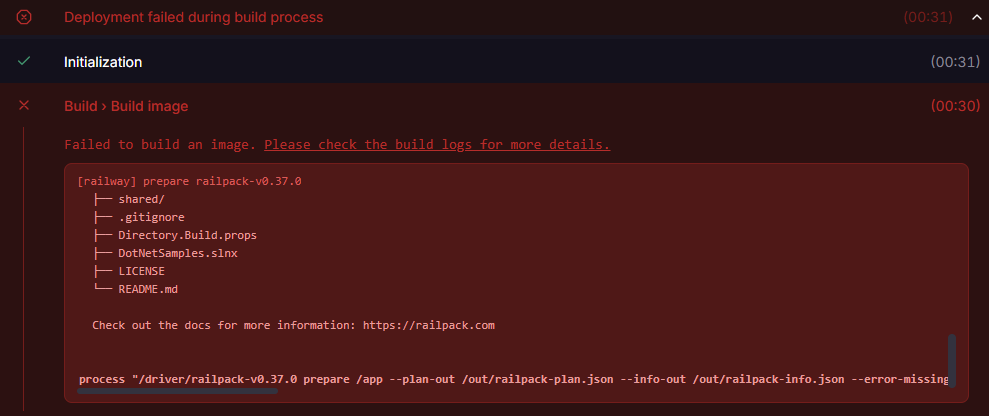
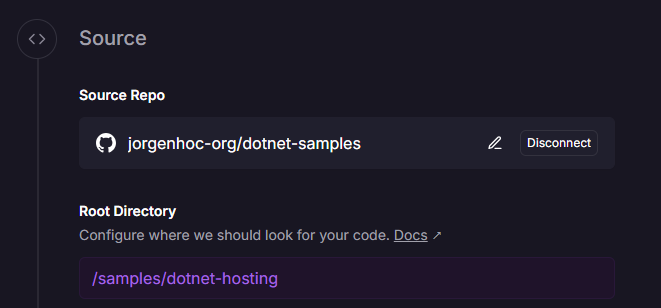
Two settings fix it. In the service's Settings tab, set Root Directory to the folder that contains your app:
And since the sample's railway.json sits in a deploy/ subfolder rather than the service root, point Config-as-code at it:
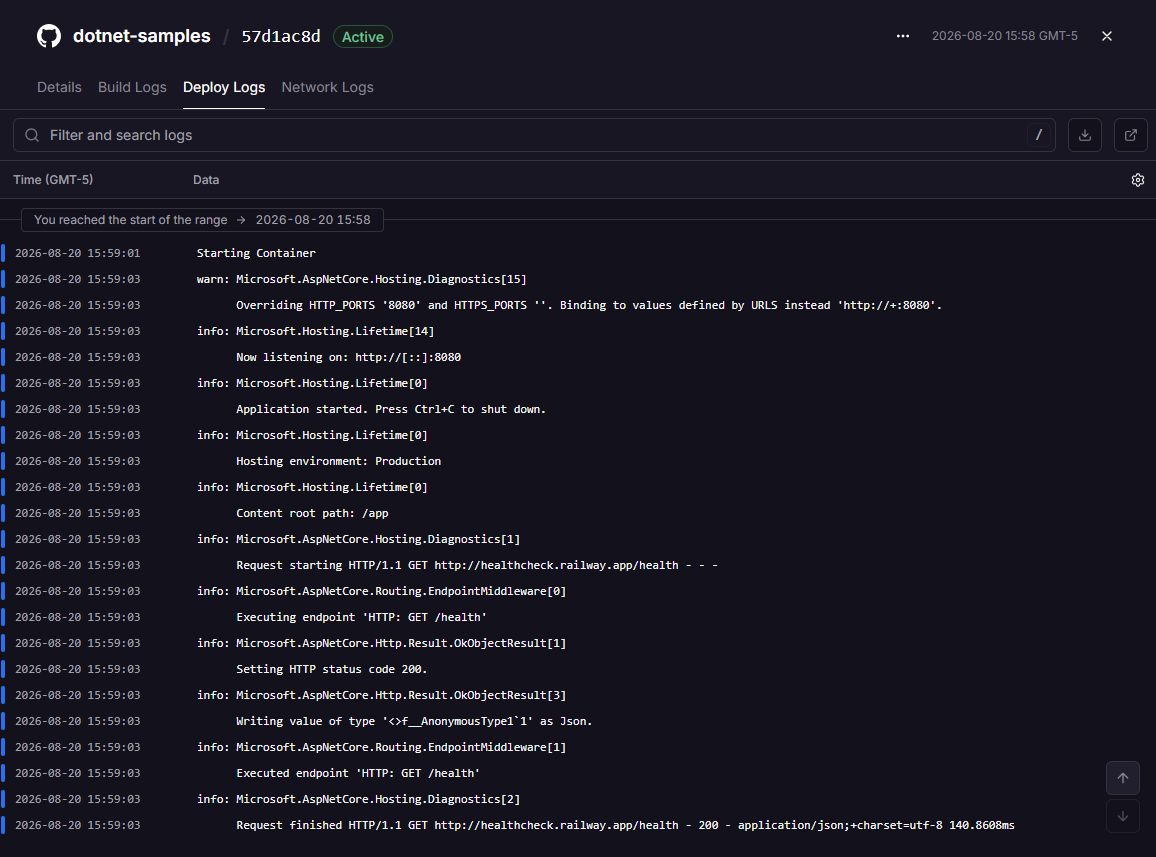
Redeploy, and the builder switches from Railpack to the Dockerfile. The deploy logs show the app starting, binding to Railway's injected port, and answering the /health check from railway.json with a 200 before the deployment goes live:
Generating a Public URL
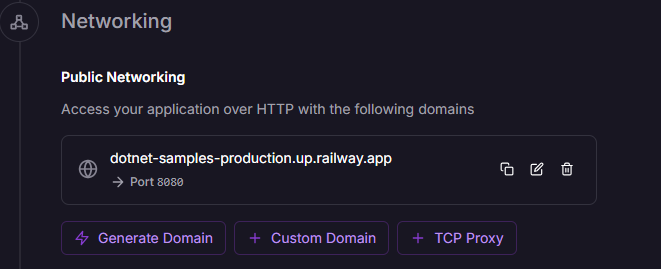
Deployed doesn't mean public — Railway services get no external URL by default. In Settings → Networking, click Generate Domain (accept port 8080):
The sample reports which platform it landed on by sniffing platform-specific environment variables (RAILWAY_ENVIRONMENT, in this case):
![Browser showing the JSON response from dotnet-samples-production.up.railway.app: service JorgenHoc hosting sample, runtime 10.0.11, platform Railway, listeningOn http://[::]:8080.](/images/deploy-dotnet-railway/deploy-dotnet-railway-deployed-app-response.png)
Railway CLI
The CLI gives you local development, log streaming, and environment management:
# Install
npm install -g @railway/cli

# Authenticate
railway login

# Link to an existing project (from your project directory)
railway link

# Or create a new project
railway init

# Deploy the current directory
railway up

# Watch logs in real-time
railway logs

# Open the running app in browser
railway open
Deploying with the CLI
# One-command deploy
railway up

# Deploy a specific service
railway up --service my-api

# Deploy and watch logs
railway up && railway logs
Environment Variables
Railway's environment variables are set per service per environment (Production, Staging, etc.):
Via Dashboard
In the Railway dashboard: Service → Variables → Add variable
Via CLI
# Set variables
railway variables --set "ASPNETCORE_ENVIRONMENT=Production" --set "JWT_SECRET=your-secret-here"

# List all variables
railway variables
Accessing in Your .NET App
Railway variables are just environment variables — they integrate perfectly with ASP.NET Core configuration:
// appsettings.json values are overridden by environment variables
var connectionString = builder.Configuration.GetConnectionString("DefaultConnection");
// This reads from ConnectionStrings__DefaultConnection env var (note double underscore)

// Or read directly
var jwtSecret = builder.Configuration["JWT_SECRET"]
    ?? throw new InvalidOperationException("JWT_SECRET not configured");
Adding a PostgreSQL Database
Railway has a native Postgres service that connects to your app automatically:
# Add Postgres to your project
railway add --database postgres

# Railway automatically sets DATABASE_URL in your service's environment
Install the EF Core PostgreSQL provider:
dotnet add package Npgsql.EntityFrameworkCore.PostgreSQL// Program.cs — read the DATABASE_URL Railway sets
var databaseUrl = builder.Configuration["DATABASE_URL"]
?? throw new InvalidOperationException("DATABASE_URL not set");
// Parse Railway's postgres:// URL format
var databaseUri = new Uri(databaseUrl);
var userInfo = databaseUri.UserInfo.Split(':');
var connectionString = $"Host={databaseUri.Host};Port={databaseUri.Port};" +
$"Database={databaseUri.AbsolutePath.TrimStart('/')};" +
$"Username={userInfo[0]};Password={userInfo[1]};" +
$"SSL Mode=Require;Trust Server Certificate=true";
builder.Services.AddDbContext<AppDbContext>(options =>
options.UseNpgsql(connectionString));Or use the Npgsql connection string builder:
# Railway also provides individual connection variables:
PGHOST, PGPORT, PGDATABASE, PGUSER, PGPASSWORD
var connectionString = new NpgsqlConnectionStringBuilder
{
Host = builder.Configuration["PGHOST"],
Port = int.Parse(builder.Configuration["PGPORT"] ?? "5432"),
Database = builder.Configuration["PGDATABASE"],
Username = builder.Configuration["PGUSER"],
Password = builder.Configuration["PGPASSWORD"],
SslMode = SslMode.Require
}.ConnectionString;Custom Domains
# Add a custom domain via CLI
railway domain www.yourdomain.com

# Railway provides the CNAME to point at your domain registrar
Or via dashboard: Service → Settings → Networking → Custom Domain (next to the Generate Domain button shown earlier).
Railway provides TLS certificates automatically for all custom domains.
Environments (Staging / Production)
Railway supports multiple environments per project:
# Create a staging environment
railway environment new staging

# Switch CLI context to staging (railway up then targets it)
railway environment staging
Each environment has its own set of variables, databases, and deployments. Your staging environment can mirror production with a separate database.
Pricing
Railway uses a usage-based pricing model:
| Plan | Monthly Base | Compute | Memory |
|---|---|---|---|
| Trial | $5 credit (once) | $0.000463/vCPU-minute | $0.000231/GB-minute |
| Hobby | $5/month included | Same rates | Same rates |
| Pro | $20/month included | Same rates | Same rates |
Typical costs for a small .NET API:
A minimal .NET API using ~0.1 vCPU and 256 MB RAM continuously:
- Compute: 0.1 × 43,800 min × $0.000463 ≈ $2.03/month
- Memory: 0.25 × 43,800 min × $0.000231 ≈ $2.53/month
- Total: ~$4.56/month (within Hobby plan's $5 credit)
Adding Postgres: $0.000231/GB-minute for storage + compute for the DB instance.
Most small .NET APIs with a Postgres database run comfortably within Railway's $5/month Hobby plan. Estimate your costs at railway.app/pricing before scaling up.
Automatic Deployments
By default, every push to your main branch triggers a deployment. Configure branch-based deployments:
In the dashboard: Service → Settings → Deployments:
- Watch Branch:
main(or any branch) - Root Directory:
/or a subdirectory if your .NET project isn't at the repo root
Pros and Cons
Pros
- Zero config for basics — push code, get URL, no YAML manifests
- Native Git integration — auto-deploy on push
- Excellent DX — the dashboard is clean and intuitive
- Native Postgres, Redis, MySQL — one click to add a database
- Fair pricing — usage-based, easy to estimate
- Custom domains with auto-TLS — included for all plans
- Environment branching — staging/production separation built in
Cons
- No SLA on Hobby plan — Pro plan required for uptime guarantees
- US-centric regions — fewer regions than AWS/Azure (though expanding)
- Limited enterprise features — no VPCs, private networking on lower plans
- Build minutes can add up — large .NET solutions with many projects take time
- No auto-scaling — vertical scaling only (upgrade instance size); horizontal scaling is manual
When to Choose Railway
Railway is the right choice when:
- You're a solo developer or small team
- You want to deploy quickly without infrastructure expertise
- Your app is a standard web API + database combination
- Budget is a concern and you want predictable, low costs
- You're prototyping or running a side project
Migrate off Railway when:
- You need compliance guarantees (SOC2, HIPAA with BAA, etc.)
- You need complex networking (VPCs, private endpoints)
- You need multi-region active-active deployments
- Your traffic patterns require sophisticated auto-scaling