Entity Framework Core is the standard ORM for .NET. It maps your C# classes to database tables, handles migrations as your schema evolves, and turns LINQ expressions into SQL. This guide covers everything from a blank project to production-ready patterns.
Every topic here has a dedicated deep-dive article with a runnable, asserted sample behind it — collected in Runnable Samples for This Guide at the end. The code snippets below are verified on EF Core 10, and where this guide makes a performance claim, the number comes from a program in jorgenhoc-org/dotnet-samples that I ran myself — statement counts and allocation figures you can reproduce, not adjectives. Writing those samples changed several of my own recommendations along the way (the biggest one: projection beats Include more often than I used to claim), so the advice here is what survived being measured.
LINQ (C#)
var users = await context.Users
    .Where(u => u.IsActive)
    .OrderBy(u => u.LastName)
    .ToListAsync();
Generated SQL
SELECT [u].[Id], [u].[Email], [u].[FirstName],
       [u].[IsActive], [u].[LastName]
FROM [Users] AS [u]
WHERE [u].[IsActive] = 1
ORDER BY [u].[LastName]
Where() → WHERE, OrderBy() → ORDER BY. EF Core translates LINQ operators 1:1.
Installation
Start with a new ASP.NET Core project and add the EF Core packages:
dotnet new webapi -n MyApp
cd MyApp

# Core EF packages
dotnet add package Microsoft.EntityFrameworkCore
dotnet add package Microsoft.EntityFrameworkCore.SqlServer   # or Npgsql.EntityFrameworkCore.PostgreSQL
dotnet add package Microsoft.EntityFrameworkCore.Tools       # for migrations CLI
For SQLite (great for development and small apps):
dotnet add package Microsoft.EntityFrameworkCore.SqliteDefining Your Entities
Entities are plain C# classes. EF Core uses conventions to infer table names, primary keys, and column types:
// Models/Product.cs
public class Product
{
    public int Id { get; set; }               // Convention: "Id" → primary key
    public required string Name { get; set; }
    public decimal Price { get; set; }
    public int StockQuantity { get; set; }
    public DateTime CreatedAt { get; set; }

    // Navigation property (one-to-many)
    public int CategoryId { get; set; }
    public Category Category { get; set; } = null!;
}

// Models/Category.cs
public class Category
{
    public int Id { get; set; }
    public required string Name { get; set; }

    // Collection navigation property
    public List<Product> Products { get; set; } = [];
}Use required on string properties (C# 11+) to enforce non-null values at the compiler level. EF Core maps required string to a non-nullable column automatically.
Setting Up DbContext
DbContext is the central class — it holds your DbSet<T> properties and manages the database connection:
// Data/AppDbContext.cs
using Microsoft.EntityFrameworkCore;

public class AppDbContext : DbContext
{
    public AppDbContext(DbContextOptions<AppDbContext> options)
        : base(options) { }

    public DbSet<Product> Products => Set<Product>();
    public DbSet<Category> Categories => Set<Category>();

    protected override void OnModelCreating(ModelBuilder modelBuilder)
    {
        // Fluent API configuration (optional but recommended)
        modelBuilder.Entity<Product>(entity =>
        {
            entity.Property(p => p.Name)
                  .HasMaxLength(200)
                  .IsRequired();

            entity.Property(p => p.Price)
                  .HasPrecision(18, 2);

            entity.HasOne(p => p.Category)
                  .WithMany(c => c.Products)
                  .HasForeignKey(p => p.CategoryId)
                  .OnDelete(DeleteBehavior.Restrict);
        });

        modelBuilder.Entity<Category>(entity =>
        {
            entity.Property(c => c.Name)
                  .HasMaxLength(100)
                  .IsRequired();
        });
    }
}
Registering the DbContext
In Program.cs:
using Microsoft.EntityFrameworkCore;

var builder = WebApplication.CreateBuilder(args);

// SQL Server
builder.Services.AddDbContext<AppDbContext>(options =>
    options.UseSqlServer(builder.Configuration.GetConnectionString("DefaultConnection")));

// Or SQLite
builder.Services.AddDbContext<AppDbContext>(options =>
    options.UseSqlite("Data Source=app.db"));

// Or PostgreSQL
builder.Services.AddDbContext<AppDbContext>(options =>
    options.UseNpgsql(builder.Configuration.GetConnectionString("DefaultConnection")));
Connection string in appsettings.json:
{
  "ConnectionStrings": {
    "DefaultConnection": "Server=(localdb)\\mssqllocaldb;Database=MyAppDb;Trusted_Connection=True;"
  }
}
Migrations
Migrations track schema changes as versioned files. Every time you change your entity classes, you add a migration.
# Add the EF global tool (one-time setup)
dotnet tool install --global dotnet-ef

# Create initial migration
dotnet ef migrations add InitialCreate

# Apply migrations to the database
dotnet ef database update
This generates a Migrations/ folder with files like:
// Migrations/20250116120000_InitialCreate.cs
public partial class InitialCreate : Migration
{
    protected override void Up(MigrationBuilder migrationBuilder)
    {
        migrationBuilder.CreateTable(
            name: "Categories",
            columns: table => new
            {
                Id = table.Column<int>(nullable: false)
                    .Annotation("SqlServer:Identity", "1, 1"),
                Name = table.Column<string>(maxLength: 100, nullable: false)
            },
            constraints: table =>
            {
                table.PrimaryKey("PK_Categories", x => x.Id);
            });

        migrationBuilder.CreateTable(
            name: "Products",
            columns: table => new
            {
                Id = table.Column<int>(nullable: false)
                    .Annotation("SqlServer:Identity", "1, 1"),
                Name = table.Column<string>(maxLength: 200, nullable: false),
                Price = table.Column<decimal>(precision: 18, scale: 2, nullable: false),
                StockQuantity = table.Column<int>(nullable: false),
                CreatedAt = table.Column<DateTime>(nullable: false),
                CategoryId = table.Column<int>(nullable: false)
            },
            constraints: table =>
            {
                table.PrimaryKey("PK_Products", x => x.Id);
                table.ForeignKey(
                    name: "FK_Products_Categories_CategoryId",
                    column: x => x.CategoryId,
                    principalTable: "Categories",
                    principalColumn: "Id",
                    onDelete: ReferentialAction.Restrict);
            });
    }

    protected override void Down(MigrationBuilder migrationBuilder)
    {
        migrationBuilder.DropTable(name: "Products");
        migrationBuilder.DropTable(name: "Categories");
    }
}Never edit migration files manually after they've been applied to any database. If you need to change something, add a new migration instead.
Migration Commands Reference
# Add a new migration after changing entities
dotnet ef migrations add AddProductDescription

# Update database to latest migration
dotnet ef database update

# Roll back to a specific migration
dotnet ef database update InitialCreate

# Remove the last unapplied migration
dotnet ef migrations remove

# Generate SQL script instead of applying directly (good for production)
dotnet ef migrations script --output migration.sql
CRUD Operations
Create
// Inject AppDbContext via constructor injection
public class ProductService
{
    private readonly AppDbContext _db;

    public ProductService(AppDbContext db) => _db = db;

    public async Task<Product> CreateProductAsync(string name, decimal price, int categoryId)
    {
        var product = new Product
        {
            Name = name,
            Price = price,
            StockQuantity = 0,
            CreatedAt = DateTime.UtcNow,
            CategoryId = categoryId
        };

        _db.Products.Add(product);
        await _db.SaveChangesAsync();

        return product; // Id is populated after SaveChangesAsync
    }
}
Read — Basic Queries
// Get all products
var products = await _db.Products.ToListAsync();

// Get by primary key (most efficient — uses PK index)
var product = await _db.Products.FindAsync(42);

// Get single with condition
var product = await _db.Products
    .FirstOrDefaultAsync(p => p.Id == 42);

// Get with related data (eager loading)
var productsWithCategory = await _db.Products
    .Include(p => p.Category)
    .ToListAsync();
Read — LINQ Queries
// Filter
var expensiveProducts = await _db.Products
    .Where(p => p.Price > 100)
    .OrderBy(p => p.Price)
    .ToListAsync();

// Project to DTO (avoid loading full entity when not needed)
var productDtos = await _db.Products
    .Where(p => p.StockQuantity > 0)
    .Select(p => new ProductDto(p.Id, p.Name, p.Price))
    .ToListAsync();

// Pagination
int page = 1, pageSize = 20;
var pagedProducts = await _db.Products
    .OrderBy(p => p.Name)
    .Skip((page - 1) * pageSize)
    .Take(pageSize)
    .ToListAsync();

// Count
var inStockCount = await _db.Products
    .CountAsync(p => p.StockQuantity > 0);

// Any / All
bool hasExpensiveItems = await _db.Products.AnyAsync(p => p.Price > 500);Always use .Select() to project to a DTO when you only need a subset of columns. Loading full entities when you only need Name and Price wastes memory and adds unnecessary SQL columns.
Update
// Fetch-then-update pattern (safest, handles concurrency)
public async Task<bool> UpdatePriceAsync(int productId, decimal newPrice)
{
    var product = await _db.Products.FindAsync(productId);
    if (product is null) return false;

    product.Price = newPrice;
    await _db.SaveChangesAsync();
    return true;
}

// Bulk update (EF Core 7+ ExecuteUpdateAsync — no entity loading)
await _db.Products
    .Where(p => p.CategoryId == 5)
    .ExecuteUpdateAsync(p => p.SetProperty(x => x.Price, x => x.Price * 0.9m));
Delete
// Fetch-then-delete
public async Task<bool> DeleteProductAsync(int productId)
{
    var product = await _db.Products.FindAsync(productId);
    if (product is null) return false;

    _db.Products.Remove(product);
    await _db.SaveChangesAsync();
    return true;
}

// Bulk delete (EF Core 7+ ExecuteDeleteAsync — no entity loading)
await _db.Products
    .Where(p => p.StockQuantity == 0 && p.CreatedAt < DateTime.UtcNow.AddYears(-2))
    .ExecuteDeleteAsync();
Relationships
One-to-Many (configured above)
Loading related data:
// Eager loading with Include
var category = await _db.Categories
    .Include(c => c.Products)
    .FirstOrDefaultAsync(c => c.Id == categoryId);

// Explicit loading (load navigation property on demand)
var category = await _db.Categories.FindAsync(categoryId);
await _db.Entry(category!).Collection(c => c.Products).LoadAsync();
Many-to-Many (EF Core 5+)
public class Post
{
    public int Id { get; set; }
    public required string Title { get; set; }
    public List<Tag> Tags { get; set; } = [];
}

public class Tag
{
    public int Id { get; set; }
    public required string Name { get; set; }
    public List<Post> Posts { get; set; } = [];
}

// EF Core 5+ creates the junction table automatically — no extra entity needed
modelBuilder.Entity<Post>()
    .HasMany(p => p.Tags)
    .WithMany(t => t.Posts)
    .UsingEntity(j => j.ToTable("PostTags"));
One-to-One
public class User
{
    public int Id { get; set; }
    public required string Email { get; set; }
    public UserProfile? Profile { get; set; }
}

public class UserProfile
{
    public int Id { get; set; }
    public string? Bio { get; set; }
    public int UserId { get; set; }
    public User User { get; set; } = null!;
}
What Each Loading Strategy Actually Costs
"Eager loading is faster than lazy loading" is the kind of claim that gets repeated without evidence, so I measured it. The N+1 sample seeds 500 orders with 8 line items each, runs every loading strategy against the same data, and counts the SQL statements EF Core actually executes:
| Strategy | SQL statements | Orders loaded |
|---|---|---|
| Query per row (N+1, one navigation) | 501 | 500 |
| Query per row (N+1, two navigations) | 1,001 | 500 |
Include (eager, single query) | 1 | 500 |
Include + AsSplitQuery() | 2 | 500 |
Select() projection | 1 | 500 |
I report counts rather than timings deliberately: counts are reproducible on any machine and any relational provider, so you can clone the sample, run its seed.sql, and get exactly these numbers instead of taking them on trust. Timings depend on where your database lives — and that is precisely why the counts matter. Against LocalDB, 501 round-trips cost milliseconds and the bug hides; against a managed database in another region, each round-trip pays real network latency and the same code takes seconds. The statement count is the honest signal because it doesn't change when the latency does.
Two things in that table surprised me when I first ran it. First, AsSplitQuery() issued two statements, not three: Customer is a reference navigation, so it stays in the JOIN, and only the collection gets split out — an easy detail to miss if you've only read that split queries "issue one query per include". Second, the projection row is the quiet winner: one statement and it transfers only the columns you name. The single highest-impact change in most EF Core codebases I've reviewed is replacing ToList()-then-navigate with a Select() projection; the one-to-many article walks the same measurement through every relationship-loading pattern.
To catch N+1 before production, log the statements in development (see Logging SQL Queries below) and grep your code for navigation-property access inside loops. The N+1 deep dive shows a DbCommandInterceptor that counts queries in integration tests and fails the build when a request exceeds a threshold.
No-Tracking Queries
By default, EF Core tracks loaded entities for change detection. For read-only queries, disable tracking for better performance:
// No-tracking for read operations
var products = await _db.Products
    .AsNoTracking()
    .Where(p => p.Price > 50)
    .ToListAsync();

// Configure globally for a DbContext used only for reads
optionsBuilder.UseQueryTrackingBehavior(QueryTrackingBehavior.NoTracking);Use .AsNoTracking() on any query where you won't be updating the returned entities. It skips the change tracker overhead and can provide 10–30% better performance for read-heavy workloads.
Transactions
using var transaction = await _db.Database.BeginTransactionAsync();
try
{
    _db.Products.Add(newProduct);
    await _db.SaveChangesAsync();

    _db.Orders.Add(newOrder);
    await _db.SaveChangesAsync();

    await transaction.CommitAsync();
}
catch
{
    await transaction.RollbackAsync();
    throw;
}
Raw SQL Without Opening an Injection Hole
Sometimes the SQL you need is easier to write than to coax out of LINQ. EF Core supports that directly — but the API surface splits into a safe half and a sharp half, and the difference is one suffix:
// SAFE — FromSql (EF Core 7+) takes an interpolated string handler.
// The {minPrice} below becomes a DbParameter, NOT string concatenation.
var products = await _db.Products
    .FromSql($"SELECT * FROM Products WHERE Price > {minPrice}")
    .ToListAsync();

// SHARP — FromSqlRaw with string interpolation is an injection vulnerability.
// Never do this with user input:
var products = await _db.Products
    .FromSqlRaw($"SELECT * FROM Products WHERE Name = '{userInput}'")  // DON'T
    .ToListAsync();
That first example looks like it should be vulnerable — it reads exactly like string interpolation — which is why I didn't ask anyone to believe it. The raw SQL sample runs a live injection attempt through both shapes against a real database: the identical attack input ' OR '1'='1 leaks all 12 seeded rows when concatenated into FromSqlRaw, and matches 0 rows through the interpolated API, because there it's just a parameter value. Same input, one suffix apart — and the sample asserts both outcomes among its 19 checks. The raw SQL article walks through the demo, plus SqlQueryRaw<T> for un-mapped result types and how raw SQL composes with LINQ: stacking .Where() and .Include() on top of a raw SELECT still runs as one statement, with EF wrapping your SQL in a subquery (visible in ToQueryString()) — though an EXEC can't be wrapped that way, so stored-procedure results don't compose.
The safety lives in the compile-time type, not in how the code looks. FromSql accepts only an interpolated string handler, so its {...} holes become DbParameters. Build the same text as a plain string first and the interpolation has already happened — and the only overload that accepts it is the raw one. If you must build SQL dynamically, use FromSqlRaw with explicit parameter objects and never concatenate user input into the SQL text.
Global Query Filters: Soft Delete and Multi-Tenancy
A global query filter is a Where clause the model applies to every query against an entity — the standard mechanism for soft delete and row-level multi-tenancy:
public class Product
{
    public int Id { get; set; }
    public required string Name { get; set; }
    public bool IsDeleted { get; set; }   // Soft-delete flag
}

// In OnModelCreating — every query on Products now gets WHERE IsDeleted = 0
modelBuilder.Entity<Product>().HasQueryFilter(p => !p.IsDeleted);

// Opt out for admin/restore screens
var everything = await _db.Products.IgnoreQueryFilters().ToListAsync();
The concept takes a paragraph; the edge cases are where teams get burned, and they're the reason the global query filters sample asserts 22 separate behaviours instead of narrating them. Three of those checks are worth knowing about before you ship a filter. Filters apply through Include() and navigation properties automatically, which is the point — but it cuts both ways, because IgnoreQueryFilters() removes all filters on the entity, tenant isolation included, not just the soft-delete one you meant to bypass. There's a fixup trap: after an IgnoreQueryFilters() query, the deleted rows are tracked, and a later filtered query in the same context attaches them to its results anyway via navigation fixup — the sample reproduces this, and the fix is a fresh context or AsNoTracking(). And the most expensive one: building a tenant filter with Expression.Constant(tenantProvider) bakes the first request's provider into the cached model, which the sample demonstrates by handing tenant A's rows to a tenant-B request. The full article covers each one with the assertion that proves it, plus EF Core 10's named filters (IgnoreQueryFilters(["SoftDelete"])) that finally make selective bypass safe.
Common Mistakes to Avoid
Never call .ToList() before filtering. _db.Products.ToList().Where(...) loads ALL rows into memory then filters in C#. Always filter with .Where() before .ToList() or .ToListAsync() so the filter runs in SQL.
Don't share DbContext across threads. DbContext is not thread-safe. In ASP.NET Core, use the default scoped lifetime — one instance per HTTP request.
Enable sensitive data logging only in development. Add .EnableSensitiveDataLogging() to see parameter values in query logs, but never in production.
Logging SQL Queries
To see the SQL EF Core generates (essential for debugging performance):
// Program.cs
builder.Services.AddDbContext<AppDbContext>(options =>
{
    options.UseSqlServer(connectionString);

    if (builder.Environment.IsDevelopment())
    {
        options.LogTo(Console.WriteLine, LogLevel.Information)
               .EnableSensitiveDataLogging();
    }
});
Applying Migrations at Runtime
For containerized apps, apply migrations at startup instead of as a separate step:
// Program.cs
var app = builder.Build();

// Apply pending migrations automatically on startup
using (var scope = app.Services.CreateScope())
{
    var db = scope.ServiceProvider.GetRequiredService<AppDbContext>();
    await db.Database.MigrateAsync();
}

app.Run();Automatic migration at startup works well for small teams. For large teams or zero-downtime deployments, run migrations as a separate step before deploying the new application version.
How Much Does the ORM Cost? EF Core vs Dapper, Measured
Eventually someone on every team asks whether EF Core is "too slow" and the answer should be a measurement, not a mood. I benchmarked EF Core against Dapper and raw ADO.NET with BenchmarkDotNet on the same schema and queries; the full environment header, StdDev columns, and methodology are in the EF Core vs Dapper article, but these rows carry the argument:
| Scenario | Method | Mean | Allocated |
|---|---|---|---|
| SELECT 1,000 rows | EF Core (tracking) | 2,210.5 µs | 1,079.7 KB |
EF Core AsNoTracking | 1,309.6 µs | 427.4 KB | |
| Dapper | 793.9 µs | 201.5 KB | |
| Single-row lookup by PK | EF Core FirstOrDefaultAsync | 370.4 µs | 74.7 KB |
| Dapper | 151.9 µs | 6.8 KB |
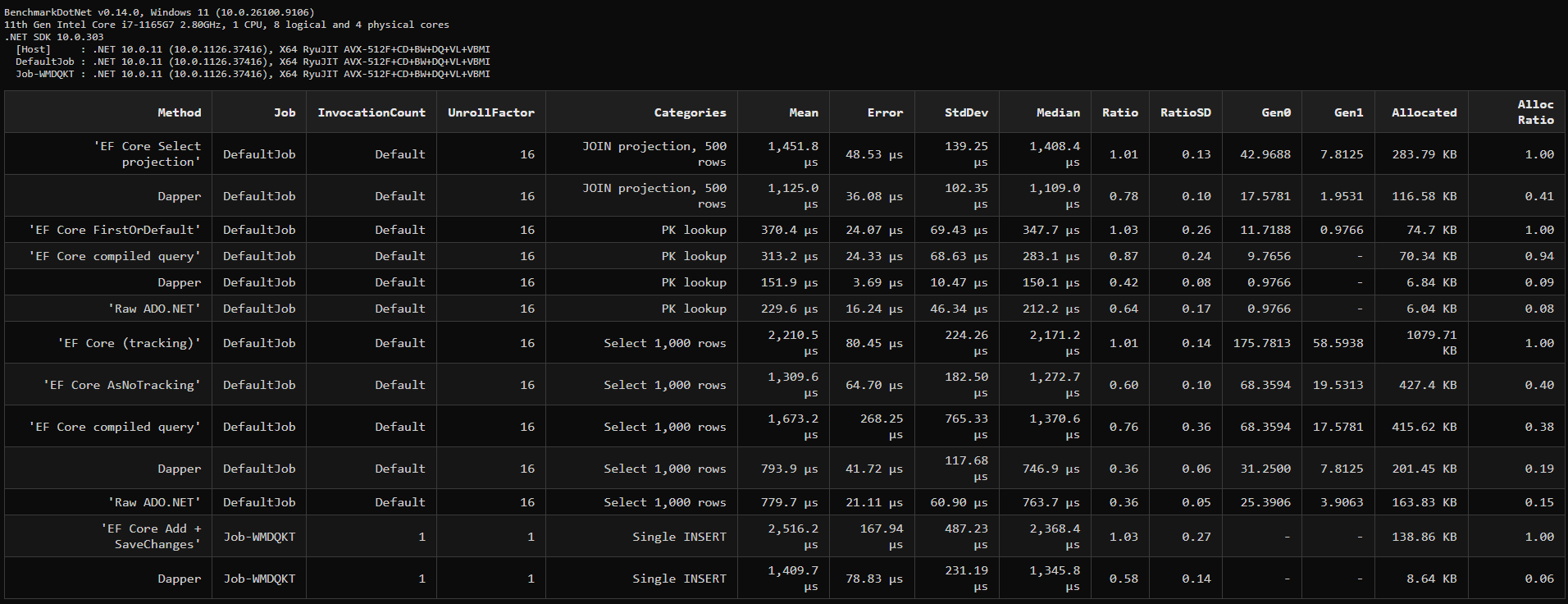
Two honest readings of that table. Yes, Dapper is roughly 2–3× faster on reads and allocates a fraction of the memory — if your workload is dominated by high-volume read endpoints, that gap is real. But look at what a single line of EF Core buys back: AsNoTracking() alone cut the 1,000-row query from 2,210 µs to 1,310 µs and dropped allocations by 60%, closing most of the distance to Dapper without giving up LINQ, migrations, or change tracking where you still want them. The pattern I've settled on for larger apps is hybrid: EF Core for writes and anything touching the change tracker, Dapper for the handful of read paths that profiling — not intuition — shows are hot. The full comparison includes JOIN projections, inserts, and a decision table for choosing per-workload rather than per-religion.
Runnable Samples for This Guide
Each section above is expanded in a focused article with a console project you can clone and run — every one asserts its claims or reports deterministic SQL statement counts, so the numbers reproduce on your machine rather than being taken on trust. All live in jorgenhoc-org/dotnet-samples.
| This guide's section | Deep dive | Sample |
|---|---|---|
| Migrations | Migrations walkthrough | ef-core-migrations-walkthrough — four real migration files |
| Relationships → one-to-many | One-to-many relationships | ef-core-one-to-many — loading strategies by statement count |
| Relationships → many-to-many | Many-to-many relationships | ef-core-many-to-many — implicit + explicit join entity |
No-tracking, raw SQL, ExecuteUpdate/ExecuteDelete | Raw SQL queries | ef-core-raw-sql — parameterization vs a live injection |
Read queries & Include performance | The N+1 query problem | ef-core-n-plus-one — the flood, then the fixes |
| When to drop the ORM | EF Core vs Dapper | ef-core-vs-dapper — measured trade-offs |
| Query filters (soft delete, multi-tenancy) | Global query filters | ef-core-global-query-filters — 22 asserted checks |
What's Next
With the basics solid, explore:
- Performance: compiled queries, batching, and the migrations workflow for production
- Advanced relationships: Owned entities, table-per-hierarchy inheritance
- Interceptors: Audit logging, soft delete automation (pairs with global query filters)
- Recent EF Core features (8 through 10): JSON columns, complex types, and named query filters