Many-to-many relationships model scenarios where records on both sides can relate to multiple records on the other side: posts have many tags, tags appear on many posts. EF Core 5 introduced implicit many-to-many that eliminates the need for a junction entity class. EF Core 8 refines this further.
Every query and write below has a measured SQL statement count, produced by
samples/ef-core-many-to-many
— a runnable console project using these exact entities, covering both the implicit and the explicit shape. The full table is in Verify the Costs Yourself.
Implicit Many-to-Many (EF Core 5+)
The simplest approach — just add collection navigation properties on both sides:
public class Post
{
    public int Id { get; set; }
    public required string Title { get; set; }
    public required string Content { get; set; }
    public DateTime PublishedAt { get; set; }

    // Many-to-many: a post has many tags
    public List<Tag> Tags { get; set; } = [];
}

public class Tag
{
    public int Id { get; set; }
    public required string Name { get; set; }
    public required string Slug { get; set; }
    public bool IsActive { get; set; } = true;

    // Many-to-many: a tag appears on many posts
    public List<Post> Posts { get; set; } = [];
}
EF Core automatically:
- Creates a
PostTagjunction table withPostsIdandTagsIdcolumns - Manages inserts/deletes in the junction table when you modify the collections
- No extra entity class or
DbSetneeded for the junction table
Optional: Customizing the Junction Table Name
protected override void OnModelCreating(ModelBuilder modelBuilder)
{
    modelBuilder.Entity<Post>()
        .HasMany(p => p.Tags)
        .WithMany(t => t.Posts)
        .UsingEntity(j => j.ToTable("PostTags")); // Custom table name
}
Explicit Join Entity
When you need additional columns on the junction table (e.g., timestamps, ordinal), use an explicit join entity:
// The join entity — has its own properties beyond just the FKs
public class StudentCourse
{
    public int StudentId { get; set; }
    public Student Student { get; set; } = null!;

    public int CourseId { get; set; }
    public Course Course { get; set; } = null!;

    // Additional payload
    public DateTime EnrolledAt { get; set; }
    public Grade? FinalGrade { get; set; }
}

public class Student
{
    public int Id { get; set; }
    public required string Name { get; set; }
    public required string Email { get; set; }

    // Can navigate directly to Courses (skipping the join entity)
    public List<Course> Courses { get; set; } = [];

    // Or navigate through the join entity (when you need the payload)
    public List<StudentCourse> StudentCourses { get; set; } = [];
}

public class Course
{
    public int Id { get; set; }
    public required string Title { get; set; }
    public int Credits { get; set; }

    public List<Student> Students { get; set; } = [];
    public List<StudentCourse> StudentCourses { get; set; } = [];
}

public enum Grade { A, B, C, D, F }
// Fluent API for explicit join entity
protected override void OnModelCreating(ModelBuilder modelBuilder)
{
modelBuilder.Entity<StudentCourse>(entity =>
{
entity.HasKey(sc => new { sc.StudentId, sc.CourseId }); // Composite PK
entity.HasOne(sc => sc.Student)
.WithMany(s => s.StudentCourses)
.HasForeignKey(sc => sc.StudentId);
entity.HasOne(sc => sc.Course)
.WithMany(c => c.StudentCourses)
.HasForeignKey(sc => sc.CourseId);
entity.Property(sc => sc.EnrolledAt)
.HasDefaultValueSql("GETUTCDATE()");
});
// Configure skip navigations (direct Student.Courses access)
modelBuilder.Entity<Student>()
.HasMany(s => s.Courses)
.WithMany(c => c.Students)
.UsingEntity<StudentCourse>();
}Querying Through the Relationship
Basic Include
// Load posts with their tags
var posts = await _db.Posts
    .Include(p => p.Tags)
    .OrderBy(p => p.PublishedAt)
    .ToListAsync();

// Load tags with their posts
var tag = await _db.Tags
    .Include(t => t.Posts)
    .FirstOrDefaultAsync(t => t.Slug == "entity-framework");
Filtered Include (EF Core 5+)
// Load posts with only published, non-draft tags
var posts = await _db.Posts
    .Include(p => p.Tags.Where(t => t.IsActive))
    .ToListAsync();
Querying with Conditions on the Related Side
// Find all posts that have the "dotnet" tag
var dotnetPosts = await _db.Posts
    .Where(p => p.Tags.Any(t => t.Slug == "dotnet"))
    .Include(p => p.Tags)
    .ToListAsync();

// Find all tags used in posts published this year
var recentTags = await _db.Tags
    .Where(t => t.Posts.Any(p => p.PublishedAt.Year == 2025))
    .OrderBy(t => t.Name)
    .ToListAsync();
Querying Through the Explicit Join Entity
// Find all courses a student is enrolled in with their grade
var studentCourses = await _db.StudentCourses  // Requires DbSet<StudentCourse>
    .Where(sc => sc.StudentId == studentId)
    .Include(sc => sc.Course)
    .OrderByDescending(sc => sc.EnrolledAt)
    .ToListAsync();

// Students with an A grade in course 5
var topStudents = await _db.StudentCourses
    .Where(sc => sc.CourseId == 5 && sc.FinalGrade == Grade.A)
    .Include(sc => sc.Student)
    .Select(sc => sc.Student)
    .ToListAsync();

// Or via skip navigation — same result, cleaner syntax
var topStudents = await _db.Courses
    .Where(c => c.Id == 5)
    .SelectMany(c => c.StudentCourses
        .Where(sc => sc.FinalGrade == Grade.A)
        .Select(sc => sc.Student))
    .ToListAsync();
Adding Items to the Collection
Implicit Many-to-Many
// Add a tag to a post — EF Core handles the junction table entry
public async Task AddTagToPostAsync(int postId, int tagId)
{
    var post = await _db.Posts
        .Include(p => p.Tags)
        .FirstOrDefaultAsync(p => p.Id == postId)
        ?? throw new KeyNotFoundException($"Post {postId} not found");

    var tag = await _db.Tags.FindAsync(tagId)
        ?? throw new KeyNotFoundException($"Tag {tagId} not found");

    if (!post.Tags.Contains(tag))
    {
        post.Tags.Add(tag);
        await _db.SaveChangesAsync();
    }
}
Without Loading the Full Collection
Avoid loading all tags when you only want to add one:
// Efficient — no need to load the Tags collection
public async Task AddTagToPostAsync(int postId, int tagId)
{
    // Attach stub entities (no DB query needed). The required members still demand a
    // value at construction; null! is the honest way to say "never read — only the
    // key matters here".
    var post = new Post { Id = postId, Title = null!, Content = null! };
    var tag = new Tag { Id = tagId, Name = null!, Slug = null! };

    _db.Attach(post);
    _db.Attach(tag);

    post.Tags.Add(tag);
    await _db.SaveChangesAsync(); // exactly one INSERT into the junction table
}Use Attach() + add to collection when you only want to insert a junction table row without querying the full entities. This avoids unnecessary database reads.
Explicit Join Entity — Enroll a Student
public async Task EnrollStudentAsync(int studentId, int courseId)
{
    // Check if already enrolled
    var existing = await _db.StudentCourses
        .AnyAsync(sc => sc.StudentId == studentId && sc.CourseId == courseId);

    if (existing)
        throw new InvalidOperationException("Student already enrolled in this course");

    var enrollment = new StudentCourse
    {
        StudentId = studentId,
        CourseId = courseId,
        EnrolledAt = DateTime.UtcNow
    };

    _db.StudentCourses.Add(enrollment);
    await _db.SaveChangesAsync();
}
Removing Items from the Collection
Implicit Many-to-Many
// Remove a tag from a post
public async Task RemoveTagFromPostAsync(int postId, int tagId)
{
    var post = await _db.Posts
        .Include(p => p.Tags)
        .FirstOrDefaultAsync(p => p.Id == postId)
        ?? throw new KeyNotFoundException();

    var tag = post.Tags.FirstOrDefault(t => t.Id == tagId);
    if (tag is not null)
    {
        post.Tags.Remove(tag);
        await _db.SaveChangesAsync();
    }
}
Explicit Join Entity — Unenroll a Student
public async Task UnenrollStudentAsync(int studentId, int courseId)
{
    var enrollment = await _db.StudentCourses
        .FirstOrDefaultAsync(sc => sc.StudentId == studentId && sc.CourseId == courseId)
        ?? throw new KeyNotFoundException("Enrollment not found");

    _db.StudentCourses.Remove(enrollment);
    await _db.SaveChangesAsync();
}
Bulk Operations
// Remove all tags from a post (EF Core 7+ ExecuteDeleteAsync)
await _db.Set<Dictionary<string, object>>("PostTag")
    .Where(pt => (int)pt["PostsId"] == postId)
    .ExecuteDeleteAsync();

// More straightforward approach — clear and re-add
var post = await _db.Posts
    .Include(p => p.Tags)
    .FirstAsync(p => p.Id == postId);

post.Tags.Clear();
post.Tags.AddRange(newTags);
await _db.SaveChangesAsync();
Counting and Aggregating
// Count tags per post
var postTagCounts = await _db.Posts
    .Select(p => new { p.Title, TagCount = p.Tags.Count })
    .OrderByDescending(x => x.TagCount)
    .ToListAsync();

// Find most popular tags (most posts)
var popularTags = await _db.Tags
    .Select(t => new { t.Name, PostCount = t.Posts.Count })
    .OrderByDescending(t => t.PostCount)
    .Take(10)
    .ToListAsync();

// Average grade per course (using explicit join entity)
var courseAverages = await _db.Courses
    .Select(c => new
    {
        c.Title,
        AverageGrade = c.StudentCourses
            .Where(sc => sc.FinalGrade.HasValue)
            .Average(sc => (double?)sc.FinalGrade)
    })
    .ToListAsync();
Common Mistakes
Replacing the collection instance — post.Tags = newTagList — is tracked, contrary to a widely repeated claim (and to what an earlier version of this article said): DetectChanges diffs the collection's contents against its snapshot, so on a post loaded with Include(p => p.Tags) the assignment produces exactly the junction-table deletes and inserts you'd expect. The sample below proves it. The real trap is replacing a collection you never loaded: EF Core has no snapshot, sees every item in the new list as an addition, leaves existing junction rows in place — and re-adding one of them fails with a duplicate key error. Which leads to the actual rule:
Always include the navigation property before modifying it: Include(p => p.Tags). Modifying an unloaded collection without tracking context leads to silent failures or duplicate key errors. The one deliberate exception is the Attach() stub pattern above, where nothing is loaded by design and the collection starts empty — additions are exactly what you mean.
Verify the Costs Yourself
Everything above, measured as SQL statement counts against a seeded database of 5 posts,
4 tags, 3 students, and 3 courses (EF Core 10, SQL Server LocalDB). The run starts by
reading the conventional junction table back from INFORMATION_SCHEMA — PostTag
(PostsId, TagsId), created by EF Core with no entity class and no configuration:
| Operation | SQL statements |
|---|---|
Include tags (implicit junction) | 1 |
Filtered Include (active tags only) | 1 |
Where(p => p.Tags.Any(...)) + Include | 1 |
Join entity with payload (grades + Include) | 1 |
| Aggregate: average grade per course | 1 |
Add tag: Include collection + Find tag + save | 3 |
Add tag: Attach() stubs, nothing loaded | 1 |
Remove tag (Include + save) | 2 |
Bulk: ExecuteDelete on the junction rows | 1 |
| Enroll: exists-check + insert join entity | 2 |
The pattern worth internalizing: reads cost one statement in both shapes — the
junction table disappears into the JOIN whether or not it has an entity class — while
write costs are dominated by the reads you do first. The Attach() stub insert is one
statement; the loaded-collection version of the same insert is three, two of which fetch
data the write never needed.
The run ends with the collection-replacement experiment from the warning above: post 2
starts with three tags, post.Tags = [efTag] is saved, and the junction afterwards holds
exactly one row — three deletes and one insert, all tracked.
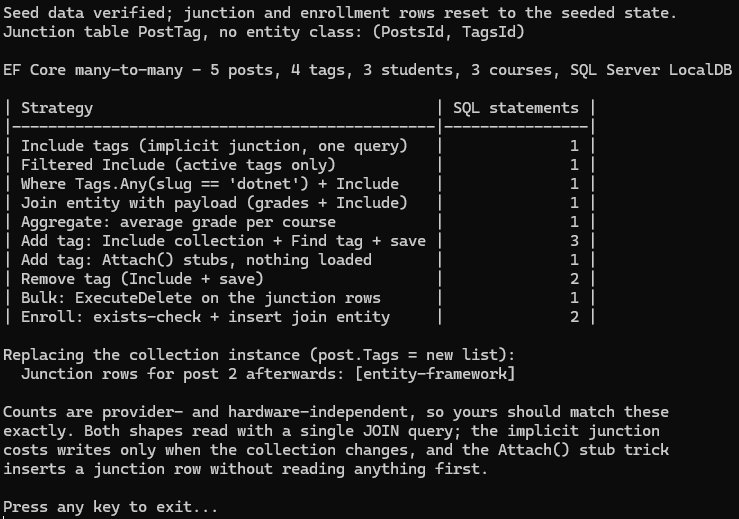
The program that produced these numbers is
samples/ef-core-many-to-many.
Run its seed.sql
first, then dotnet run. Statement counts are provider- and hardware-independent, so your
numbers should match these exactly.
Related Relationship Patterns
Many-to-many is the more intricate of the two common relationship shapes; if you are still mapping out a schema, one-to-many relationships cover the simpler case and the conventions EF Core applies by default.
Be aware that join tables make the
N+1 query problem easier to trigger: loading a list of posts
and then touching post.Tags in a loop issues one query per post, and Include plus a
second collection is exactly the cartesian-product case that AsSplitQuery() exists for.