One-to-many is the most common relationship in relational databases. A Category has many Products. An Author has many Posts. Understanding how EF Core handles this relationship — including its loading strategies — is essential for writing correct, performant data access code.
Every loading strategy and CRUD approach below has a measured SQL statement count, produced by
samples/ef-core-one-to-many
— a runnable console project using these exact entities. The full table is at the end of the article.
The Basic Setup
Two entities with a one-to-many relationship:
// One category has many products
public class Category
{
    public int Id { get; set; }
    public required string Name { get; set; }

    // Collection navigation property (the "many" side)
    public List<Product> Products { get; set; } = [];
}

// Many products belong to one category
public class Product
{
    public int Id { get; set; }
    public required string Name { get; set; }
    public decimal Price { get; set; }

    // Foreign key property
    public int CategoryId { get; set; }

    // Reference navigation property (the "one" side)
    public Category Category { get; set; } = null!;
}
EF Core's conventions handle this automatically:
CategoryIdis detected as the foreign key forCategoryProductscollection onCategorylinks back toProduct- The relationship is configured without any Fluent API
Fluent API Configuration
For explicit control over the relationship:
protected override void OnModelCreating(ModelBuilder modelBuilder)
{
    modelBuilder.Entity<Product>(entity =>
    {
        // Configure the foreign key relationship explicitly
        entity.HasOne(p => p.Category)           // Product has one Category
              .WithMany(c => c.Products)          // Category has many Products
              .HasForeignKey(p => p.CategoryId)   // FK is CategoryId
              .IsRequired()                       // Cannot be null
              .OnDelete(DeleteBehavior.Restrict); // Don't cascade delete
    });
}
Configuring in Separate Files
For large projects, use IEntityTypeConfiguration<T>:
// Configuration/ProductConfiguration.cs
public class ProductConfiguration : IEntityTypeConfiguration<Product>
{
    public void Configure(EntityTypeBuilder<Product> builder)
    {
        builder.HasKey(p => p.Id);

        builder.Property(p => p.Name)
               .HasMaxLength(200)
               .IsRequired();

        builder.Property(p => p.Price)
               .HasPrecision(18, 2);

        builder.HasOne(p => p.Category)
               .WithMany(c => c.Products)
               .HasForeignKey(p => p.CategoryId)
               .OnDelete(DeleteBehavior.Restrict);
    }
}

// Register in DbContext
protected override void OnModelCreating(ModelBuilder modelBuilder)
{
    modelBuilder.ApplyConfigurationsFromAssembly(typeof(AppDbContext).Assembly);
}
Foreign Key Options
Required vs Optional Relationships
// Required (non-nullable FK) — product MUST have a category
public int CategoryId { get; set; }         // Non-nullable
public Category Category { get; set; } = null!;

// Optional (nullable FK) — product MAY have a category
public int? CategoryId { get; set; }        // Nullable
public Category? Category { get; set; }
Shadow Properties
If you don't want the FK visible on the entity, EF Core can manage it as a shadow property:
public class Product
{
    public int Id { get; set; }
    public required string Name { get; set; }
    // No CategoryId property — FK is a shadow property

    public Category Category { get; set; } = null!;
}

// Fluent API — EF Core creates the FK column in the DB but not in the class
modelBuilder.Entity<Product>()
    .HasOne(p => p.Category)
    .WithMany(c => c.Products)
    .HasForeignKey("CategoryId"); // Shadow property name
Loading Strategies
EF Core has three strategies for loading related data: eager, explicit, and lazy.
Eager Loading (Include)
Load related data in the same query using Include():
// Load products WITH their category in one SQL query (JOIN)
var products = await _db.Products
    .Include(p => p.Category)
    .ToListAsync();

// Load category WITH all its products
var category = await _db.Categories
    .Include(c => c.Products)
    .FirstOrDefaultAsync(c => c.Id == categoryId);

// Nested includes (ThenInclude)
var orders = await _db.Orders
    .Include(o => o.Customer)
    .Include(o => o.Items)
        .ThenInclude(i => i.Product)
            .ThenInclude(p => p.Category)
.ToListAsync();Eager loading is the right default for most scenarios. It avoids N+1 queries and keeps your data access predictable. Use Include() when you know you'll need the related data.
Filtered Include (EF Core 5+)
Load only a subset of the related collection:
// Load categories with only products priced over $50
var categories = await _db.Categories
    .Include(c => c.Products.Where(p => p.Price > 50))
    .ToListAsync();

// Load categories with products ordered by price
var categories = await _db.Categories
    .Include(c => c.Products.OrderBy(p => p.Price).Take(5))
    .ToListAsync();
Explicit Loading
Load the navigation property on demand, after the entity is already loaded:
// Load category first
var category = await _db.Categories.FindAsync(categoryId);

// Later, load its products explicitly
await _db.Entry(category!)
         .Collection(c => c.Products)
         .LoadAsync();

// Or load with a filter
await _db.Entry(category!)
         .Collection(c => c.Products)
         .Query()
         .Where(p => p.Price > 100)
         .LoadAsync();

// Load a reference navigation property explicitly
var product = await _db.Products.FindAsync(productId);
await _db.Entry(product!).Reference(p => p.Category).LoadAsync();
Lazy Loading
Lazy loading automatically loads navigation properties when you access them. It requires virtual navigation properties and the lazy loading proxy package:
dotnet add package Microsoft.EntityFrameworkCore.Proxies// Enable lazy loading proxies
builder.Services.AddDbContext<AppDbContext>(options =>
{
options.UseSqlServer(connectionString)
.UseLazyLoadingProxies();
});
// Entities need virtual navigation properties
public class Category
{
public int Id { get; set; }
public required string Name { get; set; }
public virtual List<Product> Products { get; set; } = []; // virtual!
}
public class Product
{
public int Id { get; set; }
public required string Name { get; set; }
public int CategoryId { get; set; }
public virtual Category Category { get; set; } = null!; // virtual!
}// With lazy loading — Category is loaded automatically when accessed
var product = await _db.Products.FindAsync(productId);
var categoryName = product!.Category.Name; // Triggers a DB query hereLazy loading is a frequent source of N+1 query problems. When you loop over a collection and access a navigation property on each item, you generate one query per item. Avoid lazy loading in web applications unless you have a specific reason.
Cascade Delete Options
When a category is deleted, what happens to its products?
entity.HasOne(p => p.Category)
      .WithMany(c => c.Products)
      .HasForeignKey(p => p.CategoryId)
.OnDelete(DeleteBehavior.Restrict); // Options below| Option | Behavior |
|---|---|
Cascade | Delete child records when parent is deleted |
Restrict | Throw an error if parent has children (safe default) |
SetNull | Set FK to null when parent is deleted (requires nullable FK) |
ClientSetNull | EF Core loads and nulls related entities in memory (not DB-level) |
NoAction | Database handles it (or throws a DB error) |
Use Restrict as your default for required relationships. It prevents accidental data loss and forces you to explicitly handle orphaned records in your business logic.
CRUD Operations with Relationships
Creating with a Relationship
// Approach 1: Use the foreign key (most efficient — no extra query)
var product = new Product
{
    Name = "Widget",
    Price = 9.99m,
    CategoryId = existingCategoryId  // Just set the FK
};
_db.Products.Add(product);
await _db.SaveChangesAsync();

// Approach 2: Assign the navigation property (EF Core resolves the FK)
var category = await _db.Categories.FindAsync(categoryId);
var product = new Product { Name = "Widget", Price = 9.99m, Category = category! };
_db.Products.Add(product);
await _db.SaveChangesAsync();

// Approach 3: Add to the parent's collection
var category = await _db.Categories
    .Include(c => c.Products)
    .FirstAsync(c => c.Id == categoryId);

category.Products.Add(new Product { Name = "Widget", Price = 9.99m });
await _db.SaveChangesAsync();
Querying Across the Relationship
// Products in a specific category
var products = await _db.Products
    .Where(p => p.CategoryId == categoryId)
    .ToListAsync();

// Or via the navigation property (same SQL)
var category = await _db.Categories
    .Include(c => c.Products)
    .FirstAsync(c => c.Id == categoryId);

var products = category.Products;

// Count products per category
var categorySummaries = await _db.Categories
    .Select(c => new
    {
        c.Name,
        ProductCount = c.Products.Count,
        AveragePrice = c.Products.Average(p => (decimal?)p.Price)
    })
    .ToListAsync();
Moving a Product to a Different Category
public async Task MoveToCategoryAsync(int productId, int newCategoryId)
{
    var product = await _db.Products.FindAsync(productId)
        ?? throw new KeyNotFoundException();

    product.CategoryId = newCategoryId; // Just update the FK
    await _db.SaveChangesAsync();
}
Removing a Product from a Category
For required relationships, removing from the collection means deleting the entity:
public async Task RemoveProductAsync(int categoryId, int productId)
{
    var category = await _db.Categories
        .Include(c => c.Products)
        .FirstAsync(c => c.Id == categoryId);

    var product = category.Products.FirstOrDefault(p => p.Id == productId);
    if (product is not null)
    {
        category.Products.Remove(product);
        // With DeleteBehavior.Cascade or Restrict, this deletes the product
        await _db.SaveChangesAsync();
    }
}
Owned Entities (Value Objects)
When an entity is conceptually "part of" the parent and has no independent identity, use owned entities:
public class Order
{
    public int Id { get; set; }
    public required string CustomerEmail { get; set; }
    public Address ShippingAddress { get; set; } = null!;  // Owned
}

[Owned]
public class Address
{
    public required string Street { get; set; }
    public required string City { get; set; }
    public required string PostalCode { get; set; }
    public required string Country { get; set; }
}
// Fluent API
modelBuilder.Entity<Order>()
.OwnsOne(o => o.ShippingAddress);
// Stores ShippingAddress columns in the Orders table:
// ShippingAddress_Street, ShippingAddress_City, etc.Owned entities don't have their own DbSet and can't be queried independently.
Verify the Costs Yourself
Every strategy in this article, measured as SQL statement counts against a seeded database of 5 categories and 20 products (EF Core 10, SQL Server LocalDB):
| Strategy | SQL statements |
|---|---|
Include (eager, single JOIN query) | 1 |
Filtered Include (Price > 50) | 1 |
| Explicit loading (parent, then collection) | 2 |
| Lazy loading (20 products, 5 categories) | 6 |
| Create: set the FK property | 1 |
Create: assign the navigation (Find + add) | 2 |
Move to another category (Find + save) | 2 |
Two of these rows deserve a second look:
Lazy loading reports 6, not 21. Loading 20 products costs one query; touching
product.Category in a loop then fires one lazy query for the first product of each
category, and EF Core's navigation fixup attaches that category to every other tracked
product pointing at it. The cost scales with distinct parents touched — five categories
here, so five extra queries. With one product per parent, or with AsNoTracking() (which
disables fixup), it degrades to a full N+1. That
data-dependence is exactly why lazy loading passes testing and fails in production.
Creating via the FK is one INSERT. The navigation-property approach costs two
statements only because of the Find that fetched the parent — EF Core adds no overhead
of its own.
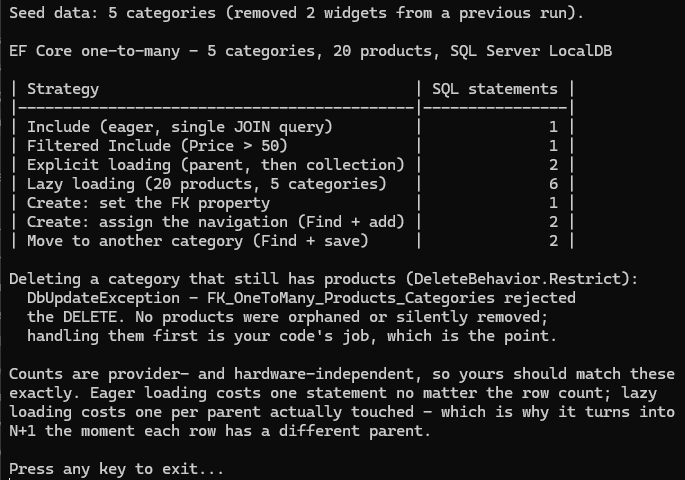
The program that produced these numbers is
samples/ef-core-one-to-many.
Run its seed.sql
first, then dotnet run. Statement counts are provider- and hardware-independent, so your
numbers should match these exactly — it also demonstrates DeleteBehavior.Restrict
rejecting the delete of a category that still has products.