EF Core's LINQ translation handles most queries elegantly, but some scenarios demand raw SQL: window functions, CTEs, complex aggregations, or database-specific features that LINQ can't express. EF Core provides several APIs for this — each with different safety characteristics.
Every claim here is asserted by
samples/ef-core-raw-sql
— 19 checks including a live SQL injection against the vulnerable pattern, so the safety difference between the APIs is data, not prose (see Verify It Yourself).
The Three Raw SQL APIs
| API | Use Case | Entity Tracking | SQL Injection Safe |
|---|---|---|---|
FromSqlRaw | Query entities with raw SQL | Yes | Only with parameters |
FromSqlInterpolated | Query entities with interpolated SQL | Yes | Always |
ExecuteSqlRaw | Non-query SQL (INSERT/UPDATE/DELETE) | N/A | Only with parameters |
ExecuteSqlInterpolated | Non-query with interpolated SQL | N/A | Always |
FromSqlRaw
Query entities using a raw SQL string. Always use parameters for user input:
// SAFE — parameterized query
var categoryId = 5;
var products = await _db.Products
    .FromSqlRaw("SELECT * FROM Products WHERE CategoryId = {0}", categoryId)
    .ToListAsync();

// SAFE — named parameters (SQL Server)
var products = await _db.Products
    .FromSqlRaw("SELECT * FROM Products WHERE CategoryId = @categoryId",
        new SqlParameter("@categoryId", categoryId))
.ToListAsync();Never concatenate user input into a FromSqlRaw query string. FromSqlRaw("SELECT * FROM Products WHERE Name = '" + userInput + "'") is a SQL injection vulnerability — and not a theoretical one: the sample feeds ' OR '1'='1 through exactly this pattern and every row in the table comes back, while the same input through FromSqlInterpolated becomes parameter @p0 and matches zero rows. The EF Core analyzer flags concatenation into FromSqlRaw with warning EF1003; treat that warning as a build error.
Composing with LINQ
Raw SQL queries can be composed with LINQ — EF Core wraps them in a subquery:
// Raw SQL for the base query, then compose with LINQ
var products = await _db.Products
    .FromSqlRaw("SELECT * FROM Products WHERE CategoryId = {0}", categoryId)
    .Where(p => p.Price > 50)        // Adds WHERE clause
    .OrderBy(p => p.Name)            // Adds ORDER BY
    .Include(p => p.Category)        // Adds JOIN
    .ToListAsync();
Generated SQL approximately:
SELECT p.*, c.*
FROM (SELECT * FROM Products WHERE CategoryId = 5) AS p
JOIN Categories AS c ON p.CategoryId = c.Id
WHERE p.Price > 50
ORDER BY p.Name
FromSqlInterpolated — Always SQL-Injection Safe
FromSqlInterpolated treats C# string interpolation values as SQL parameters automatically:
// This looks like string interpolation, but EF Core converts it to parameters
int categoryId = 5;
string nameFilter = "Widget%";

var products = await _db.Products
    .FromSqlInterpolated(
        $"SELECT * FROM Products WHERE CategoryId = {categoryId} AND Name LIKE {nameFilter}")
    .OrderBy(p => p.Price)
    .ToListAsync();
Despite the $"..." syntax, EF Core does NOT concatenate the values. It extracts them and creates proper SQL parameters:
-- Actual SQL executed (no injection possible):
SELECT * FROM Products WHERE CategoryId = @p0 AND Name LIKE @p1
-- @p0 = 5, @p1 = 'Widget%'Prefer FromSqlInterpolated over FromSqlRaw for all queries that include user-provided or runtime values. The interpolated API is always safe; the raw API requires discipline to use correctly.
Complex Queries Where LINQ Falls Short
Window Functions
EF Core can't translate window functions like ROW_NUMBER(), RANK(), or LAG():
// Window function for ranked products by price within category
var rankedProducts = await _db.Products
    .FromSqlRaw(@"
        SELECT
            p.*,
            ROW_NUMBER() OVER (PARTITION BY p.CategoryId ORDER BY p.Price DESC) AS PriceRank
        FROM Products p
    ")
    .ToListAsync();
Since PriceRank isn't a property on Product, map to a DTO instead:
// DTO for the result
public record RankedProduct(int Id, string Name, decimal Price, int CategoryId, int PriceRank);

// Use raw SQL with Dapper or ADO.NET for non-entity results
// Or add PriceRank as a [NotMapped] property and use FromSqlRaw
For non-entity queries, use _db.Database.SqlQueryRaw<T> (EF Core 7+):
// EF Core 7+ — query to any type, not just entity types
var rankedProducts = await _db.Database
    .SqlQueryRaw<RankedProduct>(@"
        SELECT
            p.Id,
            p.Name,
            p.Price,
            p.CategoryId,
            CAST(ROW_NUMBER() OVER (PARTITION BY p.CategoryId ORDER BY p.Price DESC) AS int) AS PriceRank
        FROM Products p
    ")
.ToListAsync();The CAST(... AS int) is not optional. ROW_NUMBER() returns bigint on SQL Server, and materializing it into an int DTO property throws InvalidCastException at runtime — types must match exactly, nothing coerces silently. (Positional C# records work fine as SqlQueryRaw<T> targets; it's the column types that bite.)
CTEs (Common Table Expressions)
var topCategories = await _db.Database
    .SqlQueryRaw<CategorySummary>(@"
        WITH ProductCounts AS (
            SELECT
                CategoryId,
                COUNT(*) AS ProductCount,
                AVG(Price) AS AvgPrice
            FROM Products
            GROUP BY CategoryId
        )
        SELECT
            c.Id,
            c.Name,
            pc.ProductCount,
            pc.AvgPrice
        FROM Categories c
        JOIN ProductCounts pc ON c.Id = pc.CategoryId
        ORDER BY pc.ProductCount DESC
    ")
    .ToListAsync();
Full-Text Search
SQL Server full-text search can't be expressed in LINQ:
var searchTerm = "entity framework performance";
var results = await _db.Articles
    .FromSqlInterpolated(
        $"SELECT * FROM Articles WHERE CONTAINS(Content, {searchTerm})")
    .Include(a => a.Author)
    .ToListAsync();
Database-Specific Features
// SQL Server — MERGE statement
await _db.Database.ExecuteSqlInterpolatedAsync($@"
    MERGE Products AS target
    USING (SELECT {id} AS Id, {newName} AS Name) AS source
    ON target.Id = source.Id
    WHEN MATCHED THEN UPDATE SET Name = source.Name
    WHEN NOT MATCHED THEN INSERT (Id, Name) VALUES (source.Id, source.Name);
");
ExecuteSqlRaw / ExecuteSqlInterpolated for Non-Queries
For INSERT, UPDATE, DELETE, or DDL that doesn't return entities:
// Bulk update with ExecuteSqlInterpolated (always safe)
int categoryId = 5;
decimal discountFactor = 0.9m;

int rowsAffected = await _db.Database.ExecuteSqlInterpolatedAsync(
    $"UPDATE Products SET Price = Price * {discountFactor} WHERE CategoryId = {categoryId}");

Console.WriteLine($"Updated {rowsAffected} products");

// Or with ExecuteSqlRaw and explicit parameters
await _db.Database.ExecuteSqlRawAsync(
    "UPDATE Products SET Price = Price * @discount WHERE CategoryId = @catId",
    new SqlParameter("@discount", discountFactor),
new SqlParameter("@catId", categoryId));EF Core 7+ ExecuteUpdateAsync and ExecuteDeleteAsync LINQ extensions are often better than raw SQL for bulk operations because they're type-safe and compose with LINQ. Use raw SQL when the query is genuinely complex.
Calling Stored Procedures
// Stored procedure that returns entities
var products = await _db.Products
    .FromSqlRaw("EXEC dbo.GetProductsByCategory @CategoryId = {0}", categoryId)
    .ToListAsync();

// Stored procedure with output parameter
var outputParam = new SqlParameter("@TotalCount", SqlDbType.Int)
{
    Direction = ParameterDirection.Output
};

await _db.Database.ExecuteSqlRawAsync(
    "EXEC dbo.ProcessOrders @BatchSize = {0}, @TotalCount = @TotalCount OUTPUT",
    100,
    outputParam);

var totalCount = (int)outputParam.Value;
Console.WriteLine($"Processed {totalCount} orders");Stored procedure results cannot be composed with LINQ. FromSqlRaw("EXEC ...") followed by .Where(...), .Include(...), or anything else that must translate to SQL throws InvalidOperationException — an EXEC cannot be wrapped in a subquery the way a SELECT can. Filter inside the procedure, or materialize with ToListAsync() first and filter in memory.
No-Tracking with Raw SQL
Raw SQL queries participate in EF Core's change tracking by default. For read-only queries:
var products = await _db.Products
    .FromSqlInterpolated($"SELECT * FROM Products WHERE Price > {minPrice}")
    .AsNoTracking()  // No change tracking — better performance for reads
    .ToListAsync();
When Raw SQL Beats LINQ
| Scenario | Use Raw SQL |
|---|---|
| Window functions (ROW_NUMBER, RANK, LAG) | Yes |
| CTEs or recursive queries | Yes |
| Full-text search | Yes |
| MERGE / UPSERT statements | Yes |
| Stored procedures | Yes |
| Database-specific hints (NOLOCK, FORCESEEK) | Yes |
| Complex aggregations with ROLLUP/CUBE | Yes |
| Queries that generate bad SQL through LINQ | Yes |
| Simple CRUD and filtered queries | No — LINQ is fine |
Checking the Generated SQL
Before reaching for raw SQL, check what LINQ generates — it may be perfectly adequate:
// Log queries to console in development
builder.Services.AddDbContext<AppDbContext>(options =>
{
    options.UseSqlServer(connectionString);
    if (builder.Environment.IsDevelopment())
        options.LogTo(Console.WriteLine, LogLevel.Information);
});
Or inspect the query without executing it:
var query = _db.Products
    .Where(p => p.CategoryId == 5)
    .OrderBy(p => p.Price)
    .Select(p => new { p.Id, p.Name, p.Price });

// Get the SQL without executing
var sql = query.ToQueryString();
Console.WriteLine(sql);
PostgreSQL-Specific Example
// PostgreSQL JSONB query — can't be expressed in portable LINQ
var results = await _db.Database
    .SqlQueryRaw<OrderResult>(@"
        SELECT id, data->>'customer_name' AS CustomerName,
               (data->>'total')::numeric AS Total
        FROM orders
        WHERE data @> '{""status"": ""pending""}'::jsonb
        ORDER BY created_at DESC
    ")
    .ToListAsync();
Verify It Yourself
Every claim above is asserted by
samples/ef-core-raw-sql
— 19 checks that throw on failure (EF Core 10, SQL Server LocalDB). The highlights:
- The injection is real:
' OR '1'='1concatenated intoFromSqlRawleaks all 12 seeded rows; the identical input throughFromSqlInterpolatedmatches 0. - Composing
Where+OrderBy+Includeover a rawSELECTruns as one statement, with the subquery wrapper visible inToQueryString(). ROW_NUMBER()into anintDTO property throwsInvalidCastException; withCAST(... AS int), rank 1 lands on the most expensive product of each category.- A CTE materializes into a plain record; a stored procedure materializes tracked entities, refuses LINQ composition with
InvalidOperationException, and returns its OUTPUT parameter. AsNoTracking()keeps the change tracker empty (vs 11 tracked entities without it);ToQueryString()executes zero statements;MERGEhits both its insert and update paths.
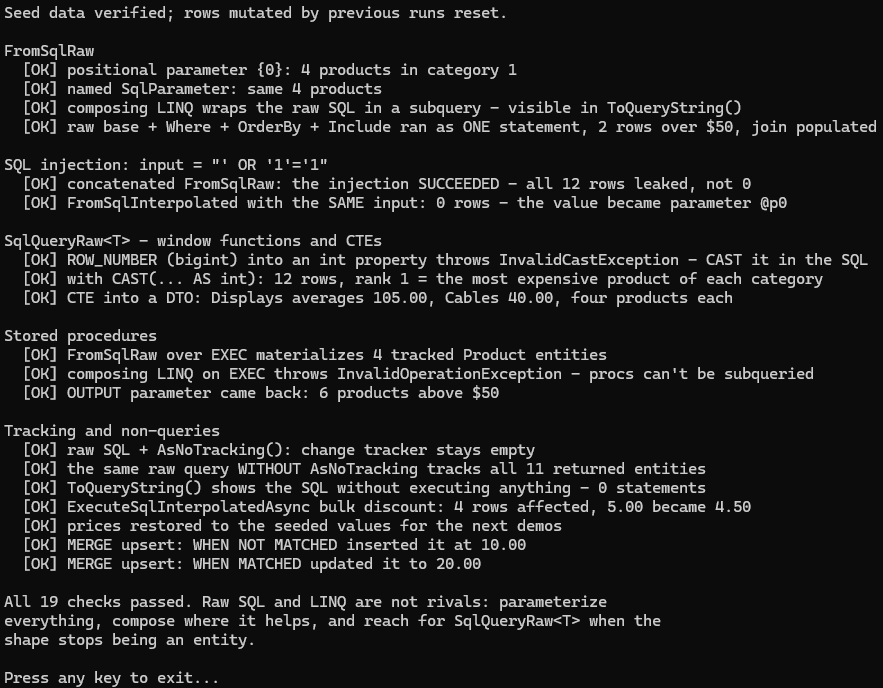
Run its seed.sql
first, then dotnet run — the seed also creates the two stored procedures. Full-text search and the PostgreSQL JSONB example are the two sections not asserted: LocalDB has no full-text engine, and the sample runs on SQL Server only.
When Raw SQL Becomes the Common Case
If you find that most of your queries have drifted to raw SQL, that is worth treating as a signal rather than a habit. At that point the comparison in EF Core vs Dapper is the relevant one — Dapper is built for exactly this style of access and does not charge you for a change tracker you are not using.
Before concluding that LINQ is the bottleneck, though, check the generated SQL against
the patterns in the N+1 query problem. A slow LINQ query is
far more often a missing Include or a missing projection than a genuine limitation of
the translator.