ValueTask<T> was added to .NET specifically to eliminate heap allocations in async methods that often complete synchronously. In practice, most developers should use Task<T> almost always. But for performance-critical hot paths, understanding the difference pays off.
The Allocation Problem with Task
Every time you create a Task<T>, .NET allocates an object on the managed heap. For most application code, this is completely fine — the GC handles it. But consider a cache layer called thousands of times per second:
// Task<T> version — always allocates, even on cache hit
public async Task<User?> GetUserAsync(int id)
{
    if (_cache.TryGetValue(id, out var cached))
        return cached;  // Allocates a completed Task<User?> on the heap

    var user = await _db.Users.FindAsync(id);  // Async path — Task allocated anyway
    _cache.Set(id, user);
    return user;
}
On every cache hit (which might be 95% of calls), you allocate and immediately discard a Task<User?> object. At high throughput, this adds up:
- Each
Task<T>allocation: 72 bytes on the heap (measured below on .NET 10 x64) - 10,000 cache hits/second × 72 bytes = ~720 KB/second of short-lived allocations
- More GC pressure, more GC pauses
ValueTask: Zero Allocation for Synchronous Paths
ValueTask<T> is a struct. Returning a synchronously completed value costs no heap allocation:
// ValueTask<T> version — zero allocation on cache hit
public ValueTask<User?> GetUserAsync(int id)
{
    if (_cache.TryGetValue(id, out var cached))
        return ValueTask.FromResult(cached);  // Struct — no heap allocation!

    return FetchAndCacheAsync(id);  // Async path still uses Task internally
}

private async ValueTask<User?> FetchAndCacheAsync(int id)
{
    var user = await _db.Users.FindAsync(id);
    _cache.Set(id, user);
    return user;
}
On cache hits: the struct is created on the stack, returned by value, and goes out of scope — GC never involved.
Benchmarks
Using BenchmarkDotNet to compare the allocation overhead:
[MemoryDiagnoser]
public class TaskVsValueTaskBenchmark
{
    private readonly Dictionary<int, string> _cache = new() { [1] = "cached" };

    // ---- Synchronous path: the case ValueTask exists for ----

    [Benchmark(Baseline = true, Description = "Task<T>, cache hit")]
    public async Task<string?> TaskCacheHit()
    {
        if (_cache.TryGetValue(1, out var val)) return val;
        return await SlowTaskAsync();
    }

    [Benchmark(Description = "ValueTask<T>, cache hit")]
    public async ValueTask<string?> ValueTaskCacheHit()
    {
        if (_cache.TryGetValue(1, out var val)) return val;
        return await SlowValueTaskAsync();
    }

    // ---- Asynchronous path: the case where ValueTask buys nothing ----

    [Benchmark(Description = "Task<T>, cache miss")]
    public async Task<string?> TaskCacheMiss()
    {
        if (_cache.TryGetValue(999, out var val)) return val;
        return await SlowTaskAsync();
    }

    [Benchmark(Description = "ValueTask<T>, cache miss")]
    public async ValueTask<string?> ValueTaskCacheMiss()
    {
        if (_cache.TryGetValue(999, out var val)) return val;
        return await SlowValueTaskAsync();
    }

    // Task.Yield rather than Task.Delay: Delay would measure the OS timer instead of
    // the allocation behaviour, and would push every column into milliseconds.
    private static async Task<string?> SlowTaskAsync()
    {
        await Task.Yield();
        return null;
    }

    private static async ValueTask<string?> SlowValueTaskAsync()
    {
        await Task.Yield();
        return null;
    }
}
Running that with dotnet run -c Release:
BenchmarkDotNet v0.14.0, Windows 11 (10.0.26100.9106)
11th Gen Intel Core i7-1165G7 2.80GHz, 1 CPU, 8 logical and 4 physical cores
.NET SDK 10.0.303
  [Host]     : .NET 10.0.11 (10.0.1126.37416), X64 RyuJIT AVX-512F+CD+BW+DQ+VL+VBMI
  DefaultJob : .NET 10.0.11 (10.0.1126.37416), X64 RyuJIT AVX-512F+CD+BW+DQ+VL+VBMI

| Method                     | Mean         | Error      | StdDev     | Ratio  | RatioSD | Gen0   | Allocated | Alloc Ratio |
|--------------------------- |-------------:|-----------:|-----------:|-------:|--------:|-------:|----------:|------------:|
| 'Task<T>, cache hit'       |    11.491 ns |  0.3985 ns |  1.0638 ns |   1.01 |    0.13 | 0.0115 |      72 B |        1.00 |
| 'ValueTask<T>, cache hit'  |     6.676 ns |  0.2023 ns |  0.2630 ns |   0.59 |    0.06 |      - |         - |        0.00 |
| 'Task<T>, cache miss'      | 1,172.718 ns | 23.3628 ns | 23.9919 ns | 102.90 |    9.45 | 0.0305 |     195 B |        2.71 |
| 'ValueTask<T>, cache miss' | 1,238.435 ns | 11.6302 ns | 10.8789 ns | 108.66 |    9.79 | 0.0362 |     229 B |        3.18 |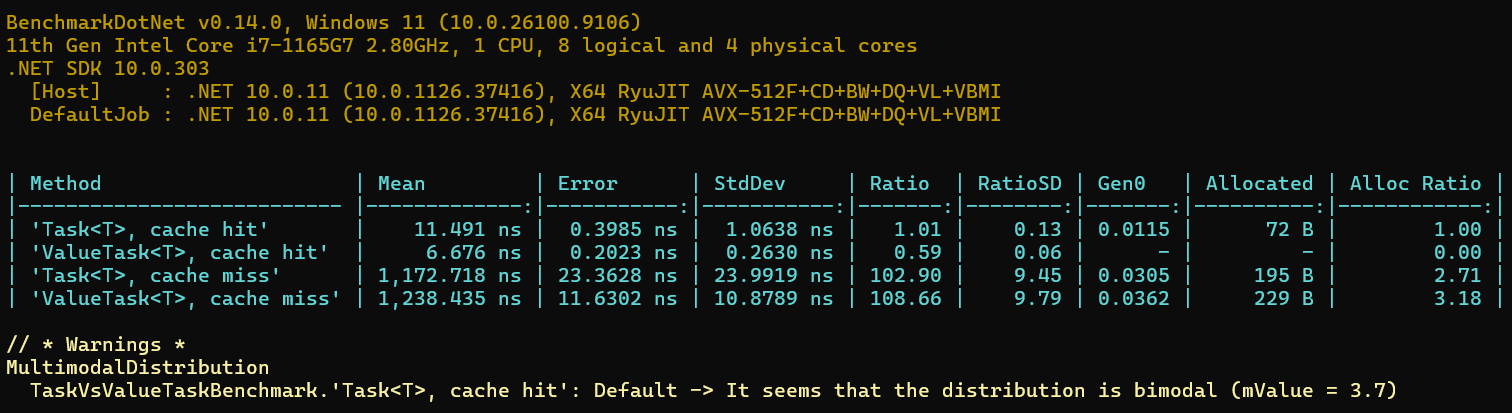
Read the Allocated column, not Mean. On the synchronous path the result is what
you would expect: Task<T> allocates 72 bytes per call, ValueTask<T> allocates nothing
at all. That is the case ValueTask was designed for, and it delivers.
Look at the cache-miss rows. On the genuinely async path ValueTask<T> allocated more
than Task<T> — 229 B against 195 B. Once an async ValueTask<T> method
actually suspends, its builder still has to heap-allocate something to hold the state
machine, and the struct wrapper sits on top of that rather than replacing it. The saving
only exists when the method returns without ever suspending.
That last point is the one that matters when deciding whether to convert an API. ValueTask
is not a free upgrade — it is a trade that wins on the synchronous path and loses on the
asynchronous one. If your cache hit rate is 95%, it is clearly worth it. If it is 30%, you
have made things slightly worse while also taking on the single-await restriction described
below.
Two caveats on the timings. BenchmarkDotNet flagged the Task<T>, cache hit row as bimodal
(mValue 3.7) and discarded 17 outliers from it, so of the four rows that is the one to trust
least — at single-digit nanoseconds you are measuring scheduling noise alongside the work.
The Ratio column says ValueTask is 0.59 of the baseline on a hit, but do not carry a
"1.7x faster" headline away from that; it is a handful of nanoseconds on a bimodal
distribution.
The allocation column has no such problem. Across three separate runs on this machine the
timings moved by up to 4% while Allocated came back byte-identical every time — 72 B,
0, 195 B, 229 B. That is the difference between a measurement that is deterministic and one
that is statistical, and it is why the allocation figures carry the argument here.
These figures still come from one laptop. The shape should reproduce anywhere; the absolute nanoseconds will not, which is why the ratio of hits to misses in your own workload is the thing worth measuring.
Against a Real Repository
The benchmark above is synthetic — it uses Task.Yield() for the async path so that timing
noise does not swallow the allocation difference. Put the same two shapes in front of an
actual EF Core query and measure allocated bytes instead of time:
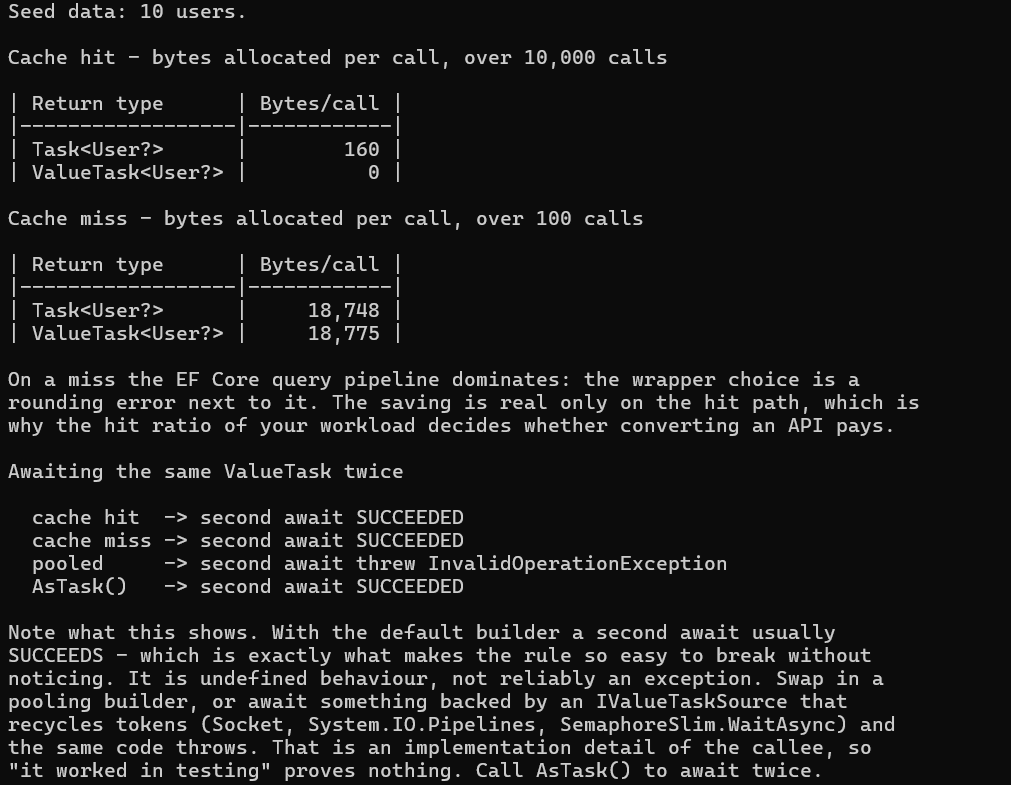
| Path | Task<User?> | ValueTask<User?> |
|---|---|---|
| Cache hit | 160 B/call | 0 B/call |
| Cache miss | 18,748 B/call | 18,775 B/call |
The hit row is the promise delivered: nothing allocated at all. The miss row is the part that decides whether converting an API is worth it — the two land within 0.15% of each other, because the query pipeline dwarfs anything the wrapper does. Which of the two comes out marginally ahead flips between runs, which tells you the difference is noise.
Look at the ratio between rows: a miss costs about 117 times a hit. So the
question is never "is ValueTask faster", it is "what fraction of my calls complete
synchronously". At 95% hits the saving is real and compounding. At 30% you have adopted the
single-await hazard below in exchange for a rounding error.
Measured with GC.GetTotalAllocatedBytes(precise: true), not
GC.GetAllocatedBytesForCurrentThread(). The per-thread counter is the obvious choice and
the wrong one: a cache miss suspends at await and resumes on a different thread-pool
thread, so those allocations are never counted. Using it here produced a difference of more
than 10x between the two return types that was pure measurement artifact — and, worse, it
looked plausible.
The numbers also differ from the Allocated column above (160 B versus 72 B) because they
measure different scopes: BenchmarkDotNet isolates the benchmarked method, while
GetTotalAllocatedBytes counts everything the calling loop does. The direction and the ratio
reproduce; the absolute figure depends on where you draw the boundary.
Both are runnable:
samples/valuetask-vs-task-csharp
for the allocation figures and the single-await demonstration, and
benchmarks/JorgenHoc.Benchmarks
for the BenchmarkDotNet run.
When ValueTask Actually Helps
1. High-Frequency Methods with Common Synchronous Path
// Good ValueTask use case — in-memory buffer that fills asynchronously
public class DataBuffer
{
    private readonly Queue<byte[]> _buffer = new();

    // Called in a tight loop — often has data, rarely needs to wait
    public ValueTask<byte[]> ReadChunkAsync(CancellationToken ct = default)
    {
        if (_buffer.TryDequeue(out var chunk))
            return ValueTask.FromResult(chunk);  // Zero allocation — common path

        return WaitForChunkAsync(ct);
    }

    private async ValueTask<byte[]> WaitForChunkAsync(CancellationToken ct)
    {
        await _dataAvailableSignal.WaitAsync(ct);
        return _buffer.Dequeue();
    }
}
2. Interface Methods on Hot Paths
When defining interfaces for performance-critical async components:
// Interface for a serializer used millions of times
public interface IFastSerializer<T>
{
    // ValueTask makes sense here — implementations may complete synchronously
    ValueTask<byte[]> SerializeAsync(T value, CancellationToken ct = default);
    ValueTask<T> DeserializeAsync(byte[] data, CancellationToken ct = default);
}

// Implementation that often completes synchronously (small objects)
public class SmallObjectSerializer<T> : IFastSerializer<T>
{
    public ValueTask<byte[]> SerializeAsync(T value, CancellationToken ct = default)
    {
        var data = JsonSerializer.SerializeToUtf8Bytes(value);
        if (data.Length < 1024)
            return ValueTask.FromResult(data);  // Small — synchronous

        return WriteLargeAsync(data, ct);
    }

    private async ValueTask<byte[]> WriteLargeAsync(byte[] data, CancellationToken ct)
    {
        await Task.Yield();  // Yield to allow other work during large serialization
        return data;
    }
}
3. Already-Completed Operations
// A reader that buffers ahead — frequently has data already in buffer
public ValueTask<int> ReadAsync(Memory<byte> buffer, CancellationToken ct = default)
{
    if (TryCopyFromBuffer(buffer, out var bytesRead))
        return ValueTask.FromResult(bytesRead);  // Buffer hit — no allocation

    return ReadFromStreamAsync(buffer, ct);  // Actual I/O — task needed
}
When NOT to Use ValueTask
1. Most Application Code
For typical ASP.NET Core controller/service code, Task<T> is correct:
// Don't use ValueTask here — no hot path, one allocation per request is fine
public async Task<List<Product>> GetProductsAsync(int categoryId)
{
    return await _db.Products
        .Where(p => p.CategoryId == categoryId)
        .ToListAsync();
}
The allocation cost of one Task per HTTP request is completely negligible.
2. Methods That Always Await
// ValueTask provides no benefit here — always goes to the async path
public async ValueTask<UserDto> GetUserDtoAsync(int id)
{
    var user = await _db.Users.FindAsync(id);  // Always async
    return new UserDto(user!.Id, user.Name, user.Email);
}

// Use Task<T> instead — simpler, same performance
public async Task<UserDto> GetUserDtoAsync(int id)
{
    var user = await _db.Users.FindAsync(id);
    return new UserDto(user!.Id, user.Name, user.Email);
}
3. Methods Awaited Multiple Times
This is a correctness issue, not just a performance one — and it is worse than a straightforward crash, because most of the time it appears to work.
// UNDEFINED BEHAVIOUR — a ValueTask may only be consumed once
var vt = cache.GetUserAsync(42);
var a = await vt;  // OK
var b = await vt;  // WRONG — but very likely to succeed anyway

// Safe — convert to Task if you need to await more than once
var task = cache.GetUserAsync(42).AsTask();
var a = await task;
var b = await task;  // Safe
Running that second await against a normal async ValueTask<T> method gives:
| Path | Second await |
|---|---|
| Cache hit (completed synchronously) | Succeeds |
| Cache miss (completed asynchronously) | Succeeds |
Method using PoolingAsyncValueTaskMethodBuilder | Throws InvalidOperationException |
.AsTask() | Succeeds — always safe |
Note the first two rows. With the default AsyncValueTaskMethodBuilder the state machine
box stays alive after completion, so nothing detects the violation and a second await
quietly returns the right answer. "It worked when I tested it" is not evidence here.
It breaks when the box gets recycled: a method annotated with
PoolingAsyncValueTaskMethodBuilder, or anything backed by an IValueTaskSource that
reuses tokens — Socket, System.IO.Pipelines, SemaphoreSlim.WaitAsync. Which builder
the callee uses is an implementation detail you do not control and that can change under
you in a library upgrade.
So treat single-consumption as an invariant you enforce, not a rule the runtime enforces for
you. Call AsTask() the moment you need the result twice.
4. Storing in Fields or Using with WhenAll
// WRONG — ValueTask cannot be stored and awaited later
ValueTask<string> _pendingTask;

public async Task StartAsync()
{
    _pendingTask = DoWorkAsync();  // Can't store and await later reliably
}

// WRONG — Task.WhenAll doesn't accept ValueTask
await Task.WhenAll(task1, task2);  // task1/task2 must be Task, not ValueTask

// Convert if needed
await Task.WhenAll(vt1.AsTask(), vt2.AsTask());A ValueTask must be awaited exactly once, immediately. If you need to await it multiple times, check it from multiple places, or pass it to Task.WhenAll, convert it with .AsTask() first.
The IValueTaskSource Interface
For ultimate control (used in .NET BCL), implement IValueTaskSource<T> to reuse the task object across multiple calls — eliminating even the minimal overhead of async state machines:
// Advanced pattern — reusable async operation object
// Used internally in Socket, PipeReader, etc.
// Most application code never needs this level of optimization
public class ReusableAsyncOperation : IValueTaskSource<int>
{
    private ManualResetValueTaskSourceCore<int> _core;

    public ValueTask<int> GetValueTask() => new ValueTask<int>(this, _core.Version);

    public int GetResult(short token) => _core.GetResult(token);
    public ValueTaskSourceStatus GetStatus(short token) => _core.GetStatus(token);
    public void OnCompleted(Action<object?> continuation, object? state,
        short token, ValueTaskSourceOnCompletedFlags flags)
        => _core.OnCompleted(continuation, state, token, flags);

    public void SetResult(int result) => _core.SetResult(result);
    public void Reset() => _core.Reset();
}
This is deep infrastructure code — you'll likely never write this in application development.
Practical Decision Guide
Is this a hot path? (1000+ calls/second per instance)
├── No → Use Task<T>
└── Yes → Does it frequently complete synchronously?
           ├── No → Use Task<T>
           └── Yes → Use ValueTask<T>
                      └── Does the caller need to await it multiple times?
                               ├── Yes → Use Task<T> or convert with .AsTask()
                               └── No → ValueTask<T> is appropriate
How I tested this
The benchmark ran on my laptop: an 11th-gen Intel Core i7-1165G7 (4 physical cores) on Windows 11, .NET SDK 10.0.303 with the 10.0.11 runtime, BenchmarkDotNet v0.14.0, in a Release build. The full report, environment header included, is committed under BenchmarkDotNet.Artifacts in the samples repository, and the screenshot above is that run, not a retyped table.
Two things I controlled for. First, nanosecond timings on a laptop are noisy, so I treat the Mean column as indicative and the Allocated column as the actual result: bytes allocated per call are deterministic and will match on your machine even if the timings do not. Second, BenchmarkDotNet flagged one of the distributions as bimodal, which I left in the screenshot rather than re-running until it looked clean.
The result that matters most is the one that cuts against the usual advice, on the async path: on a cache miss it allocated 229 bytes against 195 for Task, while on the synchronous path it allocated nothing against 72 bytes. That is a trade, not a win, and it is why the "When NOT to Use ValueTask" section exists in its current form.
To reproduce:
git clone https://github.com/jorgenhoc-org/dotnet-samples
cd dotnet-samples/benchmarks/JorgenHoc.Benchmarks
dotnet run -c Release -- --filter *ValueTask*
The allocation figures against a real repository and the double-await demonstration are a separate console project in samples/valuetask-vs-task-csharp; it runs with a plain dotnet run.
Summary
ValueTask<T> is a specialized optimization tool, not a general replacement for Task<T>. Use it when:
- The method is on a hot path
- The synchronous completion case is common (cache hits, buffered reads)
- The caller will await exactly once and immediately
For everything else — which is most application code — Task<T> is simpler, safer, and carries negligible overhead.
If you are still building the underlying mental model, the
C# async/await guide covers how the state machine and
the awaiter pattern work — which is what makes ValueTask<T>'s single-await restriction
make sense rather than seem arbitrary.
For streaming scenarios, note that
IAsyncEnumerable<T> already uses ValueTask internally
in MoveNextAsync, which is a good illustration of the intended use case: a hot path where
the synchronous completion is common.