Shipping a .NET 10 application in Docker is straightforward, but shipping it correctly — small image, no SDK in production, non-root user, health checks — requires deliberate choices. This guide walks through every layer of a production-ready Dockerfile and explains the reasoning behind each decision.
Why Multi-Stage Builds
A naive single-stage Dockerfile copies the SDK into the final image. The .NET 10 SDK image weighs 846 MB uncompressed (measured with docker image inspect). Your application code might be 5 MB. Multi-stage builds solve this by using the SDK only during compilation, then copying the compiled output into a lean runtime image.
# WITHOUT multi-stage — ships the entire SDK (846 MB)
FROM mcr.microsoft.com/dotnet/sdk:10.0
WORKDIR /app
COPY . .
RUN dotnet publish -c Release -o out
ENTRYPOINT ["dotnet", "out/MyApp.dll"]
With a multi-stage build the final image uses aspnet:10.0 (219 MB measured) or smaller alternatives, and contains zero build tooling — which also reduces the attack surface.
Choosing a Base Image
The runtime base image is the single biggest lever for image size. Microsoft publishes several variants. The sizes below are measured, not quoted — the same minimal API built on each base, then docker image inspect --format '{{.Size}}':
| Image | Final app image (measured) | Notes |
|---|---|---|
mcr.microsoft.com/dotnet/aspnet:10.0 | 219 MB | Debian, broadest compatibility |
mcr.microsoft.com/dotnet/aspnet:10.0-alpine | 115 MB | Alpine, musl libc — verify native deps |
mcr.microsoft.com/dotnet/aspnet:10.0-noble-chiseled | 118 MB | Ubuntu Chiseled, no shell, no package manager |
Note what the measurements say: chiseled is no longer a size win over Alpine — on .NET 10 it comes out 3 MB larger. Older comparisons (including an earlier version of this article) put chiseled at half Alpine's size; that gap has closed.
Chiseled's real advantage today is attack surface, not size: no shell, no package manager, nothing for an attacker to run after compromising the process. Pick it for that reason. If you need to exec into production containers for debugging, that same property will bite you.
Alpine uses musl libc instead of glibc. Some NuGet packages that wrap native libraries (e.g., certain crypto or image processing libs) will crash at runtime on Alpine. Test thoroughly before committing to Alpine in production.
For the examples below the Debian variant is used to maximize compatibility, with the Alpine and Chiseled equivalents noted where relevant.
Complete Production Dockerfile
This is the full, copy-pasteable Dockerfile for an ASP.NET Core 10 application. A runnable version — this Dockerfile plus Alpine and chiseled variants and the script that measured the sizes above — is in samples/dotnet-docker-container.
# ── Stage 1: restore ──────────────────────────────────────────────────────────
# Separate restore step so Docker can cache the layer until *.csproj changes.
# This avoids re-downloading all NuGet packages on every source-code change.
FROM mcr.microsoft.com/dotnet/sdk:10.0 AS restore
WORKDIR /src

# Copy only project files first — this layer is cached as long as .csproj files
# don't change, even if the rest of the source code changes.
COPY ["src/MyApp/MyApp.csproj", "src/MyApp/"]
COPY ["src/MyApp.Infrastructure/MyApp.Infrastructure.csproj", "src/MyApp.Infrastructure/"]

RUN dotnet restore "src/MyApp/MyApp.csproj"

# ── Stage 2: build ────────────────────────────────────────────────────────────
FROM restore AS build
WORKDIR /src

# Now copy everything — this layer changes frequently, but restore is already cached
COPY . .

RUN dotnet build "src/MyApp/MyApp.csproj" \
    -c Release \
    --no-restore \
    -o /app/build

# ── Stage 3: publish ──────────────────────────────────────────────────────────
FROM build AS publish
RUN dotnet publish "src/MyApp/MyApp.csproj" \
    -c Release \
    --no-restore \
    --no-build \
    -o /app/publish \
    /p:UseAppHost=false        # disable native apphost — not needed in containers

# ── Stage 4: final runtime image ──────────────────────────────────────────────
FROM mcr.microsoft.com/dotnet/aspnet:10.0 AS final

WORKDIR /app

# Copy published output from the publish stage only
# The SDK, source code, and build artifacts never reach this image
COPY --from=publish /app/publish .

# Tell ASP.NET Core to listen on port 8080 (non-privileged, good practice)
# ASPNETCORE_URLS overrides the default https/5000+5001 bindings
ENV ASPNETCORE_URLS=http://+:8080
ENV ASPNETCORE_ENVIRONMENT=Production

EXPOSE 8080

# Non-root: select the `app` user (UID 1654) that ships in every .NET 8+ image.
# Do NOT create one with `RUN adduser` — the .NET 10 Debian image no longer
# includes adduser/addgroup, so that classic pattern fails the build (exit 127).
USER app

# Deliberately no HEALTHCHECK: this image contains neither wget nor curl, so the
# classic `CMD wget .../health` marks a healthy container unhealthy.
# See the HEALTHCHECK section below for what actually works per base image.
ENTRYPOINT ["dotnet", "MyApp.dll"]
Why UseAppHost=false?
The native apphost is a small C binary that bootstraps the .NET runtime. Inside a container you always call dotnet MyApp.dll directly, so generating the apphost is wasted work and adds a few KB.
Non-Root User Security
Running as root inside a container is a well-known security risk. If the process is compromised, the attacker has root privileges within the container and a simpler path to escaping to the host.
The fix is one line, because every .NET 8+ image — Debian, Alpine and chiseled alike — ships a built-in non-root user named app (UID 1654, exposed as the APP_UID environment variable):
USER appThe classic pattern you will still find in most tutorials —
RUN addgroup --system appgroup && adduser --system --ingroup appgroup appuser —
no longer builds on the .NET 10 Debian image: the slimmed base dropped
adduser/addgroup entirely, so the build fails with exit code 127. On chiseled you
could never run it anyway (no shell). USER app works identically on all three.
Verify it took effect rather than assuming: the sample app returns Environment.UserName from GET /, and all three variants report "user":"app".
Layer Caching Strategy
Docker builds images layer by layer and caches each layer. A layer is invalidated when its content changes, and all subsequent layers are rebuilt. The key rule:
Copy files that change rarely before files that change often.
# Good: project files change less often than source files
COPY ["src/MyApp/MyApp.csproj", "src/MyApp/"]
RUN dotnet restore                          # cached until .csproj changes

COPY . .                                    # source changes invalidate from here
RUN dotnet build ...
# Bad: copying everything first means restore re-runs on every code change
COPY . .
RUN dotnet restore # never cached
RUN dotnet build ...For a monorepo with multiple projects, copy all .csproj files first, then restore:
# Copy all project files, preserving directory structure
COPY ["Directory.Build.props", "."]
COPY ["src/MyApp/MyApp.csproj", "src/MyApp/"]
COPY ["src/MyApp.Infrastructure/MyApp.Infrastructure.csproj", "src/MyApp.Infrastructure/"]
COPY ["src/MyApp.Contracts/MyApp.Contracts.csproj", "src/MyApp.Contracts/"]
RUN dotnet restore "src/MyApp/MyApp.csproj"
.dockerignore
Without a .dockerignore, Docker sends your entire build context (including bin/, obj/, .git/, test results, etc.) to the daemon. This slows down every build and can cause stale artifacts to sneak into the image.
# .dockerignore
**/.git
**/.gitignore
**/.vs
**/.vscode
**/bin
**/obj
**/out
**/*.user
**/*.md
**/tests
**/TestResults
Dockerfile*
docker-compose*
.dockerignore
README.mdAdd **/node_modules if your solution includes any front-end projects. Also exclude secrets and .env files explicitly — they should never enter a Docker build context.
HEALTHCHECK Instruction
The HEALTHCHECK instruction tells Docker how to test that the container is functioning. Orchestrators like Kubernetes use their own probes, but Docker Compose and standalone Docker rely on this instruction.
There is a catch the classic examples skip, and it depends on the base image (checked on the .NET 10 images, not assumed):
| Base image | Can HEALTHCHECK CMD work? |
|---|---|
aspnet:10.0 (Debian) | No tooling — ships neither wget nor curl; the check fails and marks a healthy container unhealthy |
aspnet:10.0-alpine | Yes — BusyBox provides wget |
aspnet:10.0-noble-chiseled | Impossible — CMD needs /bin/sh, and there is no shell |
On Alpine, the classic pattern works as-is:
# Alpine only: BusyBox wget is built in
HEALTHCHECK --interval=30s --timeout=5s --start-period=15s --retries=3 \
    CMD wget -qO- http://localhost:8080/health || exit 1
On Debian you have two honest options: install a probe tool in the final stage — RUN apt-get update && apt-get install -y --no-install-recommends curl costs a few MB and some attack surface — or skip the Docker-level check and let the orchestrator probe over the network. On chiseled, orchestrator probes are the only option, and that is fine: Kubernetes, ECS and Azure Container Apps all probe from outside the container and need nothing inside the image.
| Option | Value | Meaning |
|---|---|---|
--interval | 30s | Check every 30 seconds |
--timeout | 5s | Fail the check if no response in 5 seconds |
--start-period | 15s | Grace period while the app initializes |
--retries | 3 | Mark unhealthy after 3 consecutive failures |
Your ASP.NET Core app needs a /health endpoint. Add the built-in health checks middleware:
// Program.cs
builder.Services.AddHealthChecks();

// Map health endpoint — keep it lightweight, no authentication required
app.MapHealthChecks("/health");
For a richer health check that includes database connectivity:
builder.Services.AddHealthChecks()
    .AddSqlServer(
        connectionString: builder.Configuration.GetConnectionString("DefaultConnection")!,
        name: "sql-server",
        tags: ["database", "sql"])
    .AddRedis(
        redisConnectionString: builder.Configuration.GetConnectionString("Redis")!,
        name: "redis",
        tags: ["cache"]);

// Separate liveness (is the process alive?) from readiness (can it serve traffic?)
app.MapHealthChecks("/health/live", new HealthCheckOptions
{
    Predicate = _ => false   // only the base check, no dependencies
});

app.MapHealthChecks("/health/ready", new HealthCheckOptions
{
    Predicate = check => check.Tags.Contains("database")
});
Environment Variables and Configuration
ASP.NET Core reads configuration from environment variables automatically. The most important ones to set in the Dockerfile or via docker run:
# Dockerfile ENV defaults (can be overridden at runtime)
ENV ASPNETCORE_ENVIRONMENT=Production
ENV ASPNETCORE_URLS=http://+:8080

# Do NOT bake connection strings or secrets into the image.
# Pass them at runtime via -e or docker-compose environment section.
Override at runtime:
docker run -p 8080:8080 \
  -e ConnectionStrings__DefaultConnection="Server=db;Database=myapp;..." \
  -e ASPNETCORE_ENVIRONMENT=Staging \
  myapp:latest
The double-underscore __ maps to the colon : separator in appsettings.json hierarchy, which is how ASP.NET Core resolves nested configuration keys from environment variables.
Build Arguments
Use ARG to pass values at build time without baking them into the image layers as environment variables (ARGs are not persisted in the final image):
ARG BUILD_VERSION=1.0.0
ARG GIT_COMMIT=unknown

LABEL org.opencontainers.image.version="${BUILD_VERSION}"
LABEL org.opencontainers.image.revision="${GIT_COMMIT}"
LABEL org.opencontainers.image.source="https://github.com/myorg/myapp"
Build with:
docker build \
  --build-arg BUILD_VERSION=2.1.0 \
  --build-arg GIT_COMMIT=$(git rev-parse --short HEAD) \
  -t myapp:2.1.0 .
Multi-Architecture Builds
Building for linux/amd64 only works on most CI systems but causes performance issues on Apple Silicon (which is linux/arm64). Use --platform for explicit targeting, or docker buildx for cross-platform images:
# Build for a specific platform
docker build --platform linux/amd64 -t myapp:latest .

# Build and push a multi-arch manifest (requires buildx)
docker buildx build \
  --platform linux/amd64,linux/arm64 \
  -t myregistry.azurecr.io/myapp:latest \
  --push \
  .
The .NET 10 base images from Microsoft are already multi-arch, so your Dockerfile needs no changes — buildx handles the rest.
docker-compose for Local Development
Local development should mirror production as closely as possible. The following docker-compose.yml spins up the app with a SQL Server and a Redis instance:
# docker-compose.yml
version: "3.9"

services:
  app:
    build:
      context: .
      dockerfile: Dockerfile
      # Pass build-time args
      args:
        BUILD_VERSION: "dev"
    ports:
      - "8080:8080"
    environment:
      ASPNETCORE_ENVIRONMENT: Development
      ASPNETCORE_URLS: http://+:8080
      ConnectionStrings__DefaultConnection: >-
        Server=sqlserver;Database=MyApp;
        User Id=sa;Password=YourStrong!Passw0rd;
        TrustServerCertificate=True
      ConnectionStrings__Redis: redis:6379
    depends_on:
      sqlserver:
        condition: service_healthy
      redis:
        condition: service_started
    healthcheck:
      test: ["CMD", "wget", "-qO-", "http://localhost:8080/health"]
      interval: 30s
      timeout: 5s
      retries: 3
      start_period: 20s

  sqlserver:
    image: mcr.microsoft.com/mssql/server:2022-latest
    environment:
      SA_PASSWORD: "YourStrong!Passw0rd"
      ACCEPT_EULA: "Y"
    ports:
      - "1433:1433"
    volumes:
      - sqldata:/var/opt/mssql
    healthcheck:
      test: ["CMD", "/opt/mssql-tools/bin/sqlcmd",
             "-S", "localhost", "-U", "sa",
             "-P", "YourStrong!Passw0rd", "-Q", "SELECT 1"]
      interval: 10s
      timeout: 5s
      retries: 5
      start_period: 30s

  redis:
    image: redis:7-alpine
    ports:
      - "6379:6379"

volumes:
  sqldata:
PostgreSQL Alternative
If you prefer PostgreSQL over SQL Server:
  postgres:
    image: postgres:16-alpine
    environment:
      POSTGRES_DB: myapp
      POSTGRES_USER: myapp
      POSTGRES_PASSWORD: mypassword
    ports:
      - "5432:5432"
    volumes:
      - pgdata:/var/lib/postgresql/data
    healthcheck:
      test: ["CMD-SHELL", "pg_isready -U myapp"]
      interval: 10s
      timeout: 5s
      retries: 5

volumes:
  pgdata:
Update the connection string accordingly:
    environment:
      ConnectionStrings__DefaultConnection: >-
        Host=postgres;Database=myapp;
        Username=myapp;Password=mypassword
docker-compose.override.yml for Developer Ergonomics
Split runtime configuration from development conveniences using an override file (ignored by production CI):
# docker-compose.override.yml — only used locally, not in CI
version: "3.9"

services:
  app:
    # Mount source for hot reload in development
    volumes:
      - .:/src
    environment:
      # Enable detailed errors
      ASPNETCORE_ENVIRONMENT: Development
      # Disable HTTPS redirect in local Docker
      ASPNETCORE_HTTPS_PORT: ""
Final Image Size Comparison
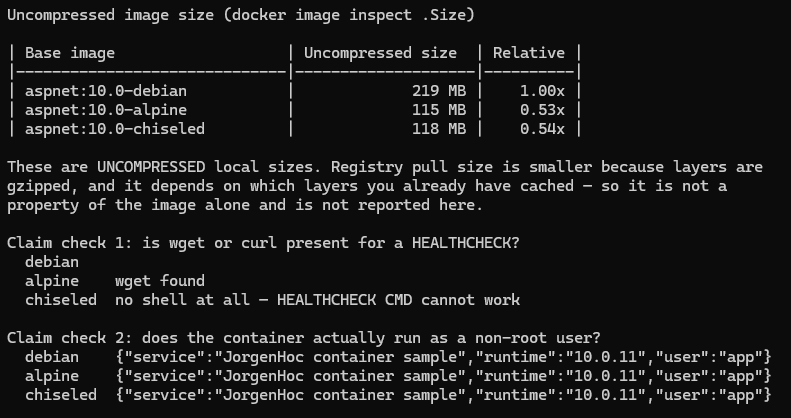
The same minimal API, built with the three Dockerfiles from this article, measured with docker image inspect --format '{{.Size}}' on .NET 10:
| Base image | Final app image | Relative |
|---|---|---|
aspnet:10.0 (Debian) | 219 MB | 1.00x |
aspnet:10.0-alpine | 115 MB | 0.53x |
aspnet:10.0-noble-chiseled | 118 MB | 0.54x |
Two things worth noticing. Moving off Debian roughly halves the image. And Alpine and chiseled are now within 3 MB of each other, so choosing between them is about musl-vs-glibc compatibility and attack surface, not size.
Only uncompressed sizes are reported, deliberately: registry pull size depends on gzip and on which layers the target host already has cached, so it is not a property of the image alone. Earlier versions of this article quoted "compressed pull sizes" — those numbers were not reproducible and are gone.
Reproduce the table on your machine with compare-image-sizes.sh — it builds all three variants and prints this table, plus checks which images can actually run a HEALTHCHECK.
Security Scanning with Docker Scout
Docker Scout (included with Docker Desktop 4.17+) analyzes your image for known CVEs:
# Analyze the local image
docker scout cves myapp:latest

# Show only critical and high severity vulnerabilities
docker scout cves --only-severity critical,high myapp:latest

# Compare two image versions
docker scout compare myapp:latest myapp:previous

# Get a quick summary
docker scout quickview myapp:latest
Integrate Scout into CI to fail builds on critical vulnerabilities:
# GitHub Actions step
- name: Scan image for vulnerabilities
  run: |
    docker scout cves \
      --only-severity critical,high \
      --exit-code \
      myapp:${{ github.sha }}
The --exit-code flag causes the command to exit with a non-zero code if vulnerabilities are found, failing the CI step.
Prefer Chiseled images not just for size but for security: fewer installed packages means fewer CVEs. A Debian image ships with hundreds of packages that your app never uses, each one a potential vulnerability.
Complete Alpine Dockerfile
For teams that have validated their dependencies work on Alpine:
FROM mcr.microsoft.com/dotnet/sdk:10.0-alpine AS restore
WORKDIR /src
COPY ["src/MyApp/MyApp.csproj", "src/MyApp/"]
RUN dotnet restore "src/MyApp/MyApp.csproj" \
    --runtime linux-musl-x64           # musl RID for Alpine

FROM restore AS build
WORKDIR /src
COPY . .
RUN dotnet build "src/MyApp/MyApp.csproj" \
    -c Release \
    --no-restore \
    -o /app/build

FROM build AS publish
RUN dotnet publish "src/MyApp/MyApp.csproj" \
    -c Release \
    --no-restore \
    --no-build \
    --runtime linux-musl-x64 \
    --self-contained true \             # bundle the runtime to avoid musl dependency issues
    /p:UseAppHost=false \
    -o /app/publish

FROM mcr.microsoft.com/dotnet/aspnet:10.0-alpine AS final

WORKDIR /app
COPY --from=publish /app/publish .

ENV ASPNETCORE_URLS=http://+:8080
EXPOSE 8080

# Same built-in non-root user as every other .NET 8+ image
USER app

# This works on Alpine specifically — BusyBox provides wget
HEALTHCHECK --interval=30s --timeout=5s --start-period=15s --retries=3 \
    CMD wget -qO- http://localhost:8080/health || exit 1

ENTRYPOINT ["dotnet", "MyApp.dll"]
How I tested this
The size table comes from building the same minimal API three times, once per Dockerfile in this article, against the .NET 10 runtime images available in August 2026, and reading docker image inspect --format '{{.Size}}' for each result. The script that does this, compare-image-sizes.sh, is in the samples repository, and the screenshot above is its output on my machine.
I report uncompressed sizes only. An earlier version of this article quoted "compressed pull sizes" that I had taken from other write-ups, and when I tried to reproduce them I could not: pull size depends on gzip and on which layers the target host already has cached, so it is not a property of the image. Those numbers are gone.
The script also checks two claims I had been making without evidence. It runs each image and asks which of them can actually execute the HEALTHCHECK instruction, since that instruction assumes wget or curl exists in the runtime image, and it confirms that all three variants run as the non-root app user rather than silently as root. The chiseled image has no shell at all, which is the reason the health-check section reads the way it does.
To reproduce, with a running Docker daemon:
git clone https://github.com/jorgenhoc-org/dotnet-samples
cd dotnet-samples/samples/dotnet-docker-container
./compare-image-sizes.sh
Base images move, so expect the absolute megabytes to drift over time; the ratios have been stable.
Summary
| Decision | Recommended Choice | Reason |
|---|---|---|
| Multi-stage build | Always | Keeps SDK out of production image |
| Layer caching | Copy .csproj first, then source | Avoids re-running dotnet restore on code changes |
| Base image | Chiseled for prod, Debian for dev | Smallest attack surface; Debian for broader compatibility |
| Non-root user | Always | Reduces blast radius of a compromised container |
| HEALTHCHECK | Always | Required for Docker Compose depends_on condition |
| .dockerignore | Always | Speeds up builds, prevents leaking secrets |
ASPNETCORE_URLS | http://+:8080 | Non-privileged port, explicit binding |
| Security scanning | Docker Scout in CI | Catches CVEs before they reach production |
A well-crafted Dockerfile is infrastructure-as-code in the same way a Terraform file is. It should be reviewed, version-controlled, and updated when new base images are released — especially when security patches land for the underlying OS.
Once the image builds cleanly, the deployment target is largely interchangeable — which is the main argument for containerising in the first place. Both Fly.io and Render deploy a Dockerfile directly, so the same artifact you test locally is the one that runs in production.