Render.com has quietly become one of the most developer-friendly PaaS platforms for containerized workloads — but its free tier cold-start penalty and pricing jumps trip up .NET developers who don't know what they're signing up for. This guide covers everything from Dockerfile to render.yaml, a real deployment of the .NET 10 sample in
samples/dotnet-hosting, and an honest comparison with Railway and Fly.io.
What Render.com Is (and Where It Sits in the Market)
Render is a fully managed cloud platform that runs Docker containers, static sites, cron jobs, and background workers. It occupies the middle ground between Heroku (dead or expensive) and raw Kubernetes: you get Git-driven deploys, managed TLS, and built-in Postgres without writing infrastructure code.
Its main differentiators for .NET developers:
- Zero-config HTTPS on every service and custom domain
render.yaml— infrastructure-as-code checked into your repo- Native Postgres managed databases with automatic backups
- Private networking between services on the same account (no public egress charges)
- Auto-deploy on push to any branch you configure
The catch: the free tier spins down idle services, and the jump from free ($0) to Starter ($7/month) is the smallest upgrade that eliminates cold starts.
Dockerfile for .NET on Render
Render runs any Docker image. The standard multi-stage build works without modification — this is the one the sample deploys with:
# Dockerfile — multi-stage: SDK image builds, smaller ASP.NET image runs
FROM mcr.microsoft.com/dotnet/sdk:10.0 AS build
WORKDIR /src
COPY ["JorgenHoc.DotnetHosting.csproj", "."]
RUN dotnet restore
COPY . .
RUN dotnet publish -c Release -o /app/publish

FROM mcr.microsoft.com/dotnet/aspnet:10.0 AS final
WORKDIR /app
COPY --from=build /app/publish .
EXPOSE 8080
ENTRYPOINT ["dotnet", "JorgenHoc.DotnetHosting.dll"]Render injects a PORT environment variable at runtime (10000 by default). The tempting Dockerfile line ENV ASPNETCORE_URLS=http://+:${PORT:-8080} does NOT pick it up — Docker resolves ${...} when the image is built, so the fallback gets baked in and Render's injected value is silently ignored. Read PORT in Program.cs instead.
// Program.cs — pick up Render's runtime-injected PORT
var port = Environment.GetEnvironmentVariable("PORT");
if (!string.IsNullOrEmpty(port))
{
    builder.WebHost.UseUrls($"http://+:{port}");
}
// Without PORT, the aspnet base image default (8080) applies.
Deploying from the Dashboard
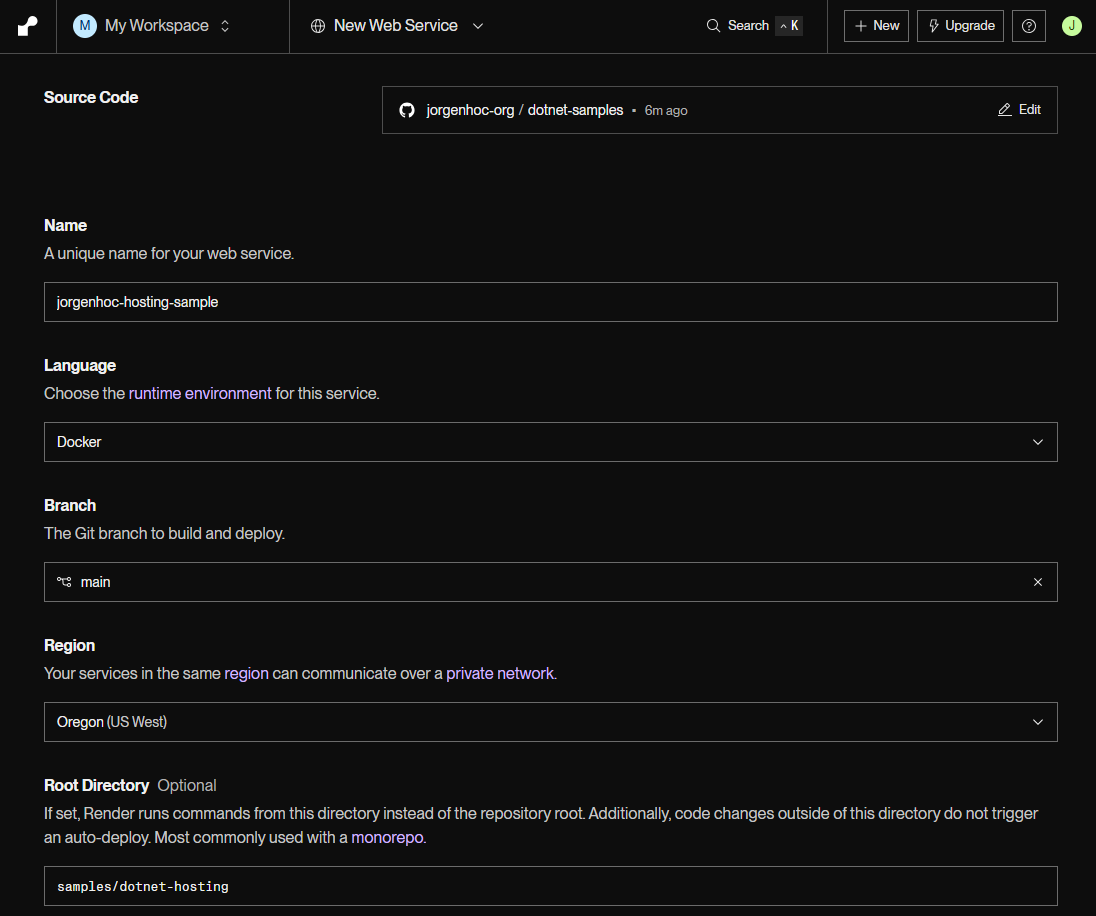
The fastest path is the dashboard form — no YAML needed. New → Web Service, connect the GitHub repo, and one form covers everything. The only non-obvious field for a monorepo is Root Directory, which points the Docker build context at the right folder:
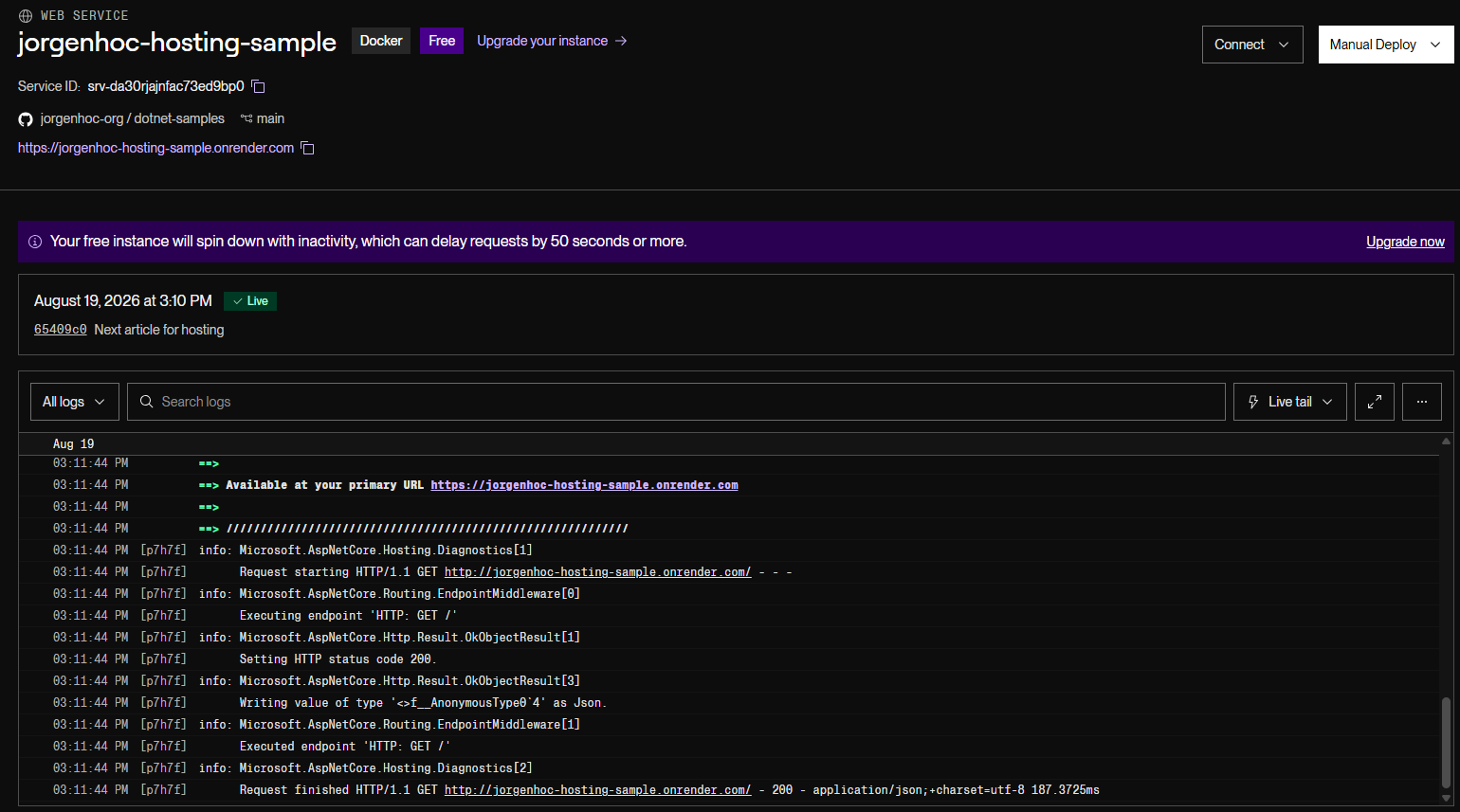
Pick an instance type (Free for this walkthrough), click Deploy Web Service, and Render builds the Dockerfile and routes traffic once the health check passes:
The deployed sample reports the platform it detected (via the RENDER environment variable) and the port Render injected:
![Browser showing the JSON response from jorgenhoc-hosting-sample.onrender.com: service JorgenHoc hosting sample, runtime 10.0.11, platform Render, listeningOn http://[::]:10000.](/images/dotnet-hosting/render-app-response.png)
render.yaml — Infrastructure as Code
The dashboard form works, but render.yaml (a "Blueprint") declares services, databases, and environment variables in a file checked into your repo — Render applies it when you connect the repo as a Blueprint. The sample keeps a minimal one at deploy/render.yaml; a fuller production-shaped example:
# render.yaml — checked into source control
services:
  - type: web
    name: my-dotnet-api
    runtime: docker
    region: oregon          # oregon | frankfurt | singapore | ohio
    plan: starter           # free | starter | standard | pro
    branch: main            # auto-deploy on push to this branch
    healthCheckPath: /health

    # Build-time overrides (rarely needed with a Dockerfile)
    dockerfilePath: ./MyApi/Dockerfile

    envVars:
      - key: ASPNETCORE_ENVIRONMENT
        value: Production
      - key: ConnectionStrings__DefaultConnection
        fromDatabase:
          name: my-postgres-db    # references the database block below
          property: connectionString
      - key: JWT_SECRET
        generateValue: true       # Render generates a random value once

    autoDeploy: true

  # Background worker (no public port, no health check required)
  - type: worker
    name: my-background-worker
    runtime: docker
    plan: starter
    branch: main
    dockerfilePath: ./Worker/Dockerfile
    envVars:
      - key: ASPNETCORE_ENVIRONMENT
        value: Production

databases:
  - name: my-postgres-db
    databaseName: myapp
    user: myapp_user
    plan: free              # free | basic-256 | basic-512 | basic-1
    region: oregon
Key points:
fromDatabase.property: connectionStringinjects the full Postgres connection string automatically — no copy-pasting credentials.generateValue: trueis useful for secrets like JWT signing keys; Render generates them once and never shows them again in logs.- The
healthCheckPathtells Render's load balancer which endpoint to poll. Return HTTP 200 when the app is ready.
Health Check Endpoint
Add a minimal health endpoint so Render knows your app is up:
// Program.cs
app.MapGet("/health", () => Results.Ok(new { status = "healthy", utc = DateTime.UtcNow }));
For production, use Microsoft.Extensions.Diagnostics.HealthChecks to include database connectivity:
builder.Services.AddHealthChecks()
    .AddNpgsql(connectionString, name: "postgres");

// Map at /health
app.MapHealthChecks("/health");
Environment Variables
Render provides two ways to set environment variables:
1. render.yaml (source-controlled, non-secret values)
envVars:
  - key: ASPNETCORE_ENVIRONMENT
    value: Production
  - key: FEATURE_FLAG_NEW_CHECKOUT
    value: "true"
2. Dashboard (secrets, per-service overrides)
Navigate to your service → Environment → Add Environment Variable. Values set in the dashboard override render.yaml for the same key. Never put secrets in render.yaml — use the dashboard or generateValue: true instead.
Render also exposes built-in variables you can read in your app:
| Variable | Value |
|---|---|
RENDER | true |
RENDER_SERVICE_NAME | Your service name |
RENDER_GIT_COMMIT | Full SHA of deployed commit |
RENDER_GIT_BRANCH | Branch name |
PORT | Port your server must bind to |
// Read Render-specific context for logging/tracing
var isRender = Environment.GetEnvironmentVariable("RENDER") == "true";
var commitSha = Environment.GetEnvironmentVariable("RENDER_GIT_COMMIT") ?? "local";
var serviceName = Environment.GetEnvironmentVariable("RENDER_SERVICE_NAME") ?? "unknown";

logger.LogInformation("Starting {Service} @ {Commit}", serviceName, commitSha[..7]);
Adding a Postgres Database
Via render.yaml (recommended)
The databases block shown above creates a managed Postgres instance. Render links it to your service via fromDatabase, which automatically injects the ConnectionStrings__DefaultConnection environment variable.
// appsettings.json — key must match the envVar key in render.yaml
{
  "ConnectionStrings": {
    "DefaultConnection": "Host=localhost;Database=myapp;Username=dev;Password=dev"
  }
}
// Program.cs
builder.Services.AddDbContext<AppDbContext>(options =>
options.UseNpgsql(builder.Configuration.GetConnectionString("DefaultConnection")));Via Dashboard
- Dashboard → New → PostgreSQL
- Choose region (match your web service region to avoid cross-region latency)
- Copy the Internal Database URL — this is the private network URL, free egress
- Paste it into your service's environment variables as
ConnectionStrings__DefaultConnection
Always use the Internal Database URL (starts with postgres://...@dpg-...oregon-a:5432/...) rather than the external URL. Internal connections stay within Render's private network — no egress costs and ~0.3ms lower latency vs the public endpoint.
Running EF Core Migrations on Deploy
Render does not have a built-in migration hook. Common approaches:
Option 1 — Migrate on startup (simple, suitable for small teams)
// Program.cs — run migrations before the app starts accepting requests
using (var scope = app.Services.CreateScope())
{
    var db = scope.ServiceProvider.GetRequiredService<AppDbContext>();
    // ApplyMigrations is idempotent — safe to run on every startup
    await db.Database.MigrateAsync();
}
Option 2 — Pre-deploy job (safer for production)
Add a preDeployCommand in render.yaml (currently in beta for Docker services via shell scripts). Alternatively, use Render's one-off job feature to run migrations manually before promoting.
Custom Domains and TLS
- Dashboard → your service → Settings → Custom Domains → Add Custom Domain
- Add the CNAME record your DNS provider requires (Render shows the exact value)
- Render provisions a Let's Encrypt certificate automatically — usually within 60 seconds
- HTTP → HTTPS redirect is enabled by default
You can add multiple custom domains per service. Wildcard certificates (*.yourdomain.com) are not supported on the free tier.
Auto-Deploy from GitHub
render.yaml sets autoDeploy: true and branch: main. Every push to main triggers a new Docker build and rolling deploy.
To deploy preview environments per pull request, enable Pull Request Previews under your service's Settings. Each PR gets its own URL (https://my-dotnet-api-pr-42.onrender.com) with isolated environment variables.
For branch-based staging environments, create a second service in render.yaml:
services:
  - type: web
    name: my-dotnet-api-staging
    runtime: docker
    plan: starter
    branch: develop           # auto-deploy staging from develop branch
    envVars:
      - key: ASPNETCORE_ENVIRONMENT
        value: Staging
The Free Tier Cold Start Problem
This is the most common complaint about Render and the thing that matters most before choosing a plan.
What happens: Free tier web services spin down after 15 minutes of inactivity. The next HTTP request wakes the container. During the wake-up, Render must:
- Pull the Docker image (cached, fast)
- Start the container
- Wait for your app to pass its health check
For a typical .NET API, this takes 25–60 seconds. ASP.NET startup is not fast — it scans assemblies, initializes DI, warms up EF Core, and connects to Postgres before accepting traffic.
The first request after a cold start either hangs for 30–60 seconds or returns a 502 (if the health check timeout is shorter than your startup time).
Measuring Your Cold Start
Add startup timing to understand where time is spent:
// Program.cs
var sw = System.Diagnostics.Stopwatch.StartNew();

var builder = WebApplication.CreateBuilder(args);
// ... service registration ...

var app = builder.Build();
// ... middleware pipeline ...

app.Lifetime.ApplicationStarted.Register(() =>
{
    sw.Stop();
    // Log to stdout — visible in Render's log viewer
    Console.WriteLine($"[STARTUP] Ready in {sw.ElapsedMilliseconds}ms");
});

await app.RunAsync();
Cold Start Workarounds
Option 1 — External health check ping (free)
Use a free uptime monitor (UptimeRobot, Better Uptime, Cronitor free tier) to ping your /health endpoint every 10 minutes. This keeps the container warm without upgrading.
Limitations: the monitor itself can have gaps, and pings don't count as user traffic — Render's inactivity timer is based on HTTP requests from external clients, not your own monitoring.
Option 2 — Upgrade to Starter ($7/month)
The Starter plan eliminates cold starts entirely. The service runs continuously, and you get 512 MB RAM and a shared CPU. For most .NET APIs, this is the right choice the moment you have real users.
Option 3 — Optimize startup time
Reduce cold start duration by deferring expensive initialization:
// Use IHostedService for background initialization instead of blocking startup
builder.Services.AddSingleton<IMyService, MyService>();
builder.Services.AddHostedService<MyServiceWarmup>();

// MyServiceWarmup.cs
public class MyServiceWarmup : IHostedService
{
    private readonly IMyService _service;
    public MyServiceWarmup(IMyService service) => _service = service;

    public async Task StartAsync(CancellationToken ct)
    {
        // Run expensive init in background — doesn't block health check
        _ = Task.Run(() => _service.WarmUpAsync(ct), ct);
    }

    public Task StopAsync(CancellationToken ct) => Task.CompletedTask;
}If your app takes more than Render's health check timeout (default 180 seconds) to start, the deploy will fail and Render will roll back to the previous version. Increase the timeout under Service Settings → Health Check Timeout, or optimize startup.
Pricing
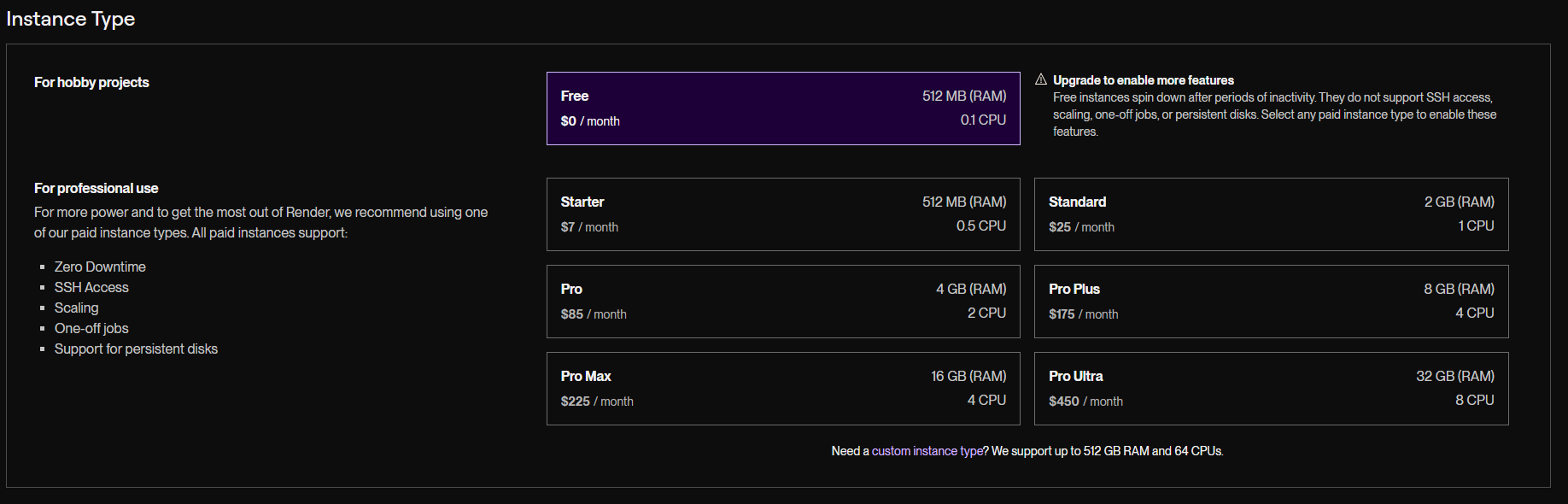
| Plan | Price/month | RAM | CPU | Cold Starts | Best For |
|---|---|---|---|---|---|
| Free | $0 | 512 MB | Shared | Yes (15 min idle) | Demos, side projects |
| Starter | $7 | 512 MB | Shared | No | Personal projects, low traffic |
| Standard | $25 | 2 GB | 1 vCPU | No | Production APIs |
| Pro | $85 | 4 GB | 2 vCPU | No | High-traffic services |
| Pro Plus | $175 | 8 GB | 4 vCPU | No | CPU-intensive workloads |
Postgres pricing (separate from web service):
| Plan | Price/month | Storage | RAM |
|---|---|---|---|
| Free | $0 | 256 MB | 256 MB |
| Basic-256 | $7 | 256 MB | 1 GB |
| Basic-512 | $14 | 512 MB | 1 GB |
| Basic-1 | $28 | 1 GB | 2 GB |
| Pro | $65 | 100 GB | 4 GB |
Free Postgres expires 30 days after creation (no backups) — after that Render deletes the database. For persistent free data, use an external provider like Neon; for production, use at least Basic-256.
Bandwidth: 100 GB free per month across all services; $0.10/GB after that.
Estimated monthly cost for a typical .NET API + Postgres:
- Development: Free web + Free Postgres = $0 (cold starts, 30-day DB limit)
- Production: Starter web + Basic-256 Postgres = $14/month
- Scaled production: Standard web + Basic-1 Postgres = $53/month
Benchmark: Render vs Railway (Real Numbers)
These numbers were actually measured (August 2026) against the two live deployments from this article series — the sample .NET 10 API on Render Free (Oregon) and Railway Hobby (US East). Fly.io was planned as the third platform but is not measured: it no longer has a free tier and signup requires a credit card.
Test setup:
- Tool: k6, script at
benchmark/k6-latency.js— run it against your own deployments - Load: fixed arrival rate of 30 req/s for 60 seconds (~1,800 requests per platform), services warmed first
- Endpoint:
/, a small JSON payload, no database — this measures the platform's HTTP path, not query performance - Client: a single machine in Bogotá, Colombia. With a fixed arrival rate, the latency distribution is dominated by the network path between the client and the provider's region — these numbers tell you what a user in that location experiences, not some absolute platform speed. Rerun the script from where your users are.
Warm Latency
| Provider | Plan | Region | p50 | p95 | p99 | Failed requests |
|---|---|---|---|---|---|---|
| Render | Free ($0) | Oregon | 152 ms | 206 ms | 318 ms | 0 of 1,800 |
| Railway | Hobby ($5) | US East | 181 ms | 220 ms | 312 ms | 0 of 1,801 |
The surprise: Render came out faster at the median despite its origin being farther away (Oregon vs US East). The reason is the edge network — Render sits behind Cloudflare, which terminated TLS in Bogotá, while Railway's nearest edge was Miami. By p99 they are indistinguishable. The honest conclusion: at 30 req/s on the cheapest tiers, both platforms are comfortable, and your users' geography matters more than the platform's compute.
Cold Start (first request after 22 minutes idle)
| Provider | 1st request | 2nd request | 3rd request |
|---|---|---|---|
| Render Free | 12.3 s | 0.63 s | 0.45 s |
| Railway Hobby | 0.69 s | 0.45 s | 0.47 s |
Render Free had spun down and needed 12.3 seconds to boot the container, start .NET, and pass the health check. Note that this minimal API is a best case — no DI graph, no EF Core warm-up, no database connection. A real application lands closer to the 25–60 second range described earlier, which is why Render's own dashboard banner warns of delays of "50 seconds or more." Railway Hobby never sleeps, so its "cold" number is just a fresh TLS handshake.
Key takeaways:
- Both cheapest tiers handled 30 req/s with zero failed requests and sub-330 ms p99 from South America.
- Edge networks beat origin proximity at the median: Render + Cloudflare was faster from Bogotá than Railway's closer origin region.
- The real free-tier difference is the cold start: Render Free pays 12+ seconds after every idle period; Railway has no free web tier, so nothing ever sleeps.
- Fly.io is unmeasured here — if you have an account, deploy the same sample with its
fly.tomland run the same script.
Pros and Cons
Pros
- render.yaml is excellent — the cleanest infra-as-code of the three platforms. Define everything in one file, diff it in PRs.
- Managed Postgres is first-class — automatic daily backups, point-in-time recovery on higher plans, seamless connection string injection.
- PR preview environments — each PR gets a live URL with isolated config. Massive for QA workflows.
- Zero networking config — internal service discovery just works. Workers can call web services by name with no extra setup.
- Transparent pricing — no surprise egress bills. 100 GB/month free bandwidth covers most small apps.
- DX is polished — deploy logs are real-time, rollbacks are one click, environment variable diffs are auditable.
Cons
- Free tier cold starts are brutal for .NET — 30–60 second wake-ups are worse than most platforms because of .NET's startup overhead. Acceptable for demos, unusable for real users.
- Build times depend on your Dockerfile — structure it for layer caching (restore before copy) or you'll feel every deploy.
- No edge/multi-region — Render has 4 regions but no automatic geo-routing or CDN-level distribution. Fly.io wins here.
- Shared CPU on Starter is limited — .NET apps with CPU-intensive tasks (PDF generation, image processing) will throttle on Starter and need Standard ($25).
- No GPU support — not a platform for ML inference workloads.
- Free Postgres expires after 30 days — easy to forget, painful when your database disappears in production.
When to Choose Render
| Scenario | Verdict |
|---|---|
| Side project / demo | Free tier is fine — accept cold starts |
| Internal tooling, low traffic | Starter ($7) — best value |
| Production API, moderate traffic | Standard ($25) — solid choice |
| Need closest-to-user latency | Consider Fly.io instead |
| No credit card / hard $0 budget | Render Free is the only real option of the three |
| Full infra-as-code in one file | Render wins with render.yaml |
| Managed Postgres with backups | Render is excellent |
| PR preview environments | Render is the best of the three |
Summary
Render.com is a strong choice for .NET developers who want a clean PaaS experience without managing infrastructure. The render.yaml format is the best infra-as-code story of any comparable platform, managed Postgres is genuinely good, and PR previews are a workflow multiplier.
The free tier is only suitable for demos and development — the cold start problem with .NET is too severe for anything user-facing. Budget $14/month (Starter + Basic Postgres) as the minimum for a production app. At that price point, Render is hard to beat for the combination of developer experience, reliability, and managed services.
If raw latency is your primary constraint, run the k6 script above from your users' region — our measurements show geography and edge networks dominate at this scale. But for most .NET teams shipping a web API or background worker, Render delivers everything you need in one place.