Hosting a .NET app cheaply in 2026 is genuinely possible — but every budget option comes with tradeoffs you need to understand before you deploy to production. This guide covers the full spectrum from truly free to about $13/month, with concrete numbers and honest assessments of each platform.
Every price below was verified in August 2026 against the provider's official pricing page (Azure numbers against the Retail Prices API). The config files in this guide are real, deployable files — the systemd unit, Caddyfile, Dockerfile, fly.toml, and Bicep all live in
samples/dotnet-hosting,
pointed at one minimal .NET 10 API with a smoke test.
Truly Free Options
Free hosting exists, but it is either heavily limited or requires some infrastructure effort on your part.
Oracle Cloud Always Free
Oracle Cloud's Always Free tier is the most generous free compute available in 2026. You get:
- 2 AMD Compute VMs (VM.Standard.E2.1.Micro): 1 OCPU + 1 GB RAM each
- 4 Arm Ampere A1 Compute VMs: up to 4 OCPUs and 24 GB RAM total (you can use all 4 on one VM)
- 2 Block Volumes totaling 200 GB
- 10 GB Object Storage
- No credit card expiry on free tier (unlike AWS/GCP/Azure 12-month trials)
The Ampere A1 option is particularly attractive — a single VM with 4 OCPUs and 24 GB RAM runs .NET 10 very well. The catch is that it is Arm64 architecture, so you need to publish for linux-arm64.
# Publish a self-contained linux-arm64 binary
dotnet publish -c Release -r linux-arm64 --self-contained true \
  -p:PublishSingleFile=true -o ./publish

# Or just target the framework-dependent runtime (smaller, requires .NET runtime installed)
dotnet publish -c Release -r linux-arm64 --self-contained false -o ./publish
To run it as a systemd service on the Oracle VM:
# /etc/systemd/system/myapp.service
[Unit]
Description=My .NET App
After=network.target

[Service]
WorkingDirectory=/opt/myapp
ExecStart=/opt/myapp/MyApp
Restart=always
RestartSec=10
# Run as non-root
User=www-data
Environment=ASPNETCORE_ENVIRONMENT=Production
Environment=ASPNETCORE_URLS=http://+:5000

[Install]
WantedBy=multi-user.target
sudo systemctl enable myapp
sudo systemctl start myappYou will still need to configure a reverse proxy (nginx or Caddy) in front of it:
# /etc/nginx/sites-available/myapp
server {
    listen 80;
    server_name yourdomain.com;

    location / {
        proxy_pass         http://localhost:5000;
        proxy_http_version 1.1;
        proxy_set_header   Upgrade $http_upgrade;
        proxy_set_header   Connection keep-alive;
        proxy_set_header   Host $host;
        proxy_cache_bypass $http_upgrade;
        proxy_set_header   X-Forwarded-For $proxy_add_x_forwarded_for;
        proxy_set_header   X-Forwarded-Proto $scheme;
    }
}Use Caddy instead of nginx for automatic HTTPS via Let's Encrypt with zero configuration. A single Caddyfile with yourdomain.com { reverse_proxy localhost:5000 } handles TLS automatically.
What you give up: You manage the VM yourself — OS updates, security patches, firewall rules, backups. There is no auto-scaling and no managed PaaS experience. For a hobby project or internal tool this is an excellent deal; for a customer-facing product you need to invest time in operations.
Azure App Service F1 (Free Tier)
Azure's F1 tier is free forever but has strict limits:
| Limit | Value |
|---|---|
| CPU | 60 CPU-minutes per day |
| RAM | 1 GB |
| Storage | 1 GB |
| Custom domains | Not supported |
| SSL | Not supported |
| Always On | Not supported |
| Scale out | Not supported |
The 60 CPU-minute/day cap is the biggest problem. A moderately active web app can hit this before noon and your app will return 403 errors for the rest of the day. F1 is suitable for development/testing only.
Custom domains and SSL are not available on F1. You are stuck with yourapp.azurewebsites.net and HTTP only (though the azurewebsites.net domain itself is served over HTTPS by Azure's load balancer).
// The F1 sku in Bicep — note the limits
resource appServicePlan 'Microsoft.Web/serverfarms@2022-03-01' = {
  name: 'myplan-free'
  location: resourceGroup().location
  sku: {
    name: 'F1'  // Free: 60 cpu-min/day, no custom domain
    tier: 'Free'
  }
}The F1 tier does not support "Always On", which means your app will cold-start (spin up from idle) after ~20 minutes of inactivity. First requests after idle can take 10–30 seconds. Do not use F1 for anything user-facing in production.
Render Free Tier
Render's free tier gives you a web service with:
- 0.1 CPU
- 512 MB RAM
- Sleeps after 15 minutes of inactivity
- Wake-up on first request (cold start can take 30–60 seconds)
- Custom domains supported (with free TLS)
- 750 free instance hours per month
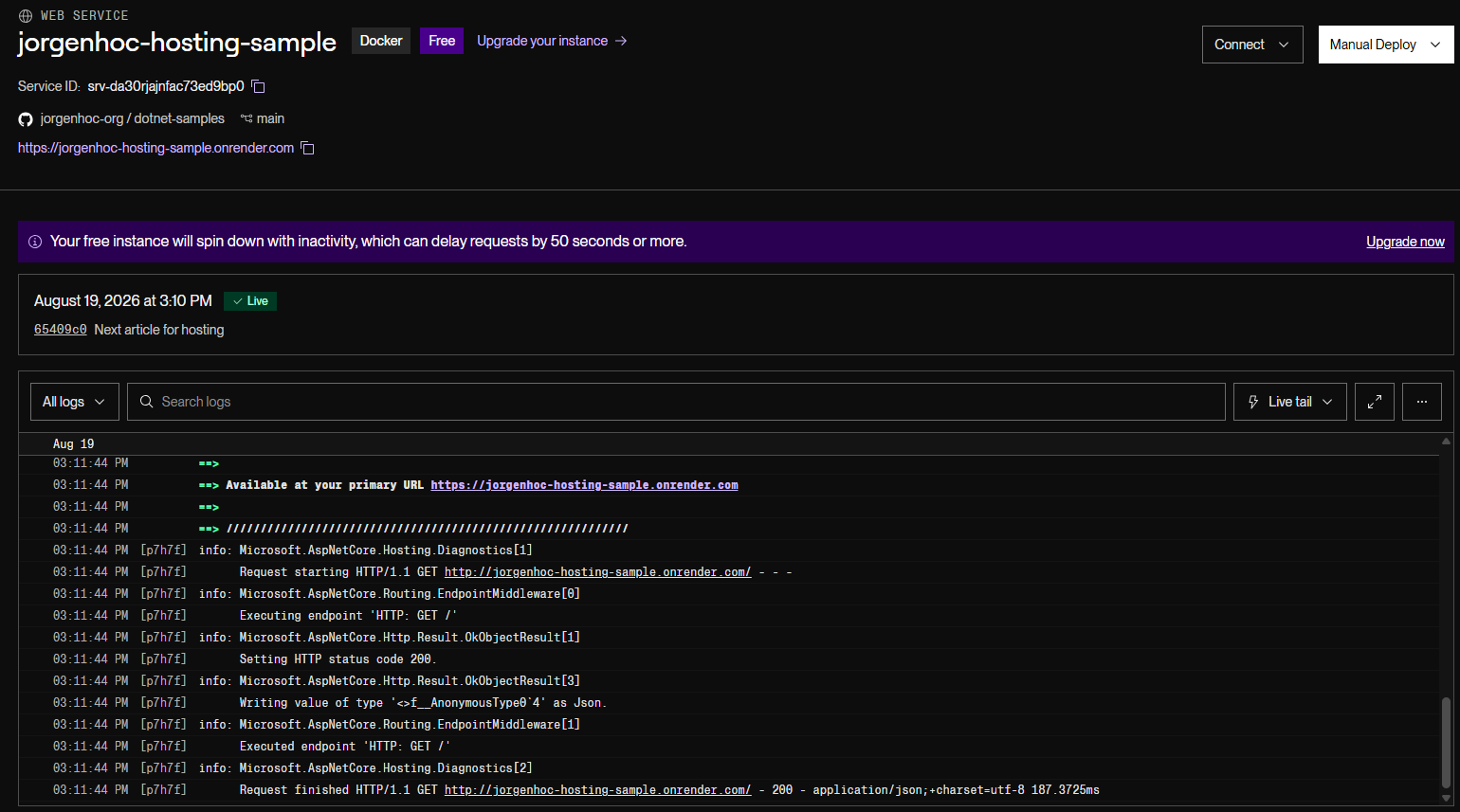
The 750-hour monthly cap means one always-on instance would exceed it (720 hours in a 30-day month, so one instance is fine). The sleep behavior is the real limitation — appropriate for hobby projects, not for anything that needs consistent response times. Render is upfront about it — this banner sits permanently on the free service's dashboard:
# Dockerfile for Render's free tier
FROM mcr.microsoft.com/dotnet/sdk:10.0-alpine AS build
WORKDIR /src
COPY ["MyApp.csproj", "."]
RUN dotnet restore
COPY . .
RUN dotnet publish -c Release -o /app/publish

FROM mcr.microsoft.com/dotnet/aspnet:10.0-alpine AS final
WORKDIR /app
COPY --from=build /app/publish .
EXPOSE 8080
ENTRYPOINT ["dotnet", "MyApp.dll"]
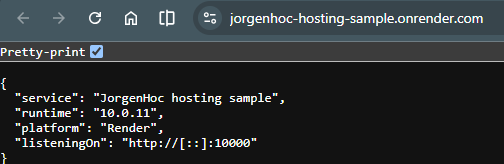
Render injects the listen port as a PORT env var at runtime. Do not try to capture it with ENV ASPNETCORE_URLS=http://+:${PORT:-8080} in the Dockerfile — Docker resolves ${...} at build time, so the default gets baked in and Render's injected value is ignored (I shipped that exact bug in an earlier version of this article). Read it in Program.cs instead:
// Program.cs — honour the platform's injected PORT (Render, Railway, Heroku-style)
var port = Environment.GetEnvironmentVariable("PORT");
if (!string.IsNullOrEmpty(port))
{
    builder.WebHost.UseUrls($"http://+:{port}");
}
The sample's smoke test starts the app with an injected PORT and asserts it answers there. And this is the same code live on Render's free tier — listeningOn reports port 10000, which only Render's injected PORT could have set:
# render.yaml — infrastructure as code for Render
services:
  - type: web
    name: my-dotnet-app
    runtime: docker
    plan: free
    healthCheckPath: /health
    envVars:
      - key: ASPNETCORE_ENVIRONMENT
        value: Production
      - key: ConnectionStrings__Default
        fromDatabase:
          name: my-postgres-db
          property: connectionString

databases:
  - name: my-postgres-db
plan: free # 1 GB storage, no backups, expires 30 days after creationRender's free PostgreSQL databases expire 30 days after creation (with a 14-day grace period before deletion), and you get one per workspace. If you need persistent data on the free tier, use an external database like Neon (0.5 GB free, scales to zero, no expiry) or Supabase (500 MB free, but projects pause after a week of inactivity).
The $4–$5/Month Tier
This is where things get genuinely useful for side projects and internal tools.
Railway Hobby Plan — $5/Month Credit
Railway's Hobby plan costs $5/month and gives you $5 worth of resource usage. If your app is small, you may not even consume the full credit.
Resource pricing on Railway (billed per second):
- CPU: $0.00000772/vCPU-second — about $20 per vCPU-month
- RAM: $0.00000386/GB-second — about $10 per GB-month
A minimal .NET API averaging 0.1 vCPU and 256 MB RAM runs roughly:
CPU:  0.1 vCPU * ~$20/vCPU-month = ~$2.00/month
RAM:  0.25 GB  * ~$10/GB-month   = ~$2.50/month
Total: ~$4.50/month  (within the Hobby plan's included $5)
Railway supports Docker deployments and has solid GitHub integration. Push to your main branch and it deploys automatically.
# Dockerfile for Railway — PORT is injected by Railway at runtime,
# and the app reads it in Program.cs (see the Render section above for why
# an ENV ${PORT:-8080} line would NOT work)
FROM mcr.microsoft.com/dotnet/sdk:10.0 AS build
WORKDIR /src
COPY ["MyApp.csproj", "."]
RUN dotnet restore
COPY . .
RUN dotnet publish -c Release -o /app/publish

FROM mcr.microsoft.com/dotnet/aspnet:10.0 AS final
WORKDIR /app
COPY --from=build /app/publish .
EXPOSE 8080
ENTRYPOINT ["dotnet", "MyApp.dll"]
// railway.json — optional config file at repo root
{
"$schema": "https://railway.app/railway.schema.json",
"build": {
"builder": "DOCKERFILE",
"dockerfilePath": "Dockerfile"
},
"deploy": {
"healthcheckPath": "/health",
"healthcheckTimeout": 300,
"restartPolicyType": "ON_FAILURE",
"restartPolicyMaxRetries": 3
}
}This exact setup — the sample app with that railway.json — is deployed and answering on a Railway domain:
![Browser showing the JSON response from dotnet-samples-production.up.railway.app: service JorgenHoc hosting sample, runtime 10.0.11, platform Railway, listeningOn http://[::]:8080.](/images/deploy-dotnet-railway/deploy-dotnet-railway-deployed-app-response.png)
Databases add to the cost: Railway Postgres is billed as ordinary usage (RAM at ~$10/GB-month plus a small volume charge of ~$0.16/GB-month). A small always-on instance using ~1 GB RAM lands around $10–13/month — well beyond the Hobby plan's included $5, so for a budget stack pair Railway compute with an external free Postgres like Neon.
Fly.io — ~$4/Month for a Small App
Fly.io charges per second of machine time — you pay only while your app is running. For .NET apps (US/EU regions; prices vary slightly by region):
shared-cpu-1x(256 MB RAM): ~$2/month if running 24/7- Volume storage (for SQLite or file storage): $0.15/GB/month, so a 3 GB volume is $0.45/month
- Egress bandwidth: ~$0.02/GB in North America and Europe — there is no free bandwidth allowance for new organizations
A typical small app on Fly.io with a 3 GB volume runs about $2.50/month. Databases are where Fly stopped being cheap: Managed Postgres starts at $38/month, so at this budget pair Fly compute with an external free Postgres like Neon instead.
# fly.toml
app = "my-dotnet-app"
primary_region = "iad"  # us-east — pick the region closest to your users

[build]
  dockerfile = "Dockerfile"

[env]
  ASPNETCORE_ENVIRONMENT = "Production"
  ASPNETCORE_URLS = "http://+:8080"

[http_service]
  internal_port = 8080
  force_https = true
  auto_stop_machines = true   # stop when idle to save cost
  auto_start_machines = true  # start on first request (cold start)
  min_machines_running = 0    # set to 1 to avoid cold starts (costs more)

[checks]
  [checks.health]
    grace_period = "10s"
    interval = "30s"
    method = "GET"
    path = "/health"
    timeout = "5s"

[[mounts]]
  source = "myapp_data"
  destination = "/data"
# Deploy to Fly.io
fly auth login
fly launch --dockerfile Dockerfile --name my-dotnet-app --region iad
fly deploySet auto_stop_machines = true and min_machines_running = 0 to pay near-zero when your app is idle. For a production API with SLA requirements, set min_machines_running = 1 — this prevents cold starts but always charges for one running machine.
The $7–$10/Month Tier
This tier buys you consistent performance without cold starts and usually includes better support and SLAs.
Render Starter — $7/Month
Render's Starter plan eliminates the free tier's biggest problems:
| Feature | Free | Starter ($7/mo) |
|---|---|---|
| CPU | 0.1 | 0.5 |
| RAM | 512 MB | 512 MB |
| Cold starts | Yes (15-min sleep) | No |
| Bandwidth | 100 GB | 100 GB |
| SLA | None | 99.95% |
| Custom domain | Yes | Yes |
The jump from 0.1 to 0.5 CPU makes a noticeable difference for .NET apps, which tend to be more CPU-heavy than Node.js equivalents during startup and request processing.
DigitalOcean App Platform — $10/Month
DigitalOcean's $10 App Platform container gives you 1 GiB RAM on a shared vCPU with 100 GiB of transfer, always-on, with predictable flat pricing — no usage meter to watch. (The $5 tier halves the RAM to 512 MiB, which is workable for a lean minimal API but tight once EF Core and a few background services are loaded.)
If you hit CPU throttling on Fly's shared tier instead, more RAM on shared-cpu-1x costs about $5/GB/month before jumping to the performance-* family, which starts around $32/month — at that point the platforms above are usually the better deal.
Azure App Service — The Cheapest Real Option
If you want a proper managed PaaS experience on Azure with SLA, the cheapest option is the B1 Basic plan.
B1 Basic App Service Plan
| Spec | Value |
|---|---|
| vCores | 1 |
| RAM | 1.75 GB |
| Storage | 10 GB |
| Monthly price (Linux, East US) | ~$12–13/month ($0.017/hr on the Retail Prices API; the portal shows ~$13) |
| Custom domains | Yes |
| SSL certificates | Yes |
| Always On | Yes |
| Auto-scale | No (manual scale only) |
| SLA | 99.95% |
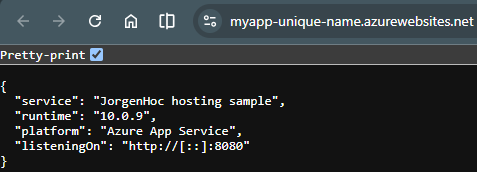
B1 supports custom domains, SSL, and the "Always On" feature that prevents cold starts. It is the minimum tier for anything production-facing on Azure.
// Bicep template for B1 App Service
resource appServicePlan 'Microsoft.Web/serverfarms@2022-03-01' = {
  name: 'myplan-basic'
  location: resourceGroup().location
  sku: {
    name: 'B1'   // Basic tier — cheapest plan with Always On + custom domain
    tier: 'Basic'
  }
  kind: 'linux'
  properties: {
    reserved: true  // required for Linux
  }
}

resource appService 'Microsoft.Web/sites@2022-03-01' = {
  name: 'my-dotnet-app'
  location: resourceGroup().location
  properties: {
    serverFarmId: appServicePlan.id
    siteConfig: {
      linuxFxVersion: 'DOTNETCORE|10.0'
      alwaysOn: true   // prevents cold starts — not available on F1
      http20Enabled: true
      minTlsVersion: '1.2'
    }
    httpsOnly: true
  }
}
For .NET deployments to Azure App Service from GitHub Actions:
# .github/workflows/deploy.yml
name: Deploy to Azure App Service

on:
  push:
    branches: [main]

jobs:
  deploy:
    runs-on: ubuntu-latest
    steps:
      - uses: actions/checkout@v4

      - name: Setup .NET
        uses: actions/setup-dotnet@v4
        with:
          dotnet-version: '10.0.x'

      - name: Publish
        run: dotnet publish -c Release -o ./publish

      - name: Deploy to Azure Web App
        uses: azure/webapps-deploy@v3
        with:
          app-name: my-dotnet-app
          publish-profile: ${{ secrets.AZURE_WEBAPP_PUBLISH_PROFILE }}
          package: ./publish
Azure Container Apps — Sometimes Cheaper Than B1
Azure Container Apps has a consumption-based pricing model that can beat B1 for low-traffic apps:
- Free: 180,000 vCPU-seconds, 360,000 GiB-seconds, and 2 million requests per month per subscription
- After free allowance: $0.000024/vCPU-second active, $0.000003/GiB-second, $0.40 per million requests
For an app that handles 1,000 requests/day with 100ms average response time, you might not even leave the free tier. For a continuously running app (24/7), Container Apps will cost more than B1.
# Azure Container Apps — containerapp.yaml
properties:
  managedEnvironmentId: /subscriptions/.../managedEnvironments/my-env
  configuration:
    ingress:
      external: true
      targetPort: 8080
    secrets:
      - name: db-connection
        value: "Server=...;Database=...;..."
  template:
    containers:
      - name: my-dotnet-app
        image: myregistry.azurecr.io/my-dotnet-app:latest
        resources:
          cpu: 0.25       # minimum allocation
          memory: "0.5Gi"
        env:
          - name: ASPNETCORE_ENVIRONMENT
            value: Production
          - name: ConnectionStrings__Default
            secretRef: db-connection
    scale:
      minReplicas: 0    # scale to zero when idle (saves cost, adds cold start)
      maxReplicas: 3
Database Cost Add-Ons
The hosting cost is only part of the picture. Most apps need a database, and that changes the math significantly.
| Database | Free Tier | Cheapest Paid |
|---|---|---|
| Neon (Postgres) | 0.5 GB, no expiry, scales to zero | Launch: pay-as-you-go, no monthly minimum ($0.106/CU-hour + $0.35/GB-month) |
| Supabase (Postgres) | 500 MB; projects pause after 1 week of inactivity (max 2 active) | $25/month (Pro) |
| PlanetScale (Postgres/MySQL) | No free tier | $5/month (PS-5 single node) |
| Railway Postgres | No free tier | ~$10–13/month (usage, ~1 GB RAM) |
| Fly.io Managed Postgres | No free tier | $38/month (Basic) |
| Azure SQL | Permanent free offer: 100K vCore-seconds + 32 GB/month, up to 10 serverless DBs | ~$5/month (Basic DTU) |
| Azure Cosmos DB | 1000 RU/s + 25 GB free (permanent) | Pay-per-use |
| MongoDB Atlas | 512 MB shared cluster (M0, no expiry) | Flex: ~$8/month base, capped at $30 (M2/M5 retired Jan 2026) |
For most .NET side projects, Neon is the best free Postgres option — no expiry, scales to zero, and has a .NET-friendly connection string that works with EF Core out of the box. Two 2026 surprises worth knowing: Azure SQL's free offer is now permanent (it used to be a 12-month trial), and PlanetScale — long the "no free tier, $39 minimum" option — now starts at $5.
// appsettings.json connection string format for Neon
// Use ?sslmode=require for Neon (and most managed Postgres)
{
  "ConnectionStrings": {
    "Default": "Host=ep-xyz.us-east-2.aws.neon.tech;Database=mydb;Username=user;Password=pass;SSL Mode=Require;Trust Server Certificate=true"
  }
}
// Program.cs — EF Core with Npgsql + Neon
builder.Services.AddDbContext<AppDbContext>(options =>
options.UseNpgsql(
builder.Configuration.GetConnectionString("Default"),
npgsqlOptions =>
{
// Neon serverless can have brief connection interruptions
// EnableRetryOnFailure handles transient failures automatically
npgsqlOptions.EnableRetryOnFailure(
maxRetryCount: 3,
maxRetryDelay: TimeSpan.FromSeconds(5),
errorCodesToAdd: null);
}));Cold Starts: What They Actually Mean for .NET
Cold starts in .NET are worse than in Node.js or Go because the CLR initialization, JIT compilation, and dependency injection container setup all happen at startup.
Typical cold start times for a minimal ASP.NET Core app on .NET 10:
| Platform | Cold Start Time | Cause |
|---|---|---|
| Azure App Service F1 (no Always On) | 10–30 seconds | App pool recycled after idle |
| Render Free | 30–60 seconds | Container stopped, must restart |
| Fly.io (min=0) | 3–10 seconds | Machine stopped, must boot |
| Railway (scale to zero) | 3–8 seconds | Container restart |
| Oracle Cloud VM (systemd) | 0 seconds | Systemd keeps process running |
| Azure App Service B1 (Always On) | 0 seconds | Process stays warm |
To minimize cold start impact in .NET:
// Program.cs — minimize startup time for container environments
// Use AddDbContextPool instead of AddDbContext to reuse connections
builder.Services.AddDbContextPool<AppDbContext>(options =>
    options.UseNpgsql(connectionString));

// Avoid heavy work in the constructor — defer to first use
// Use IHostedService for background initialization if needed
builder.Services.AddHostedService<DatabaseMigrator>();

// Enable ReadyToRun compilation in .csproj to reduce JIT time
// <PublishReadyToRun>true</PublishReadyToRun>
<!-- .csproj — optimize for cold start -->
<PropertyGroup>
<!-- Pre-compiles to native code at publish time, reducing JIT at startup -->
<PublishReadyToRun>true</PublishReadyToRun>
<!-- Trim unused assemblies — reduces image size, faster container start -->
<PublishTrimmed>true</PublishTrimmed>
<!-- For trimming to work reliably, use self-contained publish -->
<SelfContained>true</SelfContained>
</PropertyGroup>ASP.NET Core has supported Native AOT compilation since .NET 8. AOT-compiled apps start in under 100ms even on cold containers. The tradeoff: you cannot use reflection-heavy libraries, and EF Core's Native AOT support is still experimental as of EF Core 10 (use Dapper or raw ADO.NET instead).
Full Cost Comparison Table
| Platform | Plan | Monthly Cost | Cold Starts | Custom Domain | SLA | Best For |
|---|---|---|---|---|---|---|
| Oracle Cloud | Always Free A1 | $0 | No | Yes | None | Hobby / learning |
| Azure App Service | F1 Free | $0 | Yes | No | None | Dev/testing only |
| Render | Free | $0 | Yes (15-min) | Yes | None | Hobby demos |
| Fly.io | shared-cpu-1x (min=0) | ~$0–2 | Yes | Yes | None | Hobby + low traffic |
| Railway | Hobby ($5 credit) | $5 | No | Yes | None | Side projects |
| Fly.io | shared-cpu-1x (min=1) | ~$2–3 | No | Yes | None | Side projects |
| Render | Starter | $7 | No | Yes | 99.95% | Side projects |
| DigitalOcean | App Platform $10 | $10 | No | Yes | 99.95% | Side projects |
| Azure Container Apps | Consumption | $0–15+ | Optional | Yes | 99.95% | Variable traffic |
| Azure App Service | B1 Basic | ~$13 | No | Yes | 99.95% | Low-traffic production |
Recommendation Matrix
Choose based on your use case:
| Use Case | Recommended Platform | Why |
|---|---|---|
| Learning project / portfolio | Oracle Cloud Always Free | Most resources for $0; good learning experience |
| Hobby project, no database | Render Free or Fly.io (min=0) | Zero cost, acceptable cold starts |
| Hobby project with database | Fly.io + Neon (free) | ~$2–4/month total, reliable |
| Side project, always-on | Railway Hobby or Fly.io (min=1) | $5–6/month, no cold starts |
| Internal tool (small team) | Render Starter | $7/month, SLA, easy deploys |
| Low-traffic production API | Azure App Service B1 | ~$13/month, full Azure ecosystem |
| Spiky traffic / event-driven | Azure Container Apps | Pay for what you use |
| Azure-only constraint | Azure Container Apps (min=0) | Can be free for very low traffic |
Concrete Recommendation
For most developers building a .NET side project in 2026, the Fly.io + Neon combination is the sweet spot:
- Fly.io shared-cpu-1x with
min_machines_running = 1: ~$2/month - Neon Postgres free plan (0.5 GB, no expiry): $0
- Total: ~$2–4/month, no cold starts, custom domain, HTTPS
When you outgrow Neon's free tier or need more compute, upgrade incrementally: Neon's Launch plan is pay-as-you-go with no monthly minimum, and more RAM on Fly costs about $5/GB/month.
If you are already in the Azure ecosystem, skip the B1 Basic App Service and look at Azure Container Apps with min replicas = 0 first. For truly low-traffic apps (a few hundred requests/day), you may stay within the free monthly allowance indefinitely.
Avoid Azure App Service F1 for anything except temporary dev/test deployments. The 60 CPU-minute daily cap will bite you sooner than you expect.
Summary
| Budget | Platform | Monthly Cost | Notes |
|---|---|---|---|
| $0 | Oracle Cloud Always Free | $0 | Best free option; requires VM management |
| $0 | Fly.io (scale to zero) | $0–2 | Cold starts; good for demos (card required) |
| ~$2–4 | Fly.io + Neon | $2–4 | Best value for side projects |
| ~$5 | Railway Hobby | $5 | Simple, good DX, included credit |
| ~$7 | Render Starter + Neon | $7 | Easiest managed PaaS at this price |
| ~$13 | Azure App Service B1 | $12–13 | Full Azure PaaS; cheapest real production tier |
Every config file above — the systemd unit, Caddyfile, Dockerfile, fly.toml,
railway.json, render.yaml, and the Bicep — is a real file in
samples/dotnet-hosting,
all pointed at one deployable .NET 10 API. For the platform-by-platform feature
comparison at higher budgets, see Best .NET Hosting.