Picking the wrong hosting platform for your .NET app is an expensive mistake — both in dollars and developer time. This guide covers every serious option in 2026, with real pricing, real deployment experiences, and a concrete recommendation matrix at the end.
Prices below were verified in August 2026 against each provider's official pricing page (and, for Azure, the Retail Prices API), for US regions unless noted. The app and every deploy config in this guide are real files you can point a CLI at:
samples/dotnet-hosting
holds one minimal .NET 10 API plus the fly.toml, railway.json, render.yaml, DigitalOcean spec, and Azure Bicep used here, with a smoke test that asserts the app honours a runtime-injected PORT — the part most copied Dockerfiles get wrong (see the Railway section).
| Provider | From | Free | Docker | Auto-scale | Setup | DX |
|---|---|---|---|---|---|---|
🪁 Fly.io Global low-latency apps, multi-region | $2/mo | – | ✓ | ✓ | ●●●●○ | ●●●●○ |
🚂 Railway Fastest possible deploy, hobby to startup | $5/mo | ✓ | ✓ | – | ●●●●● | ●●●●● |
🌊 DigitalOcean Apps Predictable pricing, developer-friendly | $5/mo | – | ✓ | ✓ | ●●●●○ | ●●●●○ |
🌀 Render.com Simple deploy, no DevOps overhead | $7/mo | ✓ | ✓ | ✓ | ●●●●● | ●●●●○ |
🟠 AWS Elastic Beanstalk Teams already invested in AWS ecosystem | $8/mo | – | ✓ | ✓ | ●●○○○ | ●●○○○ |
☁️ Azure App Service Enterprises already on Azure / .NET teams | $13/mo | ✓ | ✓ | ✓ | ●●●●○ | ●●●●○ |
Pricing as of Aug 2026. "Setup" = fewer stars → simpler. "DX" = developer experience.
The Contenders
Six platforms worth your attention for .NET workloads:
- Azure App Service — Microsoft's own PaaS, deepest .NET integration
- AWS Elastic Beanstalk — Amazon's managed PaaS layer over EC2
- Railway — modern developer-focused PaaS with minimal config
- Fly.io — container-first platform with global edge deployment
- Render.com — Heroku successor with simple pricing
- DigitalOcean App Platform — straightforward PaaS from a familiar provider
Azure App Service
Overview
Azure App Service is the natural home for .NET apps. Microsoft builds and maintains it, the runtime support is always first-in-class, and the ecosystem integration (Azure SQL, Key Vault, Managed Identity, Application Insights) is unmatched.
Deployment
# Create resource group and App Service plan
az group create --name myapp-rg --location eastus
az appservice plan create --name myapp-plan --resource-group myapp-rg --sku B1 --is-linux

# Create the web app targeting .NET 10
az webapp create \
  --name myapp-unique-name \
  --resource-group myapp-rg \
  --plan myapp-plan \
  --runtime "DOTNETCORE:10.0"

# Publish, zip, deploy — az webapp deploy wants a zip FILE, not the publish folder;
# pointing --src-path at a directory fails with "not a valid local file path"
dotnet publish -c Release -o ./publish
cd ./publish && zip -r ../app.zip . && cd ..   # Windows: tar.exe -a -cf app.zip -C publish *
az webapp deploy \
  --resource-group myapp-rg \
  --name myapp-unique-name \
  --src-path ./app.zip \
  --type zip
On Windows, do not build the zip with PowerShell's Compress-Archive — it writes zip entries with backslash separators, and the moment your publish output has a subfolder (wwwroot/, runtimes/), Linux App Service fails the deployment with a Kudu rsync error like failed to stat "/home/site/wwwroot/some\file": Invalid argument (22). I hit exactly that deploying this article's sample. Windows ships bsdtar (tar.exe, in System32) which produces correct forward-slash zips. Use * rather than . as the file argument: with ., bsdtar prefixes every entry with ./ — Kudu accepts that zip, but Windows Explorer displays it as empty, which cost me a confused minute.
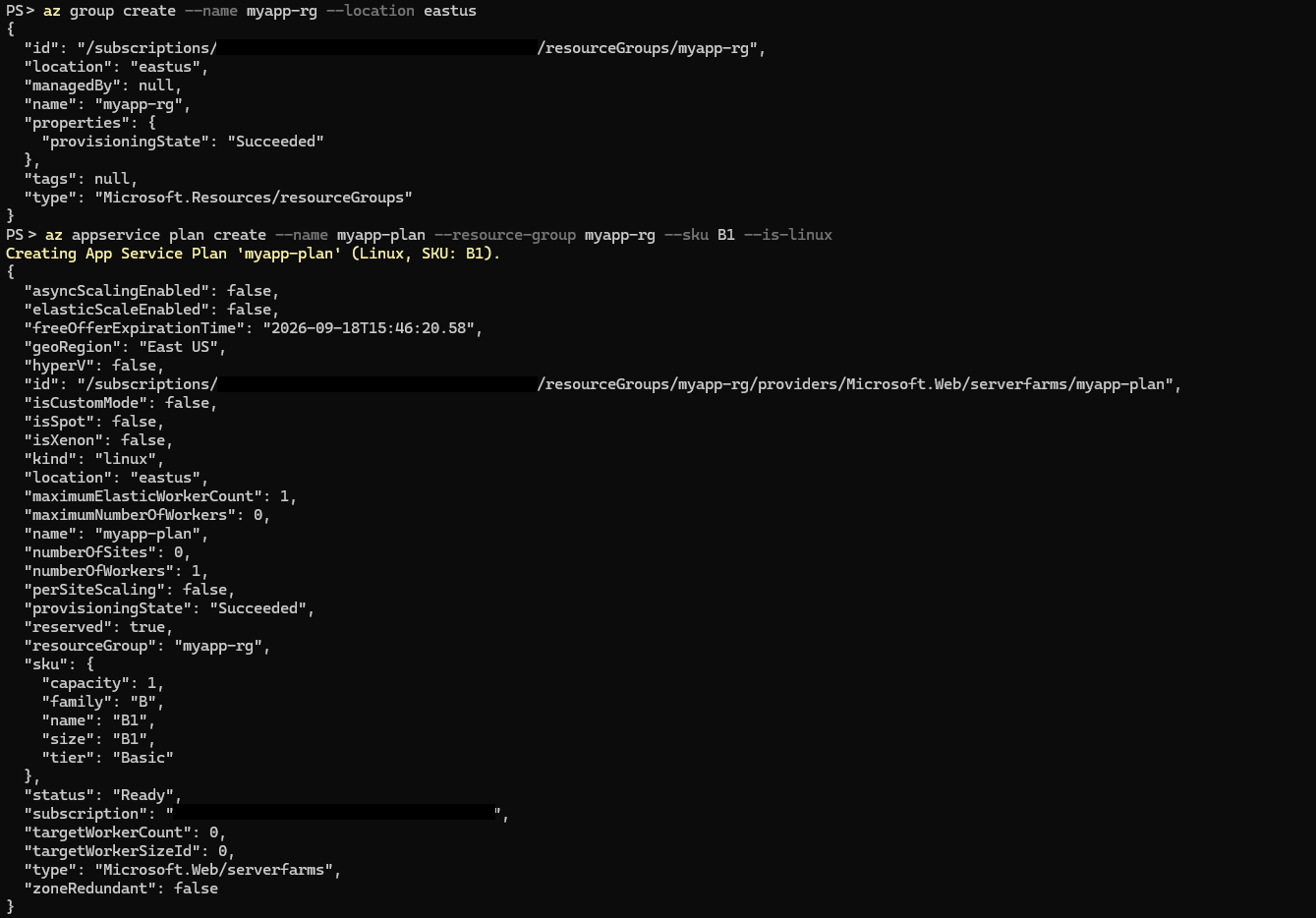
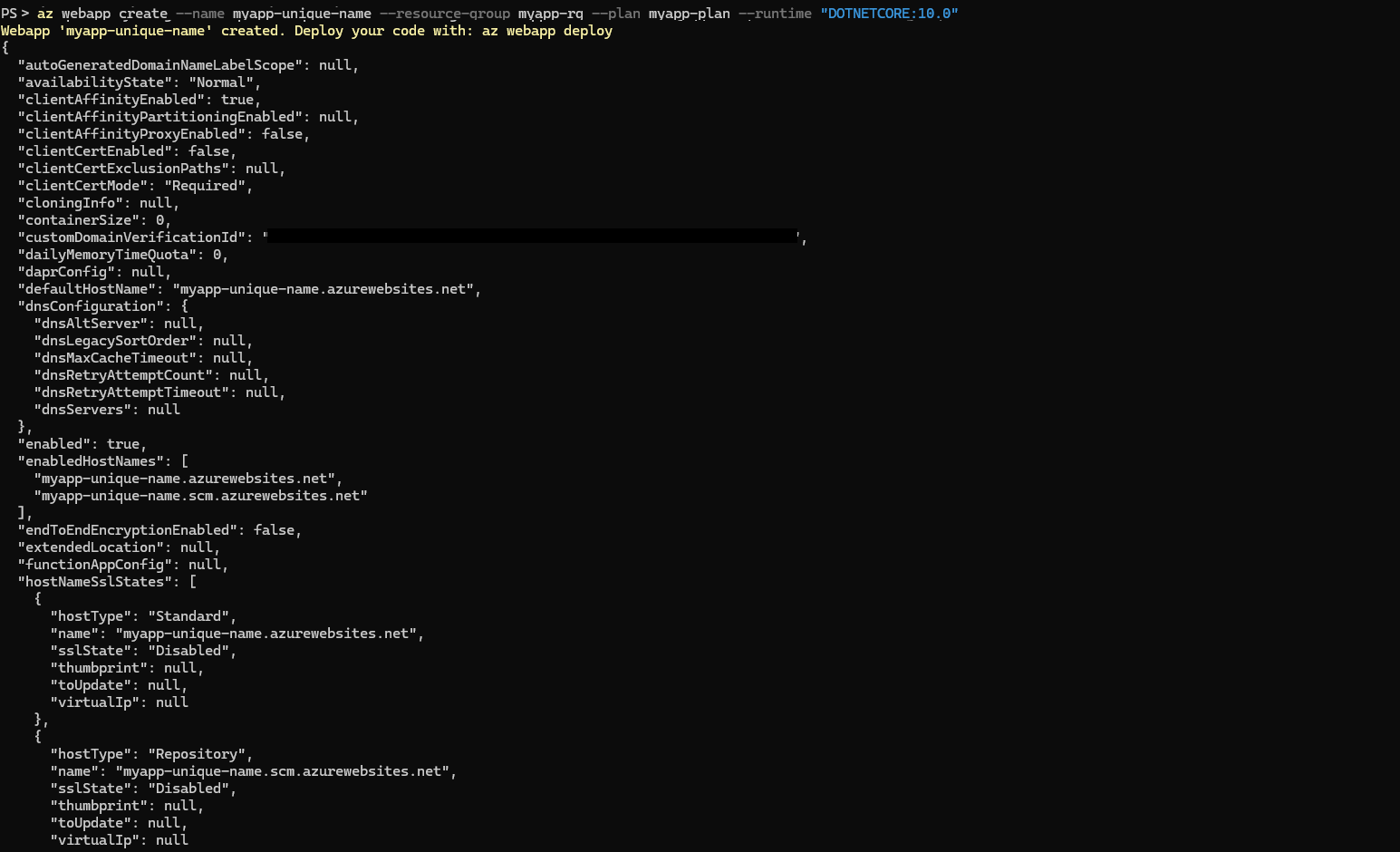
This is the exact run from deploying the sample, not a dry-run:
Pricing Tiers
Linux plans, East US, August 2026 (Azure Retail Prices API; the portal often shows slightly different rounded figures):
| Tier | Price/month | RAM | vCPU | Notes |
|---|---|---|---|---|
| F1 (Free) | $0 | 1 GB | Shared | 60 min/day CPU limit, no custom-domain SSL |
| B1 (Basic) | ~$12–13 | 1.75 GB | 1 | Always On + custom domains; no autoscale |
| S1 (Standard) | ~$69 | 1.75 GB | 1 | Autoscale, deployment slots |
| P0v4 (Premium) | ~$53 | — | — | New Premium v4 entry SKU (meters live since Sep 2025) |
| P1v3 (Premium) | ~$113 | 8 GB | 2 | Production-grade, zone redundancy available |
The B1 tier is the sweet spot for small production apps. When you outgrow it, price Premium v4's P0v4 ($53/month) against S1 ($69/month) before defaulting to Standard — the newer Premium entry SKU undercuts S1 while sitting in the stronger tier.
Deployment Slots
Deployment slots let you run a staging environment and swap it to production with zero downtime:
# Create a staging slot
az webapp deployment slot create \
  --name myapp-unique-name \
  --resource-group myapp-rg \
  --slot staging

# Swap staging to production
az webapp deployment slot swap \
  --name myapp-unique-name \
  --resource-group myapp-rg \
  --slot staging \
  --target-slot production
GitHub Actions CI/CD
# .github/workflows/deploy.yml
name: Deploy to Azure App Service
on:
  push:
    branches: [main]

jobs:
  deploy:
    runs-on: ubuntu-latest
    steps:
      - uses: actions/checkout@v4
      - name: Setup .NET 10
        uses: actions/setup-dotnet@v4
        with:
          dotnet-version: '10.0.x'
      - name: Publish
        run: dotnet publish -c Release -o ./publish
      - name: Deploy to Azure
        uses: azure/webapps-deploy@v3
        with:
          app-name: myapp-unique-name
          publish-profile: ${{ secrets.AZURE_PUBLISH_PROFILE }}
          package: ./publish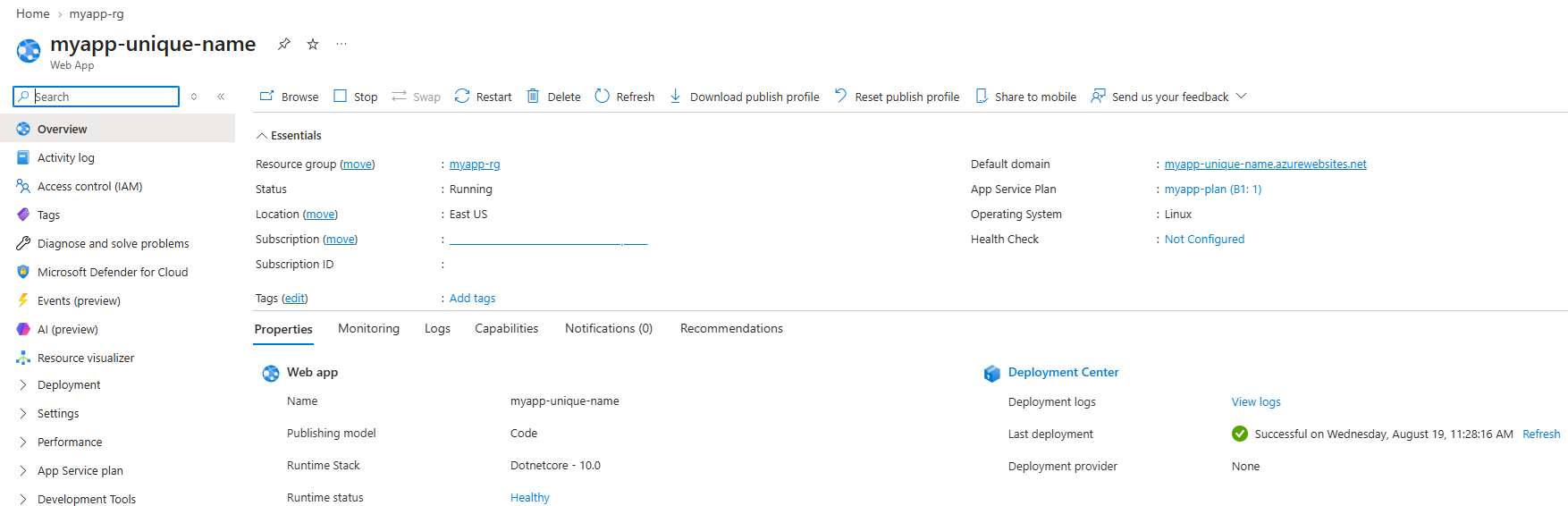
Verdict
Best for: Enterprise .NET apps, teams already in Azure, apps needing Azure SQL, Key Vault, or Managed Identity.
Watch out for: Pricing jumps sharply between B1 and S1. Cold starts on lower tiers.
AWS Elastic Beanstalk
Overview
Elastic Beanstalk is AWS's PaaS abstraction over EC2. You get more control than Azure App Service but also more configuration surface. .NET support is solid via the Windows Server or Linux platforms.
Deployment
# Install EB CLI
pip install awsebcli

# Initialize and create environment
eb init myapp --platform "dotnet-core-on-al2023" --region us-east-1
eb create myapp-prod --instance-type t3.small

# Deploy
dotnet publish -c Release -o ./publish
cd ./publish
zip -r ../deploy.zip .
eb deploy
Pricing
Elastic Beanstalk itself is free — you pay for the underlying EC2 instances, load balancers, and storage.
On-demand Linux, us-east-1, August 2026:
| Instance | Price/month (on-demand) | Notes |
|---|---|---|
| t3.micro | ~$7.60 | 1 GB RAM, burstable |
| t3.small | ~$15 | Better baseline performance |
| t3.medium | ~$30 | 2 vCPU, 4 GB RAM |
Add ~$16.50/month for an Application Load Balancer if you need it (required for multi-instance), plus LCU usage charges.
Note that AWS's famous 12-month free t3.micro is gone for new accounts: since July 2025 the free tier is credits-based — $100 at signup plus up to $100 more for completing onboarding tasks, expiring after 6 months. Accounts created before that date keep the old 12-month deal.
Autoscaling
// .elasticbeanstalk/env.yaml
option_settings:
  aws:autoscaling:asg:
    MinSize: 1
    MaxSize: 4
  aws:autoscaling:trigger:
    MeasureName: CPUUtilization
    Unit: Percent
    UpperThreshold: 70
    LowerThreshold: 20
Verdict
Best for: Teams already deep in AWS, apps needing fine-grained EC2 control, workloads with variable traffic that need auto-scaling cost optimization.
Watch out for: Steeper learning curve than Azure App Service. Configuration sprawl in .ebextensions.
Railway
Overview
Railway is the highest-DX option in this list. Push code, get a URL. No YAML manifests required for basic use. It runs containers internally and handles routing, TLS, and scaling transparently.
Deployment
# Install Railway CLI
npm install -g @railway/cli

# Login and initialize
railway login
railway init

# Add a Dockerfile or let Railway auto-detect .NET
# Then deploy
railway up
A minimal Dockerfile for .NET 10:
FROM mcr.microsoft.com/dotnet/sdk:10.0 AS build
WORKDIR /src
COPY . .
RUN dotnet publish -c Release -o /app

FROM mcr.microsoft.com/dotnet/aspnet:10.0
WORKDIR /app
COPY --from=build /app .
ENTRYPOINT ["dotnet", "MyApp.dll"]
One trap: Railway injects the listen port as a PORT env var at runtime, and the widely copied ENV ASPNETCORE_URLS=http://+:${PORT:-8080} Dockerfile line does not pick it up — Docker resolves ${...} at build time, baking 8080 in. Read PORT in Program.cs instead:
// Program.cs — honour the platform's injected PORT (Railway, Render, Heroku-style)
var port = Environment.GetEnvironmentVariable("PORT");
if (!string.IsNullOrEmpty(port))
{
    builder.WebHost.UseUrls($"http://+:{port}");
}
The sample's smoke test asserts this: the app is started with an injected PORT and must answer on it, locally and inside the container image.
Or use a railway.json for configuration (no startCommand needed — the Dockerfile's ENTRYPOINT covers it):
{
  "$schema": "https://railway.app/railway.schema.json",
  "build": {
    "builder": "DOCKERFILE",
    "dockerfilePath": "Dockerfile"
  },
  "deploy": {
    "healthcheckPath": "/health",
    "healthcheckTimeout": 300,
    "restartPolicyType": "ON_FAILURE"
  }
}
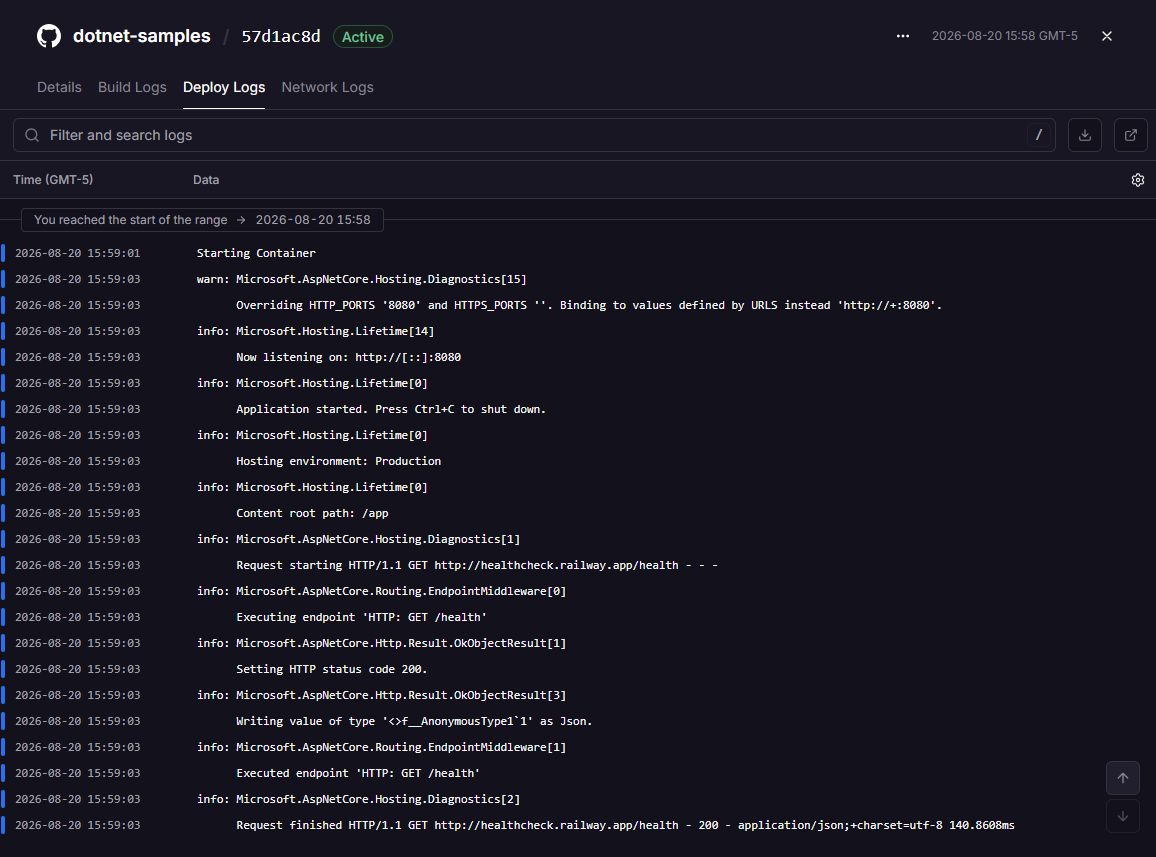
Deployed with exactly that config, Railway's deploy logs show the contract working end to end — container up, listening on the injected port, and the /health probe answering 200 before traffic is routed:
Pricing
- Hobby plan: $5/month, which includes $5 of monthly usage credit
- Pro plan: $20/month per workspace, includes $20 of usage
- Usage rates: ~$20 per vCPU-month and ~$10 per GB-of-RAM-month, billed per second ($0.00000772/vCPU-s, $0.00000386/GB-s)
- Typical small .NET API: fits inside the Hobby plan's included $5
Railway's free trial gives $5 in credits for 30 days with no credit card — enough to evaluate it with a small app before committing.
Environment Variables
railway variables --set "DATABASE_URL=Server=...;Database=...;..." --set "ASPNETCORE_ENVIRONMENT=Production"Verdict
Best for: Indie developers, startups, side projects, teams who want zero infrastructure management. Excellent for Postgres-backed .NET APIs.
Watch out for: Less mature enterprise features. No SLA for Hobby plan.
Fly.io
Overview
Fly.io runs your containers on hardware in 30+ regions worldwide. It's uniquely suited to latency-sensitive apps that need to run close to users globally.
Deployment
# Install flyctl
curl -L https://fly.io/install.sh | sh

# Launch a new app (detects Dockerfile)
fly launch --name myapp --region iad

# Deploy
fly deploy
The fly.toml config:
app = "myapp"
primary_region = "iad"

[build]
  dockerfile = "Dockerfile"

[env]
  ASPNETCORE_ENVIRONMENT = "Production"
  ASPNETCORE_URLS = "http://+:8080"

[http_service]
  internal_port = 8080
  force_https = true
  auto_stop_machines = true
  auto_start_machines = true
  min_machines_running = 0

[[vm]]
  memory = "512mb"
  cpu_kind = "shared"
  cpus = 1
Pricing
Fly discontinued its free allowance in October 2024 — the old "3 free shared VMs" only survives on grandfathered accounts. New organizations get a short free trial (about $5 / 7 days), then pay per second of machine time. Prices vary slightly by region; roughly:
- shared-cpu-1x 256 MB: ~$2/month running 24/7
- shared-cpu-1x 512 MB: ~$3.30/month
- performance-1x 2 GB: ~$32/month (the dedicated-CPU family is now the
performance-*SKUs) - Volumes: $0.15/GB/month; egress from ~$0.02/GB (no free bandwidth allowance for new orgs)
Multi-Region
# Add regions
fly regions add lhr syd

# Scale to have at least 1 machine per region
fly scale count 2 --region lhr
fly scale count 2 --region syd
Secrets Management
fly secrets set DATABASE_URL="..."
fly secrets set JWT_SECRET="..."
Verdict
Best for: Global APIs, latency-sensitive workloads, teams comfortable with containers who want global distribution at reasonable cost.
Watch out for: Auto-stop/start machines add cold-start latency when scaled to zero. More ops-focused than Railway. Managed Postgres starts at $38/month — for a cheap database, pair Fly compute with an external free Postgres instead.
Render.com
Overview
Render is the closest modern Heroku replacement. Simple Git-connected deploys, managed Postgres, and straightforward pricing.
Deployment
# Render deploys from Git automatically
# Just connect your repo in the dashboard and set:
# Build Command: dotnet publish -c Release -o ./publish
# Start Command: dotnet ./publish/MyApp.dll
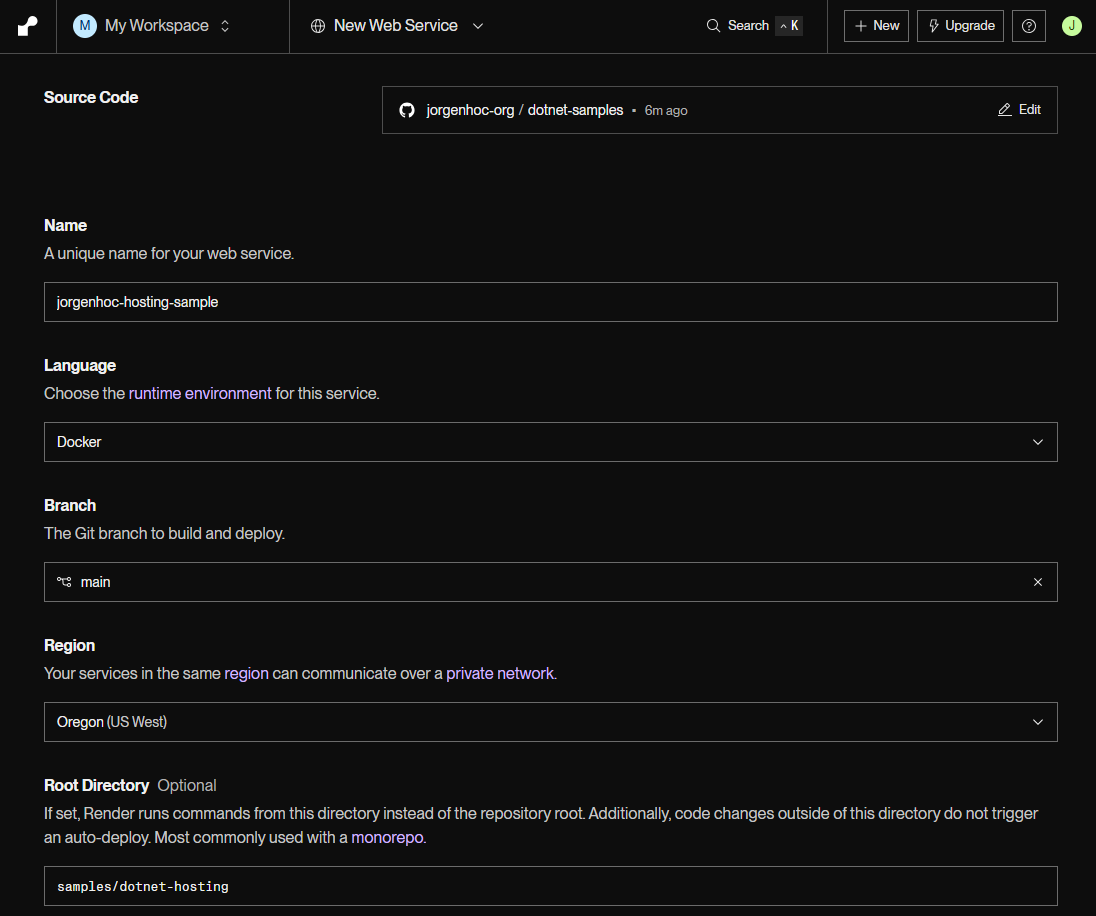
Or use a Dockerfile (recommended for .NET). This is the sample deploying that way — the whole configuration is one form; the only non-obvious field in a monorepo is Root Directory, which points the Docker build context at the right folder:
Pricing
| Tier | Price/month | RAM | vCPU |
|---|---|---|---|
| Free | $0 | 512 MB | 0.1 |
| Starter | $7 | 512 MB | 0.5 |
| Standard | $25 | 2 GB | 1 |
| Pro | $85 | 4 GB | 2 |
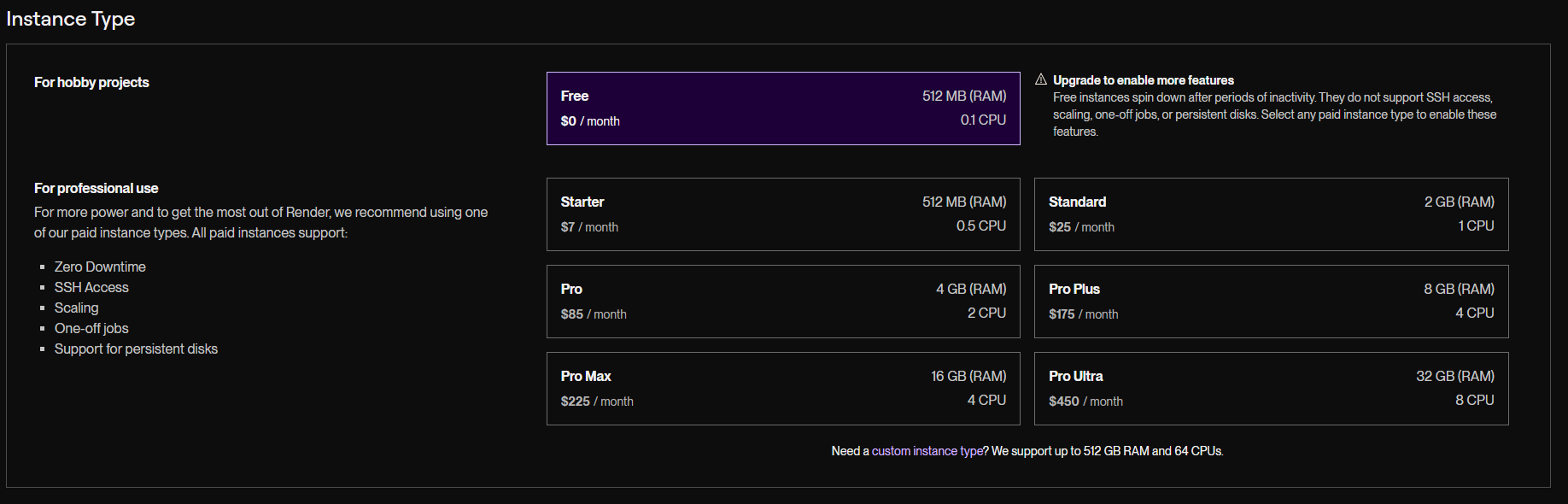
The Free tier spins down after 15 minutes of inactivity and has a cold start of 30–60 seconds. Not suitable for production APIs that need to be always-on.
Verdict
Best for: Hobby projects, staging environments, teams migrating from Heroku.
Watch out for: Free tier sleep behavior, fewer advanced features than Railway or Fly.io.
DigitalOcean App Platform
Overview
DigitalOcean App Platform offers simple container-based deployments with predictable pricing — no surprise bills from usage-based charging.
Deployment
# Using doctl CLI
doctl apps create --spec app.yaml
# app.yaml
name: myapp
region: nyc
services:
- name: api
dockerfile_path: Dockerfile
github:
repo: yourorg/yourrepo
branch: main
deploy_on_push: true
instance_size_slug: basic-xxs
instance_count: 1
http_port: 8080
envs:
- key: ASPNETCORE_ENVIRONMENT
value: ProductionPricing
DigitalOcean restructured App Platform pricing; containers are now priced per instance size (all on shared vCPUs at the low end):
| Price/month | RAM | vCPU | Transfer | Autoscaling |
|---|---|---|---|---|
| $5 | 512 MiB | 1 shared | 50 GiB | No (fixed) |
| $10 | 1 GiB | 1 shared | 100 GiB | No (fixed) |
| $12 | 1 GiB | 1 shared | 150 GiB | Yes |
| $25 | 2 GiB | 1 shared | 200 GiB | Yes |
The free tier covers static sites only — there is no free container option.
Verdict
Best for: Teams who want Heroku-like simplicity with predictable pricing and a familiar provider.
Watch out for: Fewer .NET-specific integrations than Azure. Limited regions compared to Fly.io.
Which Should You Pick? Recommendation Matrix
| Scenario | Recommended Platform |
|---|---|
| Enterprise / Azure shop | Azure App Service (S1+) |
| AWS shop, complex infrastructure | AWS Elastic Beanstalk |
| Indie dev / side project, fast start | Railway |
| Global API, latency matters | Fly.io |
| Migrating from Heroku | Render.com (paid tier) |
| Predictable-cost PaaS | DigitalOcean App Platform |
| Zero budget prototype | Render (free tier, tolerate cold starts) or an Oracle Cloud free VM |
| Needs managed Postgres, minimal config | Railway or Render |
| Needs Managed Identity, Key Vault | Azure App Service |
| Multi-region active-active | Fly.io |
Performance Comparison
Cold start times (approximate, shared/burstable VMs, .NET 10 minimal API):
| Platform | Cold Start | Notes |
|---|---|---|
| Azure App Service B1 | 2–5 s | Always-on option available |
| AWS EB t3.small | 1–3 s | Usually always-on |
| Railway | 3–8 s | Scales to zero when not in use |
| Fly.io (auto-stop) | 2–6 s | Configurable min machines |
| Render free | 30–60 s | Long sleep cold start |
| DigitalOcean Basic | 2–4 s | Always-on |
Use Native AOT (available since .NET 8) for apps that need sub-second cold starts on any platform. AOT-compiled .NET apps can start in under 200ms.
Auto-Scaling Comparison
| Platform | Auto-Scale | Min-to-Max Time | Config Complexity |
|---|---|---|---|
| Azure App Service S1 | Yes (rule-based + HTTP-based) | 3–5 min | Medium |
| AWS EB | Yes (EC2 Auto Scaling Groups) | 3–7 min | High |
| Railway | Yes (vertical scaling) | Seconds | Low |
| Fly.io | Yes (machine-based) | 5–30 s | Medium |
| Render | Yes (paid plans) | 1–3 min | Low |
| DigitalOcean | Yes (horizontal) | 1–3 min | Low |
Free Tier Summary
| Platform | Free Tier Details | Production-Ready? |
|---|---|---|
| Azure | F1: 60 CPU-min/day, no custom-domain SSL | No |
| AWS | $100–$200 in credits, expires after 6 months (12-month t3.micro only on pre-2025 accounts) | Limited |
| Railway | $5 trial credit, 30 days, no card | Trial only |
| Fly.io | Trial only — the free VM allowance was discontinued in Oct 2024 | No |
| Render | 1 service, sleeps after 15 min, 750 instance-hours/month | No |
| DigitalOcean | Static sites only | N/A |
Final Thoughts
For most .NET developers in 2026, the decision comes down to three options:
- Azure App Service if you're in the Microsoft ecosystem or need enterprise features
- Railway if you want the fastest path from code to production URL
- Fly.io if you need global distribution or cost-efficient always-on containers
The days of "just use Azure because it's .NET" are over. Railway and Fly.io offer compelling DX at lower costs for most workloads. Evaluate based on your team's expertise, scale requirements, and existing cloud commitments.
Every deploy config in this guide is a real file in
samples/dotnet-hosting
— one minimal API you can deploy to all six platforms unchanged. If budget is the
deciding factor, Cheapest Way to Host a .NET App walks
the same platforms bottom-up from $0, and the per-platform walkthroughs go deeper:
Azure App Service, Railway,
Fly.io, and Render.