Two libraries dominate .NET data access: EF Core, a full-featured ORM that manages your entire database lifecycle, and Dapper, a micro-ORM that gives you raw SQL with just enough mapping sugar. Choosing between them — or combining them — depends on your query complexity, team SQL proficiency, and how much of your domain lives in the database schema.
Philosophy
EF Core: Full ORM
EF Core treats the database as an implementation detail. You model your domain in C# classes, define relationships with navigation properties, and let the framework generate SQL, track changes, and handle migrations. The abstraction lets you swap database providers without changing application code.
The cost is complexity: the ORM layer introduces conventions, configurations, and behaviors you must understand to avoid performance traps like N+1 queries or unintentional full-table loads.
Dapper: Micro-ORM
Dapper extends IDbConnection with a handful of extension methods (Query<T>, Execute, QueryMultiple). You write SQL; Dapper maps the result set to your types. That's the entire API surface. There is no change tracking, no migration system, no lazy loading — and no magic.
The gain is predictability: the SQL you write is the SQL that runs. Performance overhead above raw ADO.NET is negligible.
Side-by-Side Code
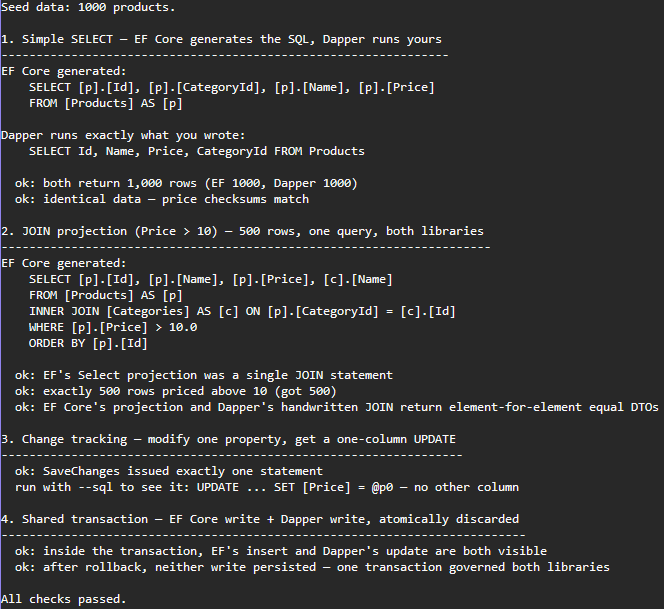
The examples below use a Product entity with an associated Category. They are not
just illustrations: a runnable version of this comparison lives in
samples/ef-core-vs-dapper,
which executes both libraries against the same seeded SQL Server database and asserts
every claim this section makes — same rows from both, single-statement JOINs, one-column
targeted updates. If any of it stops being true on a future EF Core or Dapper version,
that sample fails loudly.
// Shared model used in all examples
public class Product
{
    public int Id { get; set; }
    public string Name { get; set; } = "";
    public decimal Price { get; set; }
    public int CategoryId { get; set; }
    public Category? Category { get; set; }
}

public class Category
{
    public int Id { get; set; }
    public string Name { get; set; } = "";
    public ICollection<Product> Products { get; set; } = [];
}
Simple Query — Fetch All Products
EF Core
// DbContext resolves connection, tracks returned entities by default
var products = await context.Products
    .AsNoTracking()          // disable tracking for read-only queries
    .ToListAsync();
Dapper
// You control the SQL entirely — explicit column selection avoids SELECT *
const string sql = "SELECT Id, Name, Price, CategoryId FROM Products";

using var conn = new SqlConnection(connectionString);
var products = await conn.QueryAsync<Product>(sql);
Insert
EF Core
var product = new Product { Name = "Widget", Price = 9.99m, CategoryId = 1 };

context.Products.Add(product);
await context.SaveChangesAsync();
// product.Id is populated after SaveChanges — EF reads the generated key
Dapper
const string sql = @"
    INSERT INTO Products (Name, Price, CategoryId)
    VALUES (@Name, @Price, @CategoryId);
    SELECT CAST(SCOPE_IDENTITY() AS INT);";

using var conn = new SqlConnection(connectionString);
int newId = await conn.ExecuteScalarAsync<int>(sql, new
{
    Name = "Widget",
    Price = 9.99m,
    CategoryId = 1
});
Update
EF Core
var product = await context.Products.FindAsync(id);
if (product is null) return;

product.Price = 14.99m;
await context.SaveChangesAsync();
// Change tracking detects the Price modification and issues a targeted UPDATE
Dapper
const string sql = "UPDATE Products SET Price = @Price WHERE Id = @Id";

using var conn = new SqlConnection(connectionString);
await conn.ExecuteAsync(sql, new { Price = 14.99m, Id = id });
Delete
EF Core
// ExecuteDelete avoids loading the entity into memory first (EF Core 7+)
await context.Products
    .Where(p => p.Id == id)
    .ExecuteDeleteAsync();
Dapper
const string sql = "DELETE FROM Products WHERE Id = @Id";

using var conn = new SqlConnection(connectionString);
await conn.ExecuteAsync(sql, new { Id = id });
Join Query — Products with Category Name
EF Core
var results = await context.Products
    .AsNoTracking()
    .Include(p => p.Category)
    .Where(p => p.Price > 10)
    .Select(p => new ProductDto(p.Id, p.Name, p.Price, p.Category!.Name))
    .ToListAsync();
// EF generates a single JOIN query when you project with Select
Dapper
const string sql = @"
    SELECT p.Id, p.Name, p.Price, c.Name AS CategoryName
    FROM   Products p
    JOIN   Categories c ON c.Id = p.CategoryId
    WHERE  p.Price > @MinPrice";

using var conn = new SqlConnection(connectionString);
var results = await conn.QueryAsync<ProductDto>(sql, new { MinPrice = 10m });
Multi-Mapping (Split Result into Two Types)
Dapper's splitOn parameter maps a single result row to multiple objects:
const string sql = @"
    SELECT p.Id, p.Name, p.Price, p.CategoryId,
           c.Id, c.Name
    FROM   Products p
    JOIN   Categories c ON c.Id = p.CategoryId";

using var conn = new SqlConnection(connectionString);

var products = await conn.QueryAsync<Product, Category, Product>(
    sql,
    // splitOn tells Dapper where the Category columns start
    (product, category) =>
    {
        product.Category = category;
        return product;
    },
    splitOn: "Id"   // second "Id" column triggers the split
);
EF Core handles this automatically when you use Include or project with Select.
Stored Procedure
EF Core
// FromSqlRaw maps a stored procedure result to an entity type
var products = await context.Products
    .FromSqlRaw("EXEC GetProductsByCategory @CategoryId = {0}", categoryId)
    .AsNoTracking()
    .ToListAsync();
Dapper
using var conn = new SqlConnection(connectionString);

var products = await conn.QueryAsync<Product>(
    "GetProductsByCategory",
    new { CategoryId = categoryId },
    commandType: CommandType.StoredProcedure
);
Parameterized Query Safety
Both libraries parameterize by default, preventing SQL injection. Never interpolate user input directly into SQL strings.
// SAFE — Dapper uses parameterized queries for all anonymous object properties
var results = await conn.QueryAsync<Product>(
    "SELECT * FROM Products WHERE Name LIKE @Search",
    new { Search = $"%{userInput}%" }
);

// UNSAFE — never do this
var results = await conn.QueryAsync<Product>(
    $"SELECT * FROM Products WHERE Name LIKE '%{userInput}%'"
);
Here is the sample verifying this whole section in one run — EF's generated SQL printed next to the handwritten equivalent, and every equivalence claim checked against the database rather than asserted in prose:
Performance Benchmarks
The numbers below are measured with BenchmarkDotNet, not quoted from folklore. The suite
is EfCoreVsDapperBenchmark
— run it yourself against the seeded database from the sample (1,000 products, exactly
500 priced above 10 for the JOIN scenario). Every method pays its own realistic setup: EF
benchmarks construct a DbContext per invocation the way a web request would, Dapper and
ADO.NET open a pooled SqlConnection per invocation, and all reads materialize a List.
BenchmarkDotNet v0.14.0, Windows 11 (10.0.26100.9106)
11th Gen Intel Core i7-1165G7 2.80GHz, 1 CPU, 8 logical and 4 physical cores
.NET SDK 10.0.303 — .NET 10.0.11, X64 RyuJIT AVX-512
SQL Server LocalDB, warm connection pool| Scenario | Method | Mean | Allocated | vs baseline |
|---|---|---|---|---|
| SELECT 1,000 rows | EF Core (tracking) | 2,210.5 µs | 1,079.7 KB | 1.00× |
EF Core AsNoTracking | 1,309.6 µs | 427.4 KB | 0.60× | |
| EF Core compiled query | 1,673.2 µs | 415.6 KB | 0.76× | |
| Dapper | 793.9 µs | 201.5 KB | 0.36× | |
| Raw ADO.NET | 779.7 µs | 163.8 KB | 0.36× | |
| Single-row lookup by PK | EF Core FirstOrDefaultAsync | 370.4 µs | 74.7 KB | 1.00× |
| EF Core compiled query | 313.2 µs | 70.3 KB | 0.87× | |
| Dapper | 151.9 µs | 6.8 KB | 0.42× | |
| Raw ADO.NET | 229.6 µs | 6.0 KB | 0.64× | |
| JOIN projection, 500 rows | EF Core Select projection | 1,451.8 µs | 283.8 KB | 1.00× |
| Dapper | 1,125.0 µs | 116.6 KB | 0.78× | |
| Single INSERT | EF Core Add + SaveChanges | 2,516.2 µs | 138.9 KB | 1.00× |
| Dapper | 1,409.7 µs | 8.6 KB | 0.58× |
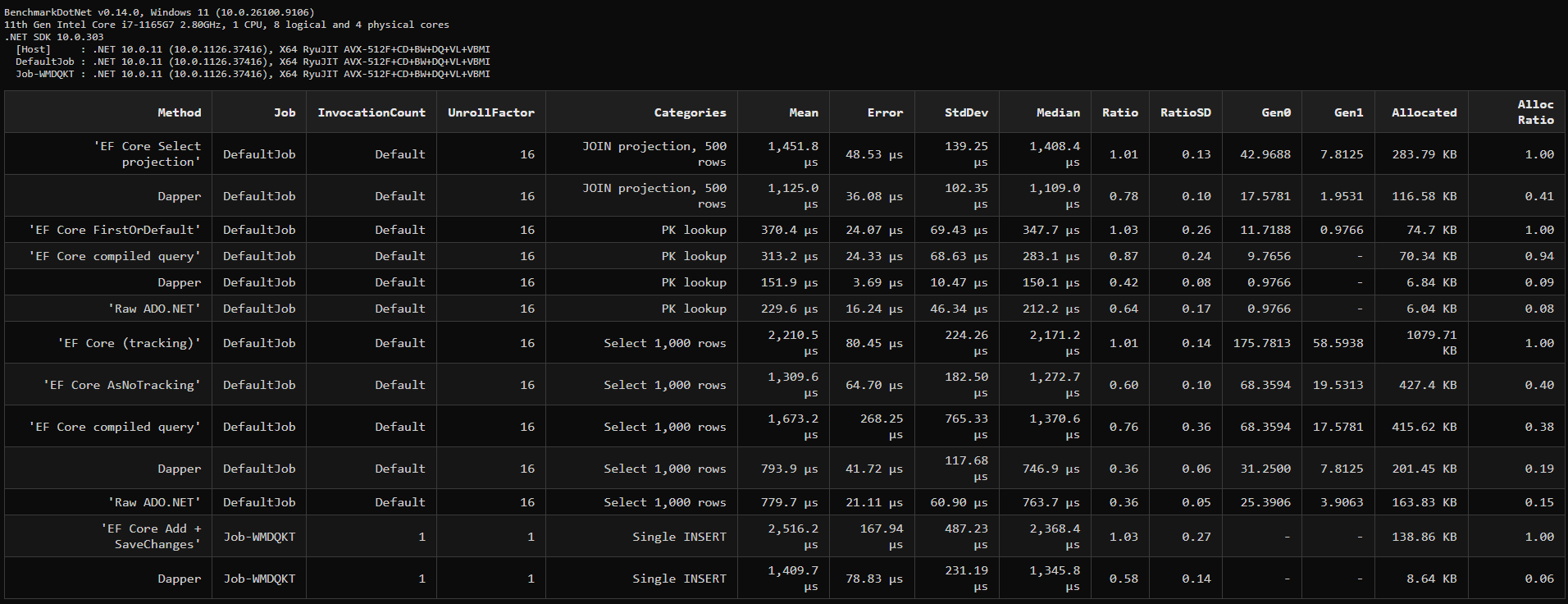
Four things these measurements actually say — two of which contradict the ratios an earlier version of this article quoted (those were approximate and not reproducible; they are gone):
AsNoTracking is the cheapest win in the table. The folklore gap — "Dapper is 2×
EF" — only exists against tracking EF Core (2.8× here, and 5× the allocation). Adding
one method call closes it to 1.6× and cuts allocation by 60%. If a read never needs
SaveChanges, that call should already be there.
Projections converge. On the JOIN into a DTO, Dapper is only 1.3× faster. Once EF
Core projects with Select instead of materializing tracked entities, the two libraries
are doing nearly the same work — the "rewrite it in Dapper" instinct pays far less on
well-written EF queries than on lazy ones.
Compiled queries are situational, not magic. On the 1,000-row SELECT the compiled
query performed worse than plain AsNoTracking on mean (with much higher variance) —
translation cost amortizes away when materialization dominates. It earned its keep on the
PK lookup (313 vs 370 µs), which is exactly the hot-path shape the feature exists for.
Dapper beat raw ADO.NET on the PK lookup (152 vs 230 µs). At this scale you are measuring cached command machinery, not mapping overhead — treat Dapper and hand-rolled ADO.NET as the same performance floor and pick Dapper for the readability.
Two honesty notes. These are LocalDB timings: round trips are nearly free, which
maximizes the visible mapper overhead — against a remote database, network latency
dominates and every ratio above compresses toward 1. And bulk-insert numbers are gone
from this table because a defensible bulk benchmark (TVP vs AddRange vs SqlBulkCopy)
needs its own methodology; the TVP pattern below remains the right tool, just without an
invented multiplier attached.
EF Core Compiled Queries
Pre-compile a query expression to skip LINQ translation overhead on every call:
// Define once at class or static level — compilation happens once
private static readonly Func<AppDbContext, int, Task<Product?>> GetByIdQuery =
    EF.CompileAsyncQuery((AppDbContext ctx, int id) =>
        ctx.Products
           .AsNoTracking()
           .FirstOrDefault(p => p.Id == id));

// Use everywhere — no LINQ→SQL translation on subsequent calls
var product = await GetByIdQuery(context, 42);Use compiled queries for hot paths that return small results — the PK-lookup shape, where they measured 15% faster above. On queries that materialize hundreds of rows the translation cost is already noise next to materialization, and the measured benefit disappears. The first call still pays the compilation cost; subsequent calls skip it.
Dapper with TVP for Bulk Operations
// Table-valued parameter for bulk inserts — far faster than row-by-row
var table = new DataTable();
table.Columns.Add("Name", typeof(string));
table.Columns.Add("Price", typeof(decimal));
table.Columns.Add("CategoryId", typeof(int));

foreach (var p in products)
    table.Rows.Add(p.Name, p.Price, p.CategoryId);

using var conn = new SqlConnection(connectionString);
await conn.ExecuteAsync(
    "INSERT INTO Products SELECT Name, Price, CategoryId FROM @Products",
    new { Products = table.AsTableValuedParameter("dbo.ProductType") }
);
EF Core has no bulk-insert API of its own — ExecuteUpdate/ExecuteDelete (EF Core 7+)
cover set-based updates and deletes, but inserts go through SaveChanges batching. For
genuinely large volumes, drop to SqlBulkCopy or a third-party package like
EFCore.BulkExtensions.
EF Core Strengths
Migrations
EF Core owns your schema lifecycle. dotnet ef migrations add generates a C# migration class from your model diff; dotnet ef database update applies it.
dotnet ef migrations add AddProductDiscountColumn
dotnet ef database update
You get a full migration history in source control, rollback support, and seeding through HasData.
Change Tracking
EF Core's identity map means you can load an entity, mutate it in application code, and call SaveChanges — the ORM issues a targeted UPDATE for only the changed columns.
// EF tracks the original snapshot and compares on SaveChanges
var product = await context.Products.FindAsync(id);
product!.Price = newPrice;          // only Price changed
product.Name = newName;             // Name also changed
await context.SaveChangesAsync();
// Generated SQL: UPDATE Products SET Price=@p0, Name=@p1 WHERE Id=@p2
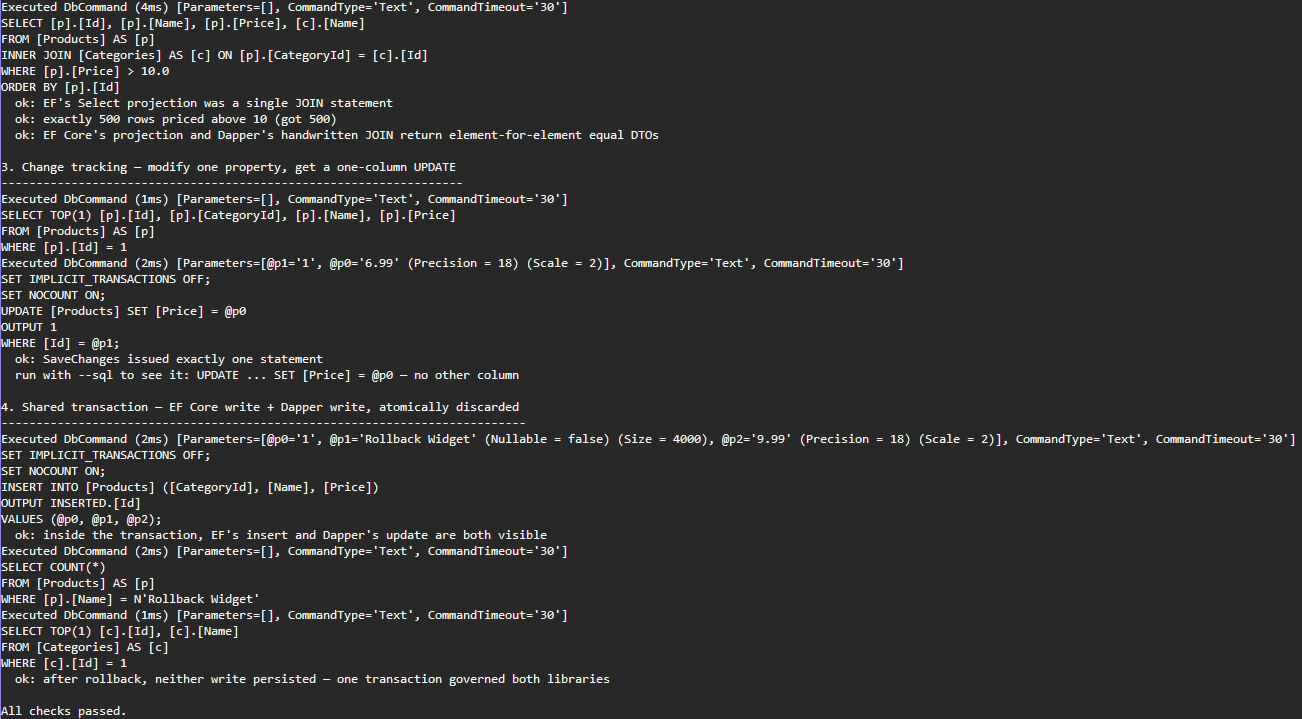
That comment about the generated SQL is checkable, so the sample checks it. Change one property and log what actually executes:
LINQ Composition
Build queries dynamically without string manipulation:
IQueryable<Product> query = context.Products.AsNoTracking();

if (minPrice.HasValue)
    query = query.Where(p => p.Price >= minPrice.Value);

if (!string.IsNullOrEmpty(category))
    query = query.Where(p => p.Category!.Name == category);

if (inStockOnly)
    query = query.Where(p => p.Stock > 0);

// SQL is only generated here, combining all filters into one WHERE clause
var results = await query.ToListAsync();
Relationship Loading
// Eager loading — single JOIN query
var orders = await context.Orders
    .Include(o => o.Customer)
    .Include(o => o.Lines)
        .ThenInclude(l => l.Product)
    .ToListAsync();

// Explicit loading — load navigation after the fact
await context.Entry(order).Collection(o => o.Lines).LoadAsync();

// Split query — separate SQL per Include, avoids Cartesian explosion
var orders = await context.Orders
    .Include(o => o.Lines)
    .AsSplitQuery()
.ToListAsync();Never use lazy loading in web APIs. It triggers a new database round-trip per navigation property access, silently multiplying your query count with each HTTP request.
Database Agnosticism
Switch providers by changing the UseXxx call in DI registration:
// SQL Server
builder.Services.AddDbContext<AppDbContext>(o =>
    o.UseSqlServer(connectionString));

// PostgreSQL
builder.Services.AddDbContext<AppDbContext>(o =>
    o.UseNpgsql(connectionString));

// SQLite (testing / embedded)
builder.Services.AddDbContext<AppDbContext>(o =>
    o.UseSqlite("Data Source=app.db"));
Dapper Strengths
Raw SQL Control
You write exactly the SQL that executes. This matters for:
- Queries using database-specific features (CTEs, window functions, JSON operators)
- Reporting queries where fine-tuned execution plans are critical
- Stored procedures with complex output parameters
// Window function — difficult to express in LINQ
const string sql = @"
    SELECT
        p.Id,
        p.Name,
        p.Price,
        RANK() OVER (PARTITION BY p.CategoryId ORDER BY p.Price DESC) AS PriceRank
    FROM Products p
    WHERE p.Price > @MinPrice";

var ranked = await conn.QueryAsync<ProductRankDto>(sql, new { MinPrice = 0m });
Performance Ceiling
When throughput is the constraint — high-frequency reads, reporting endpoints serving thousands of concurrent users — Dapper's minimal overhead lets you squeeze out every millisecond.
Stored Procedure Output Parameters
var parameters = new DynamicParameters();
parameters.Add("@CustomerId", customerId);
parameters.Add("@TotalSpend", dbType: DbType.Decimal, direction: ParameterDirection.Output);
parameters.Add("@OrderCount", dbType: DbType.Int32, direction: ParameterDirection.Output);

using var conn = new SqlConnection(connectionString);
await conn.ExecuteAsync("GetCustomerStats", parameters,
    commandType: CommandType.StoredProcedure);

decimal totalSpend = parameters.Get<decimal>("@TotalSpend");
int orderCount = parameters.Get<int>("@OrderCount");
EF Core's FromSqlRaw does not support output parameters directly — you would need to drop down to DbCommand manually.
Simpler Mental Model
Dapper has a three-page README. There are no conventions to learn, no shadow properties, no entity states, no proxy classes. A developer who knows SQL can be productive in minutes.
Using Both in the Same Project
EF Core and Dapper are not mutually exclusive. A common hybrid pattern uses EF Core for writes and relationship management, and Dapper for complex read queries and reporting.
DI Registration
// Register both — DbContext for writes, IDbConnection factory for reads
builder.Services.AddDbContext<AppDbContext>(o =>
    o.UseSqlServer(builder.Configuration.GetConnectionString("Default")));

// Register a factory so repositories can open Dapper connections on demand
builder.Services.AddScoped<IDbConnection>(_ =>
    new SqlConnection(builder.Configuration.GetConnectionString("Default")));
Repository Pattern — Hybrid
public class ProductRepository
{
    private readonly AppDbContext _context;
    private readonly IDbConnection _db;

    public ProductRepository(AppDbContext context, IDbConnection db)
    {
        _context = context;
        _db = db;
    }

    // Writes go through EF Core — change tracking, validation, events
    public async Task<Product> CreateAsync(CreateProductRequest request)
    {
        var product = new Product
        {
            Name = request.Name,
            Price = request.Price,
            CategoryId = request.CategoryId
        };
        _context.Products.Add(product);
        await _context.SaveChangesAsync();
        return product;
    }

    // Complex read query goes through Dapper — raw SQL, no overhead
    public async Task<IEnumerable<ProductSalesDto>> GetTopSellersByCategoryAsync(
        int categoryId, int top)
    {
        const string sql = @"
            SELECT TOP (@Top)
                p.Id,
                p.Name,
                p.Price,
                SUM(ol.Quantity) AS TotalSold,
                SUM(ol.Quantity * p.Price) AS Revenue
            FROM   Products p
            JOIN   OrderLines ol ON ol.ProductId = p.Id
            JOIN   Orders o ON o.Id = ol.OrderId
            WHERE  p.CategoryId = @CategoryId
              AND  o.PlacedAt >= DATEADD(month, -3, GETUTCDATE())
            GROUP  BY p.Id, p.Name, p.Price
            ORDER  BY TotalSold DESC";

        return await _db.QueryAsync<ProductSalesDto>(sql, new { CategoryId = categoryId, Top = top });
    }

    // Simple lookups still use EF Core with compiled query
    private static readonly Func<AppDbContext, int, Task<Product?>> FindQuery =
        EF.CompileAsyncQuery((AppDbContext ctx, int id) =>
            ctx.Products.AsNoTracking().FirstOrDefault(p => p.Id == id));

    public Task<Product?> FindByIdAsync(int id) => FindQuery(_context, id);
}
Sharing Transactions
When you need EF Core and Dapper to participate in the same transaction:
using var transaction = await _context.Database.BeginTransactionAsync();

try
{
    // EF Core write
    _context.Orders.Add(newOrder);
    await _context.SaveChangesAsync();

    // Dapper operation using the same underlying connection and transaction
    var conn = _context.Database.GetDbConnection();
    await conn.ExecuteAsync(
        "UPDATE Inventory SET Reserved = Reserved + @Qty WHERE ProductId = @ProductId",
        new { Qty = newOrder.Quantity, ProductId = newOrder.ProductId },
        transaction: _context.Database.CurrentTransaction!.GetDbTransaction()
    );

    await transaction.CommitAsync();
}
catch
{
    await transaction.RollbackAsync();
    throw;
}When sharing a transaction, use _context.Database.GetDbConnection() rather than opening a new IDbConnection. This ensures Dapper operates on the exact same connection that EF Core's transaction is bound to.
This pattern is the fourth check in the runnable sample: an EF Core insert and a Dapper update inside one transaction, both visible before the rollback, both gone after it — one transaction genuinely governing both libraries, asserted rather than assumed.
How I tested this
The benchmark ran on my laptop: an 11th-gen Intel Core i7-1165G7 on Windows 11, .NET SDK 10.0.303 with the 10.0.11 runtime, BenchmarkDotNet v0.14.0 in a Release build, against SQL Server LocalDB with a warm connection pool. The database is the one seed.sql produces: exactly 1,000 products, 500 of them priced above 10 so the JOIN scenario has a known row count. The full report is committed under BenchmarkDotNet.Artifacts in the samples repository.
I made each method pay its own realistic setup rather than optimising for a flattering number. The EF Core benchmarks construct a DbContext per invocation, the way a web request would; Dapper and ADO.NET open a pooled SqlConnection per invocation, and every read materialises a List. That is why the EF Core figures include context construction and change-tracker setup, which is also what your application pays.
An earlier version of this article had a performance table with ratios I could not reproduce when I sat down to measure them. It is gone. The numbers in the table now are the ones BenchmarkDotNet printed, and the screenshot is that run.
The correctness claims are asserted separately by the console sample in samples/ef-core-vs-dapper: both libraries return the same 1,000 rows with matching checksums, the JOIN is a single statement in each, and changing one property produces an UPDATE whose SET clause names only that column. The targeted-update screenshot is the sample's --sql output.
To reproduce:
git clone https://github.com/jorgenhoc-org/dotnet-samples
cd dotnet-samples/samples/ef-core-vs-dapper
sqlcmd -S "(localdb)\MSSQLLocalDB" -d JorgenHocSamples -E -i seed.sql
dotnet run -- --sql
cd ../../benchmarks/JorgenHoc.Benchmarks
dotnet run -c Release -- --filter *EfCoreVsDapper*
When to Choose EF Core
- Greenfield applications where you own the schema and want migrations in source control
- Domain-rich models with complex relationships, validation logic, and domain events
- Teams with mixed SQL expertise — LINQ lowers the barrier to correct, safe data access
- Rapid iteration — adding a column is a one-liner model change plus a migration
- Multiple database targets — one codebase, multiple providers
- Unit testability —
UseInMemoryDatabaseor SQLite in-memory for fast tests without a real DB
When to Choose Dapper
- Performance-critical read paths — reporting dashboards, high-frequency API endpoints
- Existing database with a schema you don't control
- Heavy SQL investment — team already has stored procedures, views, and optimized queries
- Complex analytical queries — window functions, CTEs, recursive queries, JSON shredding
- Microservices with simple data access — no need for a full ORM
- Read replicas / CQRS read side — Dapper is a natural fit for the query side of CQRS
Decision Matrix
| Criterion | EF Core | Dapper | Hybrid |
|---|---|---|---|
| Schema migrations | Native | Manual / Flyway | EF Core manages schema |
| Change tracking | Yes | No | EF Core for writes |
| LINQ query composition | Yes | No | EF Core for writes |
| Raw SQL control | Limited | Full | Dapper for reads |
| Stored procedure support | Partial | Full | Dapper |
| Performance (reads) | Good (AsNoTracking closes most of the gap) | Excellent | Excellent |
| Performance (writes) | Good | Good | Good |
| Bulk operations | Via extensions | Native TVP | Dapper |
| Learning curve | Medium-High | Low | Medium |
| Multi-DB support | Yes | Manual | Mixed |
| Test doubles | InMemory / SQLite | Needs real DB or mock | Needs real DB or mock |
| Team SQL proficiency needed | Low | High | Medium |
| Best fit | Greenfield, domain apps | Perf-critical reads, existing DB | Large apps with mixed workloads |
Summary
EF Core and Dapper solve different problems. EF Core is the right default for new applications — it handles migrations, keeps your schema and code in sync, and lets less SQL-fluent developers write safe, correct queries. Dapper earns its place on performance-critical read paths and when your team owns complex SQL that an ORM would only obscure.
For most mid-to-large applications, the answer is both: EF Core for command-side operations and simple reads, Dapper for reporting and high-frequency query endpoints. The shared transaction pattern above means you never have to choose between correctness and performance.