The N+1 query problem is one of the most common and damaging performance mistakes in EF Core applications. It hides during development, only revealing itself under production load — often as slow endpoints, database CPU spikes, and timeouts.
What Is the N+1 Problem?
The name describes the pattern: you execute 1 query to load a list, then N additional queries — one per row — to load related data. For 100 orders, that's 101 database round-trips. For 1,000 orders, it's 1,001.
Concrete Before/After Example
Consider a simple domain:
public class Order
{
    public int Id { get; set; }
    public string Reference { get; set; } = "";
    public int CustomerId { get; set; }
    public Customer Customer { get; set; } = null!;
    public List<OrderLine> Lines { get; set; } = [];
}

public class Customer
{
    public int Id { get; set; }
    public string Name { get; set; } = "";
}

public class OrderLine
{
    public int Id { get; set; }
    public int OrderId { get; set; }
    public string ProductName { get; set; } = "";
    public decimal UnitPrice { get; set; }
    public int Quantity { get; set; }
}
The broken code — looks innocent, works in tests, destroys production:
// BAD: N+1 query pattern
var orders = await context.Orders.ToListAsync();          // 1 query

foreach (var order in orders)
{
    // One round trip per order, every iteration
    var customer = await context.Customers.FindAsync(order.CustomerId);
    var lines = await context.OrderLines
        .Where(l => l.OrderId == order.Id)
        .ToListAsync();

    Console.WriteLine($"{order.Reference} - {customer!.Name}");

    foreach (var line in lines)
        Console.WriteLine($"  {line.ProductName}: {line.Quantity} x {line.UnitPrice:C}");
}
With 500 orders, EF Core fires:
- 1 query:
SELECT * FROM Orders - 500 queries:
SELECT TOP(1) * FROM Customers WHERE Id = @p(one per order) - 500 queries:
SELECT * FROM OrderLines WHERE OrderId = @p(one per order)
Total: 1,001 queries to render a single page.
Note what this example does not do: it never reads order.Customer or order.Lines
directly. With EF Core's defaults that would not fire a query at all — order.Customer
would be null and order.Lines an empty list, so you would get a
NullReferenceException rather than an N+1.
Automatic loading on property access requires lazy loading, which you have to opt into: the
Microsoft.EntityFrameworkCore.Proxies package, UseLazyLoadingProxies(), and virtual
navigation properties. Querying per row, as above, needs none of that — which is exactly
why it is the more common cause in real codebases.
Spotting N+1 with Query Logging
Before you can fix the problem, you need to see it. EF Core's LogTo method writes every SQL statement to any output sink.
Minimal Setup in Program.cs
builder.Services.AddDbContext<AppDbContext>(options =>
{
    options.UseSqlServer(connectionString);

    options.LogTo(
        Console.WriteLine,
        [DbLoggerCategory.Database.Command.Name],
        LogLevel.Information);

    options.EnableSensitiveDataLogging(); // shows parameter values — never in production
});It is tempting to wrap this in if (builder.Environment.IsDevelopment()). Be careful if
you do: HostApplicationBuilder reads DOTNET_ENVIRONMENT, not
ASPNETCORE_ENVIRONMENT — the latter is only honoured by WebApplicationBuilder. In a
console app with neither set, the environment is Production, the gate is silently false,
and you spend an afternoon wondering why nothing logs.
launchSettings.json sets it for dotnet run and IDE launches but is not part of the
built app, so the gate also flips off the moment someone runs the executable directly.
Also worth knowing: EF Core logs through ILoggerFactory, so a host with the default
console provider prints every statement whether or not you called LogTo. That makes
logging look configured when it is not. Call builder.Logging.ClearProviders() first if you
want the output to be exactly what you asked for, and not printed twice.
Using ILogger Instead of Console
options.LogTo(
    (eventId, logLevel) => logLevel >= LogLevel.Warning
        || eventId == RelationalEventId.CommandExecuted,
    (logEntry) => logger.Log(
        logEntry.LogLevel,
        logEntry.EventId,
        logEntry.ToString()
    )
);
Detecting N+1 Programmatically
For integration tests or CI gates, you can count queries:
public class QueryCounter
{
    private int _count;

    // Volatile read: increments happen on whichever thread EF Core's logger runs on.
    public int Count => Volatile.Read(ref _count);

    public void Increment() => Interlocked.Increment(ref _count);
}

// In your test setup — match the event id, not a log level
var counter = new QueryCounter();

options.LogTo(
    filter: (eventId, _) => eventId == RelationalEventId.CommandExecuted,
    logger: _ => counter.Increment());

// After your action
Assert.True(counter.Count <= 3, $"Expected ≤3 queries but got {counter.Count}");Use the (filter, logger) overload and match RelationalEventId.CommandExecuted exactly.
The simpler LogTo(Action<string>, LogLevel) overload counts every log message at that
level — connection and transaction events included — so the total comes out a few above the
real statement count and the assertion threshold becomes guesswork. Requires
using Microsoft.EntityFrameworkCore.Diagnostics;.
In ASP.NET Core, MiniProfiler gives you a browser overlay listing every SQL statement a request executed, with per-statement timing. It is the fastest way to catch N+1 in a web UI.
You need two packages, not one: MiniProfiler.AspNetCore.Mvc for the overlay and
MiniProfiler.EntityFrameworkCore for EF Core integration, plus .AddEntityFramework()
on the builder. With only the first, the overlay renders but the query list is empty —
which looks exactly like a profiler that does not work.
Two more things worth knowing. Set TrackConnectionOpenClose = false unless you want each
statement to appear three times, once for the connection open, once for the command, once
for the close. And do not expect the stack-trace snippets to help: with EF Core they
contain only framework internals — ExecuteReaderAsync > MoveNext > DispatchEventData and
so on — never the line of your code that triggered the query. They are genuinely useful
with Dapper or raw ADO.NET, where you invoke the command yourself.
A working setup — both packages, the configuration above, and two endpoints to compare — is
in samples/web.
Fix 1: Eager Loading with Include()
Include() tells EF Core to JOIN the related table in the same query — or issue a second query immediately — instead of lazy-loading on access.
// GOOD: single query with JOINs
var orders = await context.Orders
    .Include(o => o.Customer)
    .Include(o => o.Lines)
    .ToListAsync();
SQL generated (simplified):
SELECT o.Id, o.Reference, o.CustomerId,
       c.Id, c.Name,
       ol.Id, ol.OrderId, ol.ProductName, ol.UnitPrice, ol.Quantity
FROM Orders o
INNER JOIN Customers c ON c.Id = o.CustomerId
LEFT JOIN OrderLines ol ON ol.OrderId = o.Id
That is 1 query instead of 1,001.
ThenInclude() for Deep Hierarchies
var orders = await context.Orders
    .Include(o => o.Customer)
        .ThenInclude(c => c.Address)         // Customer -> Address
    .Include(o => o.Lines)
        .ThenInclude(l => l.Product)         // OrderLine -> Product
            .ThenInclude(p => p.Category)    // Product -> Category
.ToListAsync();Include() with multiple collection navigations produces a cartesian product. If an order has 10 lines and 5 tags, EF Core joins them and you get 50 rows per order in the result set. With 1,000 orders this becomes millions of rows transferred from the database.
Fix 2: AsSplitQuery() for Cartesian Explosions
When you include multiple collections, use AsSplitQuery() to tell EF Core to issue separate queries instead of one massive JOIN.
var orders = await context.Orders
    .Include(o => o.Lines)
    .Include(o => o.Tags)          // second collection = cartesian risk
    .AsSplitQuery()                // EF Core runs 3 targeted SELECTs
    .ToListAsync();
SQL generated (3 queries instead of 1 exploding JOIN):
-- Query 1: base entity
SELECT o.Id, o.Reference, o.CustomerId FROM Orders o;

-- Query 2: first collection
SELECT ol.Id, ol.OrderId, ol.ProductName, ol.UnitPrice, ol.Quantity
FROM OrderLines ol
WHERE ol.OrderId IN (1, 2, 3, ...);  -- keyed to loaded order IDs

-- Query 3: second collection
SELECT t.Id, t.OrderId, t.Name
FROM Tags t
WHERE t.OrderId IN (1, 2, 3, ...);
EF Core then stitches the results in memory. This avoids the row explosion while still using only 3 queries total.
Setting Split Query as the Global Default
options.UseSqlServer(connectionString, sqlOptions =>
{
    sqlOptions.UseQuerySplittingBehavior(QuerySplittingBehavior.SplitQuery);
});
You can then opt specific queries back to single query:
var order = await context.Orders
    .Include(o => o.Lines)
    .AsSingleQuery()   // override the global default
.FirstOrDefaultAsync(o => o.Id == id);| Scenario | Use |
|---|---|
| Single collection Include | AsSingleQuery (default JOIN) |
| Multiple collection Includes | AsSplitQuery |
| Large dataset, many columns | AsSplitQuery |
| Single row lookup | AsSingleQuery |
Fix 3: Projection with Select() — The Gold Standard
Include() loads entire entity graphs. Projection loads only what you need. For read-only use cases (API responses, list pages, reports), projection is almost always faster.
// Only fetch the columns the UI actually uses
var orderSummaries = await context.Orders
    .Select(o => new OrderSummaryDto
    {
        Id = o.Id,
        Reference = o.Reference,
        CustomerName = o.Customer.Name,          // auto-join, no Include needed
        LineCount = o.Lines.Count,               // COUNT subquery
        TotalValue = o.Lines.Sum(l => l.UnitPrice * l.Quantity)  // SUM subquery
    })
    .ToListAsync();
SQL generated:
SELECT o.Id,
       o.Reference,
       c.Name AS CustomerName,
       (SELECT COUNT(*) FROM OrderLines WHERE OrderId = o.Id) AS LineCount,
       (SELECT SUM(UnitPrice * Quantity) FROM OrderLines WHERE OrderId = o.Id) AS TotalValue
FROM Orders o
INNER JOIN Customers c ON c.Id = o.CustomerId
Benefits of projection:
- No change tracking overhead — EF Core skips the identity map for anonymous types and non-entity DTOs
- Smaller network payload — only selected columns travel over the wire
- EF Core auto-generates JOINs from navigation properties inside
Select()— no explicitInclude()needed - Aggregates (
Count,Sum,Max) push computation to the database engine
Reusable Projection Expressions
Avoid duplicating projections across queries by extracting them as Expression<Func<T, TResult>>:
public static class OrderProjections
{
    // Static expression — EF Core can translate this to SQL
    public static Expression<Func<Order, OrderSummaryDto>> ToSummary =>
        o => new OrderSummaryDto
        {
            Id = o.Id,
            Reference = o.Reference,
            CustomerName = o.Customer.Name,
            LineCount = o.Lines.Count,
            TotalValue = o.Lines.Sum(l => l.UnitPrice * l.Quantity)
        };
}

// Usage
var summaries = await context.Orders
    .Select(OrderProjections.ToSummary)
.ToListAsync();The AutoMapper library's ProjectTo<TDto>(mapper.ConfigurationProvider) generates the same kind of SQL projection automatically from your mapping configuration, removing the need to write Select() manually in every query.
Fix 4: Explicit Loading
Sometimes you legitimately want to load a related entity only when a condition is met — not always. Explicit loading lets you make that decision after the parent is loaded.
var order = await context.Orders.FindAsync(orderId);

// Only load lines if the order is in a state that has them
if (order?.Status == OrderStatus.Confirmed)
{
    // Reference() for single navigation properties
    await context.Entry(order)
        .Reference(o => o.Customer)
        .LoadAsync();

    // Collection() for collection navigation properties
    await context.Entry(order)
        .Collection(o => o.Lines)
        .Query()                                          // returns IQueryable
        .Where(l => l.UnitPrice > 0)                    // filter before loading
        .LoadAsync();
}
The .Query() call lets you filter, order, or project the collection before issuing the SQL — preventing loading rows you'll discard immediately.
Why Lazy Loading Is Dangerous in Web Apps
EF Core supports lazy loading via proxies (UseLazyLoadingProxies()) or ILazyLoader injection. Both work by automatically firing a query the moment you access a navigation property. In a web application, this is the N+1 factory.
// With lazy loading enabled, this controller action hides 1 + 2N queries:
public async Task<IActionResult> GetOrders()
{
    var orders = await context.Orders.ToListAsync();  // 1 query

    return Ok(orders.Select(o => new
    {
        o.Reference,
        CustomerName = o.Customer.Name,  // query fires here (hidden)
        Lines = o.Lines.Select(l => new  // query fires here (hidden)
        {
            l.ProductName,
            l.Quantity
        })
    }));
}
The queries are invisible in the controller code. They fire inside the Select lambda during JSON serialization — after your await is done, potentially off the thread pool if using async serializers.
// Lazy loading proxies require virtual navigation properties
public class Order
{
    public virtual Customer Customer { get; set; } = null!;  // virtual = proxy hooks in
    public virtual List<OrderLine> Lines { get; set; } = []; // virtual = proxy hooks in
}
Recommendation: Do not enable lazy loading in ASP.NET Core applications. Use eager loading or projection for reads. Use explicit loading for conditional loads.
Performance Comparison
| Strategy | Queries | Rows Transferred | Change Tracking | Best For |
|---|---|---|---|---|
| Lazy loading | N+1 | Minimal per query | Yes | Never (web) |
Eager loading (Include) | 1–3 | All related rows | Yes | Write operations, full graph needed |
Split query (AsSplitQuery) | 1 per collection | Targeted rows | Yes | Multiple collections |
Projection (Select) | 1 | Only selected columns | No | Read-only: APIs, lists, reports |
| Explicit loading | 1 per load call | Targeted rows | Yes | Conditional loads |
Database Indexes on Foreign Keys
EF Core automatically creates indexes on primary keys. It does not automatically create indexes on foreign key columns. Without them, every Include() becomes a full table scan on the related table.
protected override void OnModelCreating(ModelBuilder modelBuilder)
{
    modelBuilder.Entity<OrderLine>(entity =>
    {
        // Foreign key index — critical for Include() performance
        entity.HasIndex(l => l.OrderId)
              .HasDatabaseName("IX_OrderLines_OrderId");

        // Composite index for filtered queries
        entity.HasIndex(l => new { l.OrderId, l.UnitPrice })
              .HasDatabaseName("IX_OrderLines_OrderId_UnitPrice");
    });

    modelBuilder.Entity<Order>(entity =>
    {
        entity.HasIndex(o => o.CustomerId)
              .HasDatabaseName("IX_Orders_CustomerId");

        // Covering index for the summary projection
        entity.HasIndex(o => o.CustomerId)
              .IncludeProperties(o => new { o.Reference, o.Status })
              .HasDatabaseName("IX_Orders_CustomerId_Covering");
    });
}Run dotnet ef [migrations](/blog/ef-core-migrations-walkthrough) add AddForeignKeyIndexes after adding indexes via Fluent API. EF Core migrations will generate the correct CREATE INDEX SQL. Without a migration, the OnModelCreating configuration exists only in the model — not in the actual database.
Measuring the Difference on Your Own Data
How large the win is depends entirely on your row counts, your round-trip latency to the database, and how many navigation properties you touch — so a timing from someone else's machine tells you very little. Measure it against your own workload instead:
// Log every statement EF Core sends, then count them
builder.Logging.ClearProviders(); // otherwise the host's console provider prints them too

builder.Services.AddDbContext<AppDbContext>(options =>
{
    options.UseSqlServer(connectionString);
    options.LogTo(Console.WriteLine, [DbLoggerCategory.Database.Command.Name],
                  LogLevel.Information);
});
Hit a list endpoint once with lazy loading and once with projection, then compare two things: the number of SQL statements in the log, and the wall-clock time.
The statement count is the honest signal. Lazy loading over N parent rows issues 1 + N queries — or 1 + 2N when you touch two navigation properties — while projection issues exactly one. That ratio is deterministic, and you can confirm it in the log in under a minute.
Measured Statement Counts
Running each strategy against 500 orders with 8 line items each, counting the commands EF Core actually executed:
| Strategy | SQL statements | Orders loaded |
|---|---|---|
| Query per row (N+1, customer only) | 501 | 500 |
| Query per row (N+1, customer + lines) | 1,001 | 500 |
Include (eager, single query) | 1 | 500 |
Include + AsSplitQuery() | 2 | 500 |
Select() projection | 1 | 500 |
These are counts, not timings, and that is deliberate — they are reproducible on any machine and any relational provider, so you can verify them rather than take them on trust. Measured on EF Core 10 against SQL Server LocalDB.
The program that produced them is
samples/ef-core-n-plus-one.
Run seed.sql
against an empty database first — it creates the schema used throughout this article and
loads the 500 orders, so your counts should match these exactly.
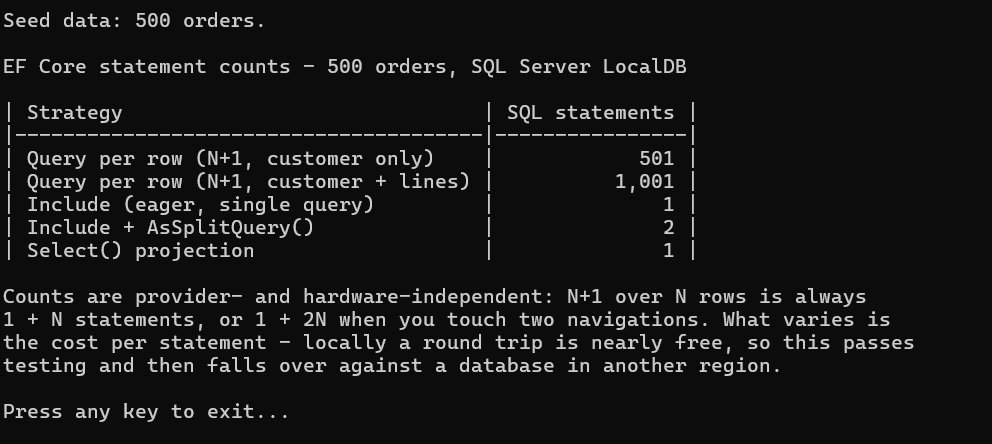
Note that AsSplitQuery() issues two statements here rather than three: Customer is a
reference navigation, so it stays in the JOIN, and only the Lines collection is split
out. Add a second collection and it becomes three.
Where the time difference lands is a different question, and it is dominated by round-trip latency. The same N+1 that costs a few milliseconds against a local instance can cost seconds against a managed database in another region, because you are paying the round trip 1,001 times instead of once. This is why N+1 problems so often pass local testing and then surface in production — and why the count above is the number worth acting on, not the local stopwatch reading.
Checklist: Eliminating N+1 in a Real Application
- Enable query logging in development — see every SQL statement
- Search for
Include-free navigation property access in loops and LINQ queries - Use
Select()projection for all read-only endpoints (controllers returning DTOs) - Use
Include()+AsSplitQuery()when you need full entity graphs with multiple collections - Never enable
UseLazyLoadingProxies()in web applications - Add indexes on all foreign key columns used in navigation properties
- Write query count assertions in integration tests to prevent regressions
How I tested this
Every number in this article is a count of SQL statements, not a timing, and that was a deliberate choice. Wall-clock figures from a laptop against LocalDB are dominated by noise and would not reproduce from one run to the next, let alone on your machine. Statement counts are different: 1 + N is 1 + N on any machine and any relational provider, so you can check my numbers rather than trust them.
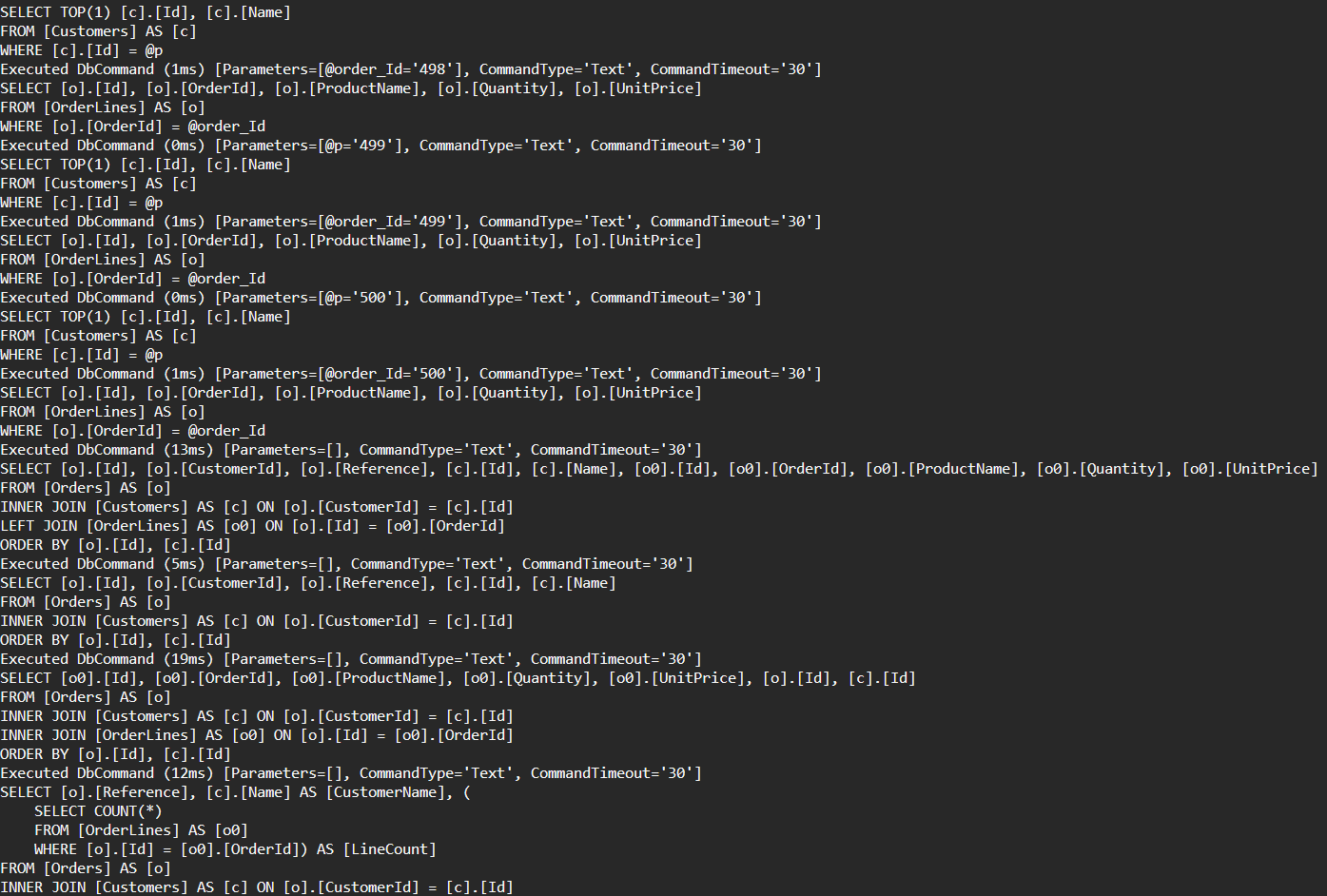
The setup is a SQL Server LocalDB database seeded by seed.sql with 500 orders and 8 line items each, queried through EF Core 10 on the .NET 10 SDK on Windows 11. Counting is done the boring way: LogTo on the DbContext filtered to the Database.Command category, with the host's console logging provider cleared so nothing else prints. The console screenshot above is that program's output, and the per-command timings visible in the query-log screenshot come from EF Core's own logger.
One detail I got wrong on the first pass: I expected AsSplitQuery() to produce three statements and it produced two. Customer is a reference navigation, so it stays in the JOIN; only the Lines collection is split out. The article now explains that instead of asserting a number I had not measured.
To reproduce:
git clone https://github.com/jorgenhoc-org/dotnet-samples
cd dotnet-samples/samples/ef-core-n-plus-one
sqlcmd -S "(localdb)\MSSQLLocalDB" -E -Q "IF DB_ID('JorgenHocSamples') IS NULL CREATE DATABASE JorgenHocSamples;"
sqlcmd -S "(localdb)\MSSQLLocalDB" -d JorgenHocSamples -E -i seed.sql
dotnet run
Add -- --sql to print every statement EF Core sends.
Summary
| Problem | Solution |
|---|---|
| N+1 on single navigation | Include(o => o.Customer) |
| N+1 on collection navigation | Include(o => o.Lines) |
| Cartesian explosion with multiple collections | .AsSplitQuery() |
| Loading more data than needed | Select() projection |
| Conditional related data | Entry().Collection().Query().LoadAsync() |
| Invisible N+1 (lazy loading) | Disable UseLazyLoadingProxies(), use explicit loading |
| Slow JOINs despite correct Include | Add HasIndex() on foreign key columns |
The single highest-impact change in most EF Core applications is replacing ToList() + navigation property access with a Select() projection that fetches only the columns needed. Do that first, measure, then fine-tune with split queries and indexes.