Global query filters let you attach a WHERE clause to every LINQ query for a given entity type — once, in OnModelCreating, and never again in application code. They are the cleanest way to implement soft delete, multi-tenancy, and row-level security in EF Core without scattering .Where(x => !x.IsDeleted) calls across the entire codebase.
Every claim in this article is asserted by
samples/ef-core-global-query-filters
— a runnable console project where each line of output is a passing check, including two traps that writing the sample uncovered (see Verify It Yourself).
What Global Query Filters Are
EF Core applies a query filter as a predicate that gets automatically AND-combined with every query against that entity, including queries through navigation properties. If Post has a filter p => !p.IsDeleted, loading a Blog and including its Posts will only return non-deleted posts — even if you forgot to filter them explicitly.
Filters are registered per entity type in OnModelCreating:
modelBuilder.Entity<Post>()
    .HasQueryFilter(p => !p.IsDeleted);
You can bypass the filter for a specific query with IgnoreQueryFilters():
// Admin endpoint: see everything including soft-deleted
var allPosts = await db.Posts
    .IgnoreQueryFilters()
.ToListAsync();Global query filters are applied at the SQL level, not in memory. EF Core translates the filter predicate into a SQL WHERE clause, so you never load rows you shouldn't see.
Implementing Soft Delete
The Entity Base Class
Define a shared base class for all soft-deletable entities. Putting the common fields here means the DbContext configuration stays DRY.
public abstract class SoftDeletableEntity
{
    public int Id { get; set; }
    public bool IsDeleted { get; set; }
    public DateTime? DeletedAt { get; set; }
    public string? DeletedBy { get; set; }
}

public abstract class AuditableEntity : SoftDeletableEntity
{
    public DateTime CreatedAt { get; set; }
    public DateTime UpdatedAt { get; set; }
    public string CreatedBy { get; set; } = string.Empty;
    public string UpdatedBy { get; set; } = string.Empty;
}
Concrete Entities
public class Blog : AuditableEntity
{
    public string Title { get; set; } = string.Empty;
    public string Slug { get; set; } = string.Empty;
    public ICollection<Post> Posts { get; set; } = new List<Post>();
}

public class Post : AuditableEntity
{
    public string Title { get; set; } = string.Empty;
    public string Body { get; set; } = string.Empty;
    public int BlogId { get; set; }
    public Blog Blog { get; set; } = null!;
    public ICollection<Tag> Tags { get; set; } = new List<Tag>();
}

public class Tag : AuditableEntity
{
    public string Name { get; set; } = string.Empty;
    public ICollection<Post> Posts { get; set; } = new List<Post>();
}
Registering the Filter in OnModelCreating
Use a loop over all entity types that inherit from SoftDeletableEntity so you never have to add the filter manually for new entities:
protected override void OnModelCreating(ModelBuilder modelBuilder)
{
    base.OnModelCreating(modelBuilder);

    // Apply soft-delete filter to every entity that inherits SoftDeletableEntity
    foreach (var entityType in modelBuilder.Model.GetEntityTypes())
    {
        if (!typeof(SoftDeletableEntity).IsAssignableFrom(entityType.ClrType))
            continue;

        // Build: e => !((SoftDeletableEntity)e).IsDeleted
        var param = Expression.Parameter(entityType.ClrType, "e");
        var prop = Expression.Property(
            Expression.Convert(param, typeof(SoftDeletableEntity)),
            nameof(SoftDeletableEntity.IsDeleted));
        var notDeleted = Expression.Not(prop);
        var lambda = Expression.Lambda(notDeleted, param);

        modelBuilder.Entity(entityType.ClrType).HasQueryFilter(lambda);
    }
}The expression tree approach avoids writing HasQueryFilter for each entity individually. Every new entity that inherits SoftDeletableEntity automatically gets the filter.
Overriding SaveChanges for Soft Delete
Calling db.Posts.Remove(post) is fine — but override SaveChanges to intercept the deletion and convert it to an update. Override the (bool, CancellationToken) overload, not SaveChangesAsync(CancellationToken): all four public entry points (SaveChanges(), SaveChanges(bool), SaveChangesAsync(ct), SaveChangesAsync(bool, ct)) funnel through the bool overloads, so intercepting there covers synchronous callers too. Override only the ct overload and a plain db.SaveChanges() somewhere in the codebase quietly issues a real DELETE.
public override int SaveChanges(bool acceptAllChangesOnSuccess)
{
    ApplySoftDeleteRules();
    return base.SaveChanges(acceptAllChangesOnSuccess);
}

public override Task<int> SaveChangesAsync(
    bool acceptAllChangesOnSuccess, CancellationToken ct = default)
{
    ApplySoftDeleteRules();
    return base.SaveChangesAsync(acceptAllChangesOnSuccess, ct);
}

private void ApplySoftDeleteRules()
{
    var now = DateTime.UtcNow;

    foreach (var entry in ChangeTracker.Entries<SoftDeletableEntity>())
    {
        switch (entry.State)
        {
            case EntityState.Deleted:
                // Convert hard delete to soft delete
                entry.State = EntityState.Modified;
                entry.Entity.IsDeleted = true;
                entry.Entity.DeletedAt = now;
                break;

            case EntityState.Added:
                // Ensure new entities are never accidentally marked deleted
                entry.Entity.IsDeleted = false;
                break;
        }
    }

    // Populate audit fields on AuditableEntity
    foreach (var entry in ChangeTracker.Entries<AuditableEntity>())
    {
        if (entry.State == EntityState.Added)
            entry.Entity.CreatedAt = now;

        if (entry.State is EntityState.Added or EntityState.Modified)
            entry.Entity.UpdatedAt = now;
    }
}ExecuteDelete/ExecuteDeleteAsync never enter SaveChanges at all — they translate straight to SQL DELETE and hard-delete rows right through this interception. In a soft-delete codebase, treat the ExecuteDelete family as superadmin-only, or express bulk soft-deletes as ExecuteUpdate(s => s.SetProperty(e => e.IsDeleted, true)) instead.
Restoring Soft-Deleted Records
Admin endpoints need to undelete records. Because the query filter hides deleted rows, you must use IgnoreQueryFilters() to find them first:
public async Task<Post?> RestorePostAsync(int postId)
{
    var post = await _db.Posts
        .IgnoreQueryFilters()
        .FirstOrDefaultAsync(p => p.Id == postId && p.IsDeleted);

    if (post is null)
        return null;

    post.IsDeleted = false;
    post.DeletedAt = null;
    post.DeletedBy = null;

    // Set Modified so SaveChanges sends an UPDATE (not intercepted as delete)
    _db.Entry(post).State = EntityState.Modified;
    await _db.SaveChangesAsync();

    return post;
}
Multi-Tenancy with Global Query Filters
For SaaS applications, every table that holds tenant data needs a TenantId column and a filter that restricts rows to the current tenant. The filter predicate must read the current tenant at query time, not at startup — so it must close over a scoped service, not a static value.
Tenant Resolution Service
public interface ITenantProvider
{
    Guid TenantId { get; }
}

public class HttpContextTenantProvider : ITenantProvider
{
    private readonly IHttpContextAccessor _httpContextAccessor;

    public HttpContextTenantProvider(IHttpContextAccessor httpContextAccessor)
    {
        _httpContextAccessor = httpContextAccessor;
    }

    public Guid TenantId
    {
        get
        {
            // Read from JWT claim, header, or subdomain — adjust to your auth strategy
            var claim = _httpContextAccessor.HttpContext?
                .User.FindFirst("tenant_id")?.Value;

            return Guid.TryParse(claim, out var id)
                ? id
                : throw new InvalidOperationException("TenantId claim missing.");
        }
    }
}
Multi-Tenant Entity Base
public abstract class TenantEntity : AuditableEntity
{
    public Guid TenantId { get; set; }
}

public class Invoice : TenantEntity
{
    public decimal Amount { get; set; }
    public string Currency { get; set; } = "USD";
    public DateTime IssuedAt { get; set; }
    public ICollection<InvoiceLineItem> LineItems { get; set; } = new List<InvoiceLineItem>();
}

public class InvoiceLineItem : TenantEntity
{
    public string Description { get; set; } = string.Empty;
    public decimal UnitPrice { get; set; }
    public int Quantity { get; set; }
    public int InvoiceId { get; set; }
    public Invoice Invoice { get; set; } = null!;
}
DbContext with Combined Filters
public class AppDbContext : DbContext
{
    private readonly ITenantProvider _tenantProvider;

    public AppDbContext(
        DbContextOptions<AppDbContext> options,
        ITenantProvider tenantProvider)
        : base(options)
    {
        _tenantProvider = tenantProvider;
    }

    public DbSet<Blog> Blogs => Set<Blog>();
    public DbSet<Post> Posts => Set<Post>();
    public DbSet<Tag> Tags => Set<Tag>();
    public DbSet<Invoice> Invoices => Set<Invoice>();
    public DbSet<InvoiceLineItem> InvoiceLineItems => Set<InvoiceLineItem>();

    protected override void OnModelCreating(ModelBuilder modelBuilder)
    {
        base.OnModelCreating(modelBuilder);

        ApplySoftDeleteFilters(modelBuilder);
        ApplyTenantFilters(modelBuilder);

        // Indexes for filter performance
        modelBuilder.Entity<Post>()
            .HasIndex(p => p.IsDeleted)
            .HasFilter("IsDeleted = 0"); // Partial index: only undeleted rows

        modelBuilder.Entity<Invoice>()
            .HasIndex(i => new { i.TenantId, i.IsDeleted });

        modelBuilder.Entity<InvoiceLineItem>()
            .HasIndex(li => new { li.TenantId, li.IsDeleted });
    }

    private static void ApplySoftDeleteFilters(ModelBuilder modelBuilder)
    {
        foreach (var entityType in modelBuilder.Model.GetEntityTypes())
        {
            if (!typeof(SoftDeletableEntity).IsAssignableFrom(entityType.ClrType))
                continue;

            var param = Expression.Parameter(entityType.ClrType, "e");
            var prop = Expression.Property(
                Expression.Convert(param, typeof(SoftDeletableEntity)),
                nameof(SoftDeletableEntity.IsDeleted));
            var filter = Expression.Lambda(Expression.Not(prop), param);

            modelBuilder.Entity(entityType.ClrType).HasQueryFilter(filter);
        }
    }

    private void ApplyTenantFilters(ModelBuilder modelBuilder)
    {
        foreach (var entityType in modelBuilder.Model.GetEntityTypes())
        {
            if (!typeof(TenantEntity).IsAssignableFrom(entityType.ClrType))
                continue;

            var param = Expression.Parameter(entityType.ClrType, "e");

            // Soft delete: !e.IsDeleted
            var isDeletedProp = Expression.Property(
                Expression.Convert(param, typeof(SoftDeletableEntity)),
                nameof(SoftDeletableEntity.IsDeleted));
            var notDeleted = Expression.Not(isDeletedProp);

            // Tenant: e.TenantId == _tenantProvider.TenantId
            //
            // The provider MUST be reached through the context instance
            // (Expression.Constant(this) -> field -> property). EF Core caches the
            // model per context type and rewrites references to the model-building
            // context to the currently executing one; a direct
            // Expression.Constant(_tenantProvider) bakes the FIRST instance's provider
            // into the cached model, and every later context silently filters by it.
            var tenantIdProp = Expression.Property(
                Expression.Convert(param, typeof(TenantEntity)),
                nameof(TenantEntity.TenantId));
            var provider = Expression.Field(
                Expression.Constant(this), nameof(_tenantProvider));
            var currentTenant = Expression.Property(
                provider, nameof(ITenantProvider.TenantId));
            var tenantMatch = Expression.Equal(tenantIdProp, currentTenant);

            // Combine: !IsDeleted && TenantId == current
            var combined = Expression.AndAlso(notDeleted, tenantMatch);
            var lambda = Expression.Lambda(combined, param);

            modelBuilder.Entity(entityType.ClrType).HasQueryFilter(lambda);
        }
    }

    public override Task<int> SaveChangesAsync(
        bool acceptAllChangesOnSuccess, CancellationToken ct = default)
    {
        var now = DateTime.UtcNow;

        foreach (var entry in ChangeTracker.Entries<TenantEntity>())
        {
            if (entry.State == EntityState.Added)
                // Automatically stamp new entities with current tenant
                entry.Entity.TenantId = _tenantProvider.TenantId;
        }

        foreach (var entry in ChangeTracker.Entries<SoftDeletableEntity>())
        {
            if (entry.State == EntityState.Deleted)
            {
                entry.State = EntityState.Modified;
                entry.Entity.IsDeleted = true;
                entry.Entity.DeletedAt = now;
            }
        }

        foreach (var entry in ChangeTracker.Entries<AuditableEntity>())
        {
            if (entry.State == EntityState.Added)
                entry.Entity.CreatedAt = now;
            if (entry.State is EntityState.Added or EntityState.Modified)
                entry.Entity.UpdatedAt = now;
        }

        return base.SaveChangesAsync(acceptAllChangesOnSuccess, ct);
    }
}How the filter reaches the provider decides whether multi-tenancy actually works. EF Core builds the model once per context type and caches it — the filter expression is part of that cached model. What makes per-request tenants work is a rewrite step: constants referencing the model-building context instance are swapped for the executing context on every query, and member access hanging off that constant (this._tenantProvider.TenantId) is then evaluated fresh per query. Reference the provider directly — Expression.Constant(_tenantProvider), or a captured local like var tid = _tenantProvider.TenantId — and there is nothing to rewrite: the first request's provider (or value) is baked into the cached model, and every subsequent context instance silently filters by the first tenant. The sample proves this with a deliberately broken context: its second instance, constructed with a tenant-B provider, still returns tenant A's rows.
How Filters Apply to JOINs and Navigation Properties
Query filters are applied to every SQL query EF Core generates for that entity type, including those generated by Include() and implicit joins through navigation properties.
// This query:
var blog = await db.Blogs
    .Include(b => b.Posts)
    .FirstOrDefaultAsync(b => b.Id == id);

// Generates SQL roughly like:
// SELECT b.*, p.*
// FROM Blogs b
// LEFT JOIN Posts p ON p.BlogId = b.Id
//   AND p.IsDeleted = 0          -- applied automatically from Post's filter
// WHERE b.IsDeleted = 0          -- applied automatically from Blog's filter
//   AND b.Id = @id
This means:
blog.Postswill never contain soft-deleted posts.blog.Posts.Countreflects only active posts.- You do not need to filter navigation properties manually.
The same applies to multi-tenant entities: if Invoice and InvoiceLineItem both have the tenant filter, loading an invoice with its line items only returns line items belonging to the same tenant.
// Cross-tenant data leaks are prevented even through navigations
var invoice = await db.Invoices
    .Include(i => i.LineItems)  // LineItems filtered by TenantId automatically
    .FirstOrDefaultAsync(i => i.Id == invoiceId);
Performance: Indexes
Without an index on IsDeleted (and TenantId), every query scans the full table. Add targeted indexes in OnModelCreating.
Partial Index for Soft Delete (SQL Server / PostgreSQL)
A partial index on IsDeleted = 0 is far smaller than a full index and speeds up the overwhelming majority of queries (which only need active rows):
// SQL Server syntax
modelBuilder.Entity<Post>()
    .HasIndex(p => p.IsDeleted)
    .HasFilter("[IsDeleted] = 0")
    .HasDatabaseName("IX_Posts_Active");

// PostgreSQL syntax (via HasFilter with lowercase)
modelBuilder.Entity<Post>()
    .HasIndex(p => p.IsDeleted)
    .HasFilter("\"IsDeleted\" = false")
    .HasDatabaseName("IX_Posts_Active");
Composite Index for Multi-Tenancy
For tenant-scoped queries, a composite index (TenantId, IsDeleted) allows the database to seek directly to the tenant's active rows:
modelBuilder.Entity<Invoice>()
    .HasIndex(i => new { i.TenantId, i.IsDeleted })
    .HasDatabaseName("IX_Invoices_Tenant_Active");

// For queries that also filter on a business column (e.g., IssuedAt):
modelBuilder.Entity<Invoice>()
    .HasIndex(i => new { i.TenantId, i.IsDeleted, i.IssuedAt })
    .HasDatabaseName("IX_Invoices_Tenant_Active_Date");
The generated migration for these indexes:
migrationBuilder.CreateIndex(
    name: "IX_Invoices_Tenant_Active",
    table: "Invoices",
    columns: new[] { "TenantId", "IsDeleted" });
Bypassing Filters
Use IgnoreQueryFilters() when you legitimately need to see all data: admin dashboards, audit logs, background jobs that operate across tenants, or data migrations.
// See all invoices across all tenants (superadmin only)
var allInvoices = await db.Invoices
    .IgnoreQueryFilters()
    .ToListAsync();

// Count soft-deleted posts for a cleanup job
var deletedCount = await db.Posts
    .IgnoreQueryFilters()
    .CountAsync(p => p.IsDeleted);

// Restore all soft-deleted tags
var deletedTags = await db.Tags
    .IgnoreQueryFilters()
    .Where(t => t.IsDeleted)
.ToListAsync();IgnoreQueryFilters() removes ALL filters on that entity type, including both soft delete and tenant filters. In a multi-tenant application, calls to IgnoreQueryFilters() must be restricted to superadmin roles and audited carefully to avoid cross-tenant data leaks.
The fixup trap: filters are SQL-level, but the change tracker doesn't care about them. Run an IgnoreQueryFilters() query and the deleted (or cross-tenant) rows are now tracked — a later filtered Include() in the same context excludes them from the SQL JOIN, yet navigation fixup attaches the already-tracked entities to the results anyway. After bypassing filters, do your filtered work in a fresh context, or query with AsNoTracking().
Ignoring Only One Filter (Named Filters, EF Core 10)
EF Core 10 added named query filters: give each filter a name, register several on the same entity (EF Core ANDs them), and drop only the ones you name. This solves the classic admin-restore problem — show a tenant's own deleted rows without dropping tenant isolation:
// Register soft delete and tenant isolation as two named filters
modelBuilder.Entity<Invoice>()
    .HasQueryFilter("SoftDelete", i => !i.IsDeleted)
    .HasQueryFilter("Tenant", i => i.TenantId == _tenantProvider.TenantId);

// Admin restore screen: deleted rows, still tenant-scoped
var withDeleted = await db.Invoices
    .IgnoreQueryFilters(["SoftDelete"])   // drops ONLY the soft-delete filter
    .ToListAsync();
The sample asserts exactly this: IgnoreQueryFilters(["SoftDelete"]) returns tenant A's deleted invoice while tenant B's rows stay hidden.
On EF Core 8/9, where filters have no names and IgnoreQueryFilters() is all-or-nothing, the workarounds are separate DbContext configurations or a scoped flag:
public class AppDbContext : DbContext
{
    // Scoped per-request; set to true in admin endpoints
    public bool IgnoreSoftDeleteFilter { get; set; }

    protected override void OnModelCreating(ModelBuilder modelBuilder)
    {
        // The lambda reads the flag at query time
        modelBuilder.Entity<Post>()
            .HasQueryFilter(p => IgnoreSoftDeleteFilter || !p.IsDeleted);
    }
}
Use the flag sparingly — it makes testing harder and can cause subtle bugs if a DbContext is reused across requests. Prefer named filters once you're on EF Core 10.
Testing with Query Filters
Strategy 1: Test Through the Filter (Default)
Most tests should exercise the filter as production code does. Seed both deleted and active data; assert only active data comes back:
[Fact]
public async Task GetPosts_ExcludesSoftDeletedPosts()
{
    // Arrange — use in-memory or SQLite provider
    var options = new DbContextOptionsBuilder<AppDbContext>()
        .UseSqlite("Data Source=:memory:")
        .Options;

    await using var db = new AppDbContext(options, new FakeTenantProvider(Guid.NewGuid()));
    await db.Database.EnsureCreatedAsync();

    var tenantId = db.CurrentTenantId; // helper or known value
    db.Posts.AddRange(
        new Post { Title = "Active", TenantId = tenantId },
        new Post { Title = "Deleted", IsDeleted = true, TenantId = tenantId }
    );
    await db.SaveChangesAsync();

    // Act
    var posts = await db.Posts.ToListAsync();

    // Assert
    Assert.Single(posts);
    Assert.Equal("Active", posts[0].Title);
}
Strategy 2: Bypass the Filter in Assertions
Use IgnoreQueryFilters() in the assertion phase to verify a soft-delete actually wrote to the database without surfacing through the filter:
[Fact]
public async Task DeletePost_SetsSoftDeleteFields()
{
    // Arrange
    var options = new DbContextOptionsBuilder<AppDbContext>()
        .UseSqlite("Data Source=:memory:")
        .Options;

    var tenantId = Guid.NewGuid();
    await using var db = new AppDbContext(options, new FakeTenantProvider(tenantId));
    await db.Database.EnsureCreatedAsync();

    var post = new Post { Title = "To Delete", TenantId = tenantId };
    db.Posts.Add(post);
    await db.SaveChangesAsync();

    // Act — trigger soft delete via Remove + SaveChanges
    db.Posts.Remove(post);
    await db.SaveChangesAsync();

    // Assert — bypass filter to inspect the underlying row
    var deletedPost = await db.Posts
        .IgnoreQueryFilters()
        .FirstAsync(p => p.Id == post.Id);

    Assert.True(deletedPost.IsDeleted);
    Assert.NotNull(deletedPost.DeletedAt);
}
Fake Tenant Provider for Tests
public class FakeTenantProvider : ITenantProvider
{
    public FakeTenantProvider(Guid tenantId) => TenantId = tenantId;
    public Guid TenantId { get; }
}
Owned Entity Filters
EF Core does not support HasQueryFilter on owned entity types (entities configured with OwnsOne or OwnsMany). Owned entities are always loaded as part of their owner and do not have independent queries, so the filter on the owner entity covers them.
public class Customer : AuditableEntity
{
    public string Name { get; set; } = string.Empty;
    // Owned — loaded with Customer, filter on Customer covers access
    public Address BillingAddress { get; set; } = null!;
}

[Owned]
public class Address
{
    public string Street { get; set; } = string.Empty;
    public string City { get; set; } = string.Empty;
    public string PostalCode { get; set; } = string.Empty;
}

// In OnModelCreating:
modelBuilder.Entity<Customer>()
    .OwnsOne(c => c.BillingAddress);

// The soft-delete filter on Customer already covers Address —
// no separate filter needed or possible for Address.
If you apply HasQueryFilter to an owned type, EF Core throws an InvalidOperationException at startup.
Full DbContext Configuration Example
public class AppDbContext : DbContext
{
    private readonly ITenantProvider _tenantProvider;

    public AppDbContext(
        DbContextOptions<AppDbContext> options,
        ITenantProvider tenantProvider)
        : base(options)
    {
        _tenantProvider = tenantProvider;
    }

    public DbSet<Blog> Blogs => Set<Blog>();
    public DbSet<Post> Posts => Set<Post>();
    public DbSet<Tag> Tags => Set<Tag>();
    public DbSet<Invoice> Invoices => Set<Invoice>();
    public DbSet<InvoiceLineItem> InvoiceLineItems => Set<InvoiceLineItem>();
    public DbSet<Customer> Customers => Set<Customer>();

    protected override void OnModelCreating(ModelBuilder modelBuilder)
    {
        base.OnModelCreating(modelBuilder);

        // Owned types
        modelBuilder.Entity<Customer>()
            .OwnsOne(c => c.BillingAddress);

        // Configure filters
        foreach (var entityType in modelBuilder.Model.GetEntityTypes())
        {
            // Skip owned entities — they cannot have independent filters
            if (entityType.IsOwned()) continue;

            var clrType = entityType.ClrType;

            if (typeof(TenantEntity).IsAssignableFrom(clrType))
            {
                // Combined: !IsDeleted && TenantId == current
                var param = Expression.Parameter(clrType, "e");
                var isDeleted = Expression.Property(
                    Expression.Convert(param, typeof(SoftDeletableEntity)),
                    nameof(SoftDeletableEntity.IsDeleted));
                var tenantId = Expression.Property(
                    Expression.Convert(param, typeof(TenantEntity)),
                    nameof(TenantEntity.TenantId));
                // Through the context constant — see the warning above: a constant of
                // the provider itself gets baked into the cached model.
                var currentTenant = Expression.Property(
                    Expression.Field(Expression.Constant(this), nameof(_tenantProvider)),
                    nameof(ITenantProvider.TenantId));

                var filter = Expression.AndAlso(
                    Expression.Not(isDeleted),
                    Expression.Equal(tenantId, currentTenant));
                modelBuilder.Entity(clrType).HasQueryFilter(Expression.Lambda(filter, param));
            }
            else if (typeof(SoftDeletableEntity).IsAssignableFrom(clrType))
            {
                // Soft delete only
                var param = Expression.Parameter(clrType, "e");
                var isDeleted = Expression.Property(
                    Expression.Convert(param, typeof(SoftDeletableEntity)),
                    nameof(SoftDeletableEntity.IsDeleted));
                modelBuilder.Entity(clrType).HasQueryFilter(
                    Expression.Lambda(Expression.Not(isDeleted), param));
            }
        }

        // Performance indexes
        modelBuilder.Entity<Post>()
            .HasIndex(p => p.IsDeleted)
            .HasFilter("[IsDeleted] = 0");

        modelBuilder.Entity<Blog>()
            .HasIndex(b => b.IsDeleted)
            .HasFilter("[IsDeleted] = 0");

        modelBuilder.Entity<Invoice>()
            .HasIndex(i => new { i.TenantId, i.IsDeleted });

        modelBuilder.Entity<InvoiceLineItem>()
            .HasIndex(li => new { li.TenantId, li.IsDeleted });

        modelBuilder.Entity<Customer>()
            .HasIndex(c => c.IsDeleted)
            .HasFilter("[IsDeleted] = 0");
    }

    // The bool overload — all four public SaveChanges entry points funnel through it,
    // so synchronous SaveChanges() callers are intercepted too.
    public override Task<int> SaveChangesAsync(
        bool acceptAllChangesOnSuccess, CancellationToken ct = default)
    {
        var now = DateTime.UtcNow;

        foreach (var entry in ChangeTracker.Entries())
        {
            // Auto-assign tenant on new tenant entities
            if (entry.Entity is TenantEntity tenantEntity
                && entry.State == EntityState.Added)
            {
                tenantEntity.TenantId = _tenantProvider.TenantId;
            }

            // Intercept hard deletes, convert to soft deletes
            if (entry.Entity is SoftDeletableEntity softEntity
                && entry.State == EntityState.Deleted)
            {
                entry.State = EntityState.Modified;
                softEntity.IsDeleted = true;
                softEntity.DeletedAt = now;
            }

            // Audit timestamps
            if (entry.Entity is AuditableEntity auditEntity)
            {
                if (entry.State == EntityState.Added)
                    auditEntity.CreatedAt = now;
                if (entry.State is EntityState.Added or EntityState.Modified)
                    auditEntity.UpdatedAt = now;
            }
        }

        return base.SaveChangesAsync(acceptAllChangesOnSuccess, ct);
    }
}
DI Registration
// Program.cs
builder.Services.AddHttpContextAccessor();
builder.Services.AddScoped<ITenantProvider, HttpContextTenantProvider>();
builder.Services.AddDbContext<AppDbContext>(options =>
    options.UseSqlServer(builder.Configuration.GetConnectionString("Default")));
Verify It Yourself
Every claim above is asserted by
samples/ef-core-global-query-filters
— 22 checks that throw on failure (EF Core 10, SQL Server LocalDB). The highlights:
- A plain query, an
Include()JOIN, and a count all exclude soft-deleted rows; a line item deliberately seeded with the wrongTenantIdnever leaks throughInclude(i => i.LineItems). Remove()+SaveChangesAsync()executes exactly one UPDATE — the row survives withIsDeleted = true, and the restore pattern brings it back.- Flipping a mutable tenant provider on the same context switches results per query; a new context with a different provider sees its own tenant — because the filter references the provider through the context.
- The deliberately broken variant (
Expression.Constant(provider)) passes its first use and then returns tenant A's rows to a tenant-B context, exactly as the model-caching warning predicts. - The fixup trap reproduces: after
IgnoreQueryFilters(), a filteredInclude()in the same context shows the deleted post again via tracked-entity fixup. ExecuteDeletehard-deletes straight through the SaveChanges interception.IgnoreQueryFilters(["SoftDelete"])surfaces the current tenant's deleted invoice while tenant B stays hidden — named filters really do compose.HasQueryFilteron an owned type throwsInvalidOperationException, and the partial index is read back fromsys.indexesas([IsDeleted]=(0)).
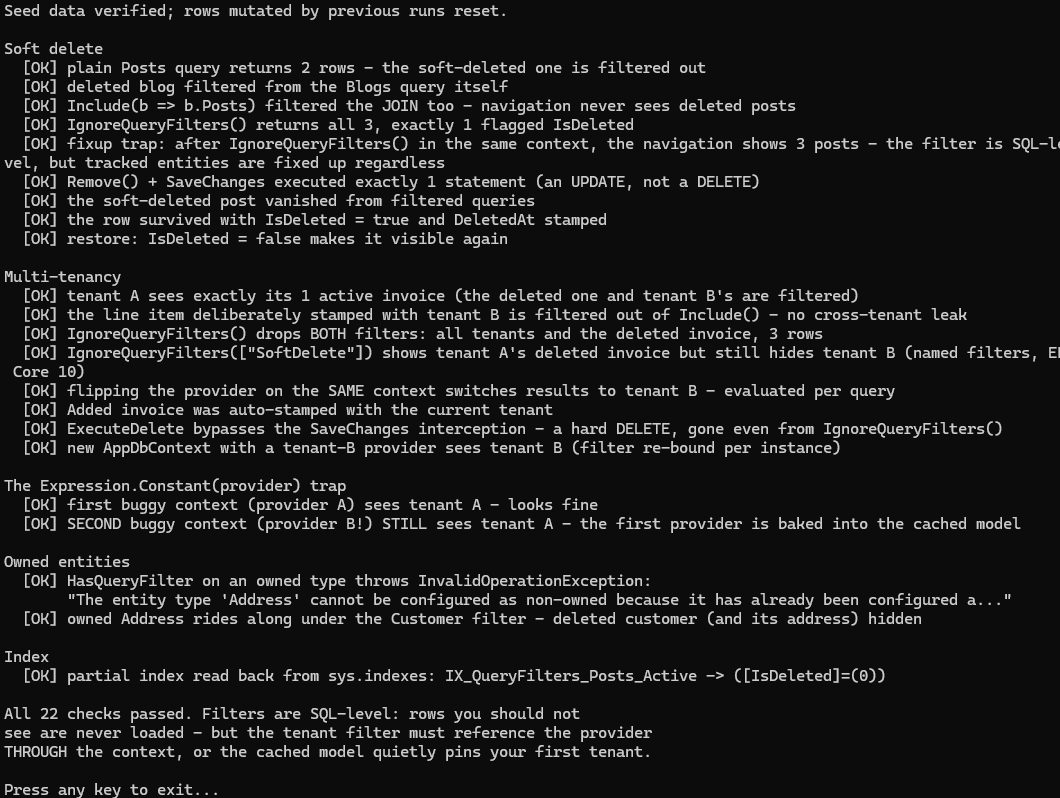
Run its seed.sql
first, then dotnet run. One practical note from writing it: create filtered indexes with QUOTED_IDENTIFIER ON — sqlcmd defaults it OFF and the CREATE INDEX ... WHERE fails.
Summary
| Scenario | Approach |
|---|---|
| Soft delete all entities | Expression tree loop over SoftDeletableEntity subtypes in OnModelCreating |
| Multi-tenancy | Scoped ITenantProvider referenced through the context in the filter; combine with soft-delete filter |
| See deleted records | IgnoreQueryFilters() on the query |
| Restore a record | Fetch with IgnoreQueryFilters(), set IsDeleted = false, save |
| Navigation property filtering | Automatic — EF Core applies filters on included entities |
| Partial index | HasIndex(...).HasFilter("[IsDeleted] = 0") |
| Testing | Seed deleted + active data; assert only active rows returned; use IgnoreQueryFilters() in assertion phase to verify soft-delete writes |
| Owned entities | No filter possible; covered by owner entity's filter |