Async code in C# looks simple until an exception escapes in a fire-and-forget method, or you lose 4 of 5 errors from Task.WhenAll because you only caught the first one. This guide covers every exception-handling pattern you need for production async code.
Every Claim Here Is Asserted, Not Narrated
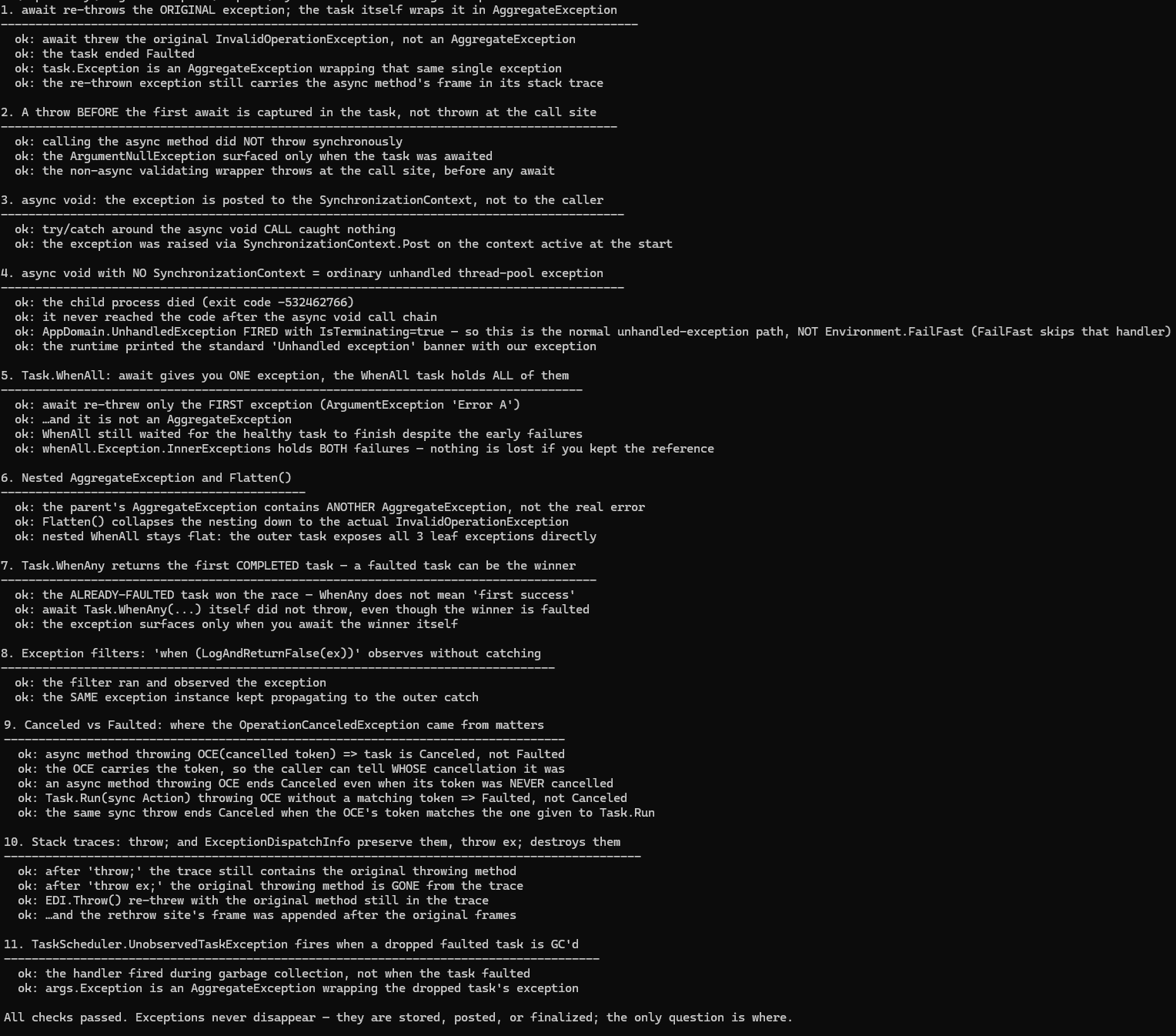
Exception routing is fully observable: which catch block ran, what type came out of the
await, what state the task ended in, what a stack trace contains. So instead of asking you
to trust prose, I turned this article's claims into assertions:
samples/async-exception-handling-csharp
is a console project where every line of output is a passing check. The one claim that
can't be asserted from inside a process — "an async void exception kills it" — is proven
by re-launching the same executable as a child process and inspecting what comes back.
Writing the sample corrected two things I had wrong myself: the widely repeated claim
that async void exceptions in ASP.NET Core go through Environment.FailFast (they
don't — see below), and my assumption that a task only ends Canceled when its token
was actually cancelled (also no).
| Demo | Asserted |
|---|---|
| await re-throw | await throws the original exception type, not AggregateException; the task ends Faulted; task.Exception is the AggregateException wrapper |
| Throw before first await | calling the async method does not throw; the exception surfaces at the await; a non-async validating wrapper throws at the call site instead |
| async void + SyncContext | try/catch around an async void call catches nothing; a custom SynchronizationContext receives the exception via Post |
| async void, no SyncContext | the child process dies via the normal unhandled-exception path — AppDomain.UnhandledException fires with IsTerminating=true, which Environment.FailFast would have skipped |
Task.WhenAll | await re-throws only the first exception; the healthy task still ran to completion; the combined task's Exception.InnerExceptions holds every failure |
| Nested aggregates | attached child tasks nest AggregateExceptions and Flatten() collapses them; WhenAll-of-WhenAll stays flat |
Task.WhenAny | an already-faulted task wins the race; await Task.WhenAny itself never throws; the exception surfaces when you await the winner |
| Exception filters | a when filter returning false observes the exception without catching; the same instance keeps propagating |
| Canceled vs Faulted | an async method throwing OperationCanceledException ends Canceled even with a never-cancelled token; a sync Task.Run delegate ends Faulted unless the token matches |
| Stack traces | throw; and ExceptionDispatchInfo keep the original frame; throw ex; erases it |
| Unobserved exceptions | TaskScheduler.UnobservedTaskException fires during garbage collection, not at fault time |
How Exceptions Propagate in Async Methods
When you await a faulted task, the exception stored inside it is re-thrown at the await site. This means ordinary try/catch blocks work exactly as you expect:
public async Task<string> FetchDataAsync(string url)
{
    try
    {
        using var client = new HttpClient();
        // If GetStringAsync throws, the exception is captured in the returned Task.
        // When we await it, the exception is re-thrown here.
        return await client.GetStringAsync(url);
    }
    catch (HttpRequestException ex)
    {
        _logger.LogError(ex, "HTTP request failed for {Url}", url);
        throw; // Re-throw to preserve the original stack trace
    }
}
The compiler transforms your async method into a state machine. When an exception occurs inside that state machine, it is caught and stored as the Task's fault. The exception surfaces when the caller awaits the task.
What Happens Without await
If you never await a task, the exception is swallowed silently — it becomes an unobserved exception:
// BAD: The exception from ProcessAsync() is never observed.
// No crash, no log entry, nothing. The bug is invisible.
_ = ProcessAsync();

// BETTER: At minimum, attach a continuation to log failures
Task.Run(ProcessAsync).ContinueWith(t =>
{
    if (t.IsFaulted)
        _logger.LogError(t.Exception, "Background task failed");
}, TaskContinuationOptions.OnlyOnFaulted);
Synchronous Exceptions in Async Methods
An exception thrown before the first await in an async method is still captured into the returned Task — it does not escape synchronously:
public async Task DoWorkAsync(string input)
{
    // This ArgumentNullException is captured in the Task, NOT thrown synchronously.
    // The caller must await the task to observe it.
    if (input is null) throw new ArgumentNullException(nameof(input));

    await Task.Delay(100);
}

// Caller sees the exception only when awaiting:
try
{
    await DoWorkAsync(null); // Exception surfaces here
}
catch (ArgumentNullException ex)
{
    Console.WriteLine(ex.Message);
}For argument validation you want to enforce immediately (before any async work), split the method into a public synchronous wrapper that validates and a private async implementation. This is the pattern used by many BCL methods.
// Public entry point — synchronous, throws immediately on bad input
public Task DoWorkAsync(string input)
{
    if (input is null) throw new ArgumentNullException(nameof(input));
    return DoWorkCoreAsync(input);
}

private async Task DoWorkCoreAsync(string input)
{
    await Task.Delay(100);
    // ... actual work
}
The async void Exception Problem
async void methods are the most dangerous pattern in async C#. Exceptions thrown inside them are raised directly on the SynchronizationContext that was active when the method started — they cannot be caught by a surrounding try/catch:
// DANGEROUS: Exception cannot be caught by callers
private async void OnButtonClick(object sender, EventArgs e)
{
    await Task.Delay(100);
    throw new InvalidOperationException("This will crash the process");
}

// This catch block does NOTHING for async void exceptions:
try
{
    OnButtonClick(this, EventArgs.Empty); // Returns immediately (void)
}
catch (InvalidOperationException)
{
    // Never reached. The exception was raised on the SynchronizationContext.
}
In a WinForms or WPF app the exception lands on the UI thread — unless something like Application.ThreadException (WinForms) or DispatcherUnhandledException (WPF) intercepts it, the application dies. In ASP.NET Core there is no SynchronizationContext, so the exception is re-thrown on the thread pool and takes the process down as an ordinary unhandled exception.
You will see it claimed — an earlier version of this article claimed it too — that this path calls Environment.FailFast. It doesn't, and the difference is testable: Environment.FailFast skips AppDomain.UnhandledException handlers, so I had the sample re-launch itself as a child process, let an async void exception escape with no SynchronizationContext, and watch from the outside. The child's AppDomain.UnhandledException handler fires, with IsTerminating=true, before the process dies with the runtime's standard Unhandled exception banner and exit code 0xE0434352. That is the normal unhandled-exception path — which also means a global handler still gets one last chance to log before an async void bug kills your service.
The Only Acceptable async void
Event handlers are the one legitimate use case, and even then you should wrap the body in try/catch:
// Acceptable: event handler, but guard the entire body
private async void OnButtonClick(object sender, EventArgs e)
{
    try
    {
        await LoadDataAsync();
        UpdateUI();
    }
    catch (Exception ex)
    {
        // Handle gracefully — cannot let this escape
        MessageBox.Show($"Error: {ex.Message}");
    }
}Never use async void outside of event handlers. If a method must return void (e.g., an interface implementation), return async Task instead. If the interface signature is fixed, wrap the async call and handle exceptions inline.
Converting async void to async Task
// Interface you cannot change
public interface IProcessor
{
    void Process(string data);
}

// Implementation that needs async work
public class DataProcessor : IProcessor
{
    // Pattern: fire-and-forget but handle exceptions inline
    public void Process(string data)
    {
        // Do NOT make this method async void.
        // Instead, start the task and attach error handling.
        _ = ProcessInternalAsync(data).ContinueWith(
            t => _logger.LogError(t.Exception, "Processing failed for {Data}", data),
            TaskContinuationOptions.OnlyOnFaulted
        );
    }

    private async Task ProcessInternalAsync(string data)
    {
        await Task.Delay(50);
        // actual async work
    }
}
AggregateException and Task.WhenAll
Task.WhenAll waits for all tasks to complete regardless of failures — the sample asserts that a healthy task still runs to completion while two siblings fault. When tasks fault, the combined task's Exception property is an AggregateException containing every failure. But await unwraps it: only the first exception is re-thrown. The others aren't destroyed — they're still on the combined task — but if you never kept a reference to it, you have no way to reach them.
var tasks = new[]
{
    Task.FromException(new ArgumentException("Error A")),
    Task.FromException(new InvalidOperationException("Error B")),
    Task.FromException(new TimeoutException("Error C")),
};

try
{
    await Task.WhenAll(tasks); // Only ArgumentException ("Error A") is re-thrown!
}
catch (Exception ex)
{
    // ex is ArgumentException — Error B and Error C are unreachable
    // because we never kept a reference to the combined task
    Console.WriteLine(ex.Message); // "Error A"
}
Capturing All Exceptions from Task.WhenAll
The solution is to hold a reference to the combined task before awaiting, then inspect its Exception property:
public async Task ProcessAllAsync(IEnumerable<string> items)
{
    var tasks = items.Select(ProcessItemAsync).ToList();

    // Store the aggregate task before awaiting
    var allTasks = Task.WhenAll(tasks);

    try
    {
        await allTasks;
    }
    catch
    {
        // allTasks.Exception is the full AggregateException with ALL inner exceptions
        if (allTasks.Exception is not null)
        {
            foreach (var inner in allTasks.Exception.InnerExceptions)
            {
                _logger.LogError(inner, "Task failed: {Message}", inner.Message);
            }
        }

        // Re-throw or handle as needed
        throw;
    }
}
Flatten Nested AggregateExceptions
AggregateExceptions can nest — an AggregateException whose inner exceptions are themselves AggregateExceptions. .Flatten() collapses the hierarchy into a single level. But be precise about when nesting actually happens, because I expected the wrong answer: nesting one Task.WhenAll inside another does not nest the aggregates. The sample awaits a WhenAll of a WhenAll, and the outer task exposes all three leaf exceptions in a flat list.
Where you do get genuine nesting is the older TPL patterns, such as attached child tasks:
// Attached child tasks are the classic source of genuinely nested aggregates
var parent = Task.Factory.StartNew(() =>
{
    Task.Factory.StartNew(
        () => throw new InvalidOperationException("from attached child"),
        TaskCreationOptions.AttachedToParent);
});

try
{
    parent.Wait();
}
catch (AggregateException ex)
{
    // ex.InnerExceptions[0] is ANOTHER AggregateException — not the real error.
    // Flatten() collapses the hierarchy to a flat InnerExceptions list:
    foreach (var inner in ex.Flatten().InnerExceptions)
    {
        Console.WriteLine($"{inner.GetType().Name}: {inner.Message}"); // InvalidOperationException
    }
}
If your code composes tasks with WhenAll and await, you rarely need Flatten() — but calling it before iterating costs nothing and makes the loop correct for both shapes.
Collecting Results AND Errors from Task.WhenAll
Sometimes you want all successful results AND all errors, not just the first error:
public async Task<(List<T> Results, List<Exception> Errors)> WhenAllSafeAsync<T>(
    IEnumerable<Task<T>> tasks)
{
    // Wrap each task so it never faults — captures success or failure
    var safeTasks = tasks
        .Select(async t =>
        {
            try
            {
                return (Value: await t, Error: (Exception?)null);
            }
            catch (Exception ex)
            {
                return (Value: default(T)!, Error: ex);
            }
        })
        .ToList();

    var outcomes = await Task.WhenAll(safeTasks);

    var results = outcomes
        .Where(o => o.Error is null)
        .Select(o => o.Value)
        .ToList();

    var errors = outcomes
        .Where(o => o.Error is not null)
        .Select(o => o.Error!)
        .ToList();

    return (results, errors);
}
Task.WhenAll vs Task.WhenAny Exception Behavior
Task.WhenAny returns as soon as any task completes — and "completes" includes faulted and cancelled, not just succeeded. The returned task is the completed task itself, not a new wrapper, and await Task.WhenAny(...) itself never throws. The sample makes the trap explicit by racing a pending task against an already-faulted one — the faulted task wins:
var pending = Task.Delay(5_000).ContinueWith(_ => "slow result");
var alreadyFaulted = Task.FromException<string>(new InvalidOperationException("fast failure"));

// winner IS alreadyFaulted — WhenAny means "first completed", and a fault
// completes immediately. Note that this await did NOT throw.
var winner = await Task.WhenAny(pending, alreadyFaulted);

// The exception surfaces only when you await the winner itself
try
{
    var result = await winner;
    Console.WriteLine(result);
}
catch (InvalidOperationException ex)
{
    Console.WriteLine($"Winner faulted: {ex.Message}");
}
// Note: the other tasks are still running! Their exceptions are unobserved
// unless you explicitly handle them.With Task.WhenAny, the tasks that did NOT win are still executing. If they fault later, those exceptions become unobserved. Always attach error handling to the non-winning tasks if you care about their outcomes.
Pattern: WhenAny with Cleanup
public async Task<string> RaceWithFallbackAsync(CancellationToken ct)
{
    var primary = FetchFromPrimaryAsync(ct);
    var secondary = FetchFromSecondaryAsync(ct);

    var first = await Task.WhenAny(primary, secondary);

    // Observe the other task to prevent unobserved exception warnings
    _ = first == primary
        ? secondary.ContinueWith(t => { /* swallow or log */ }, ct)
        : primary.ContinueWith(t => { /* swallow or log */ }, ct);

    // Will throw if first faulted
    return await first;
}
Handling Exceptions from Parallel Tasks Without Losing Results
A common requirement: run N tasks in parallel, collect all results, and report all errors together.
public record TaskOutcome<T>(T? Value, Exception? Error, string TaskId);

public async Task<IReadOnlyList<TaskOutcome<T>>> RunAllAsync<T>(
    IReadOnlyList<(string Id, Func<Task<T>> Factory)> work)
{
    var tasks = work.Select(async item =>
    {
        try
        {
            var value = await item.Factory();
            return new TaskOutcome<T>(value, null, item.Id);
        }
        catch (Exception ex)
        {
            return new TaskOutcome<T>(default, ex, item.Id);
        }
    });

    return await Task.WhenAll(tasks);
}

// Usage:
var outcomes = await RunAllAsync(new[]
{
    ("user-1", () => FetchUserAsync(1)),
    ("user-2", () => FetchUserAsync(2)),
    ("user-3", () => FetchUserAsync(3)),
});

var successful = outcomes.Where(o => o.Error is null).ToList();
var failed = outcomes.Where(o => o.Error is not null).ToList();

foreach (var failure in failed)
    _logger.LogError(failure.Error, "Failed to fetch {TaskId}", failure.TaskId);
ExceptionDispatchInfo — Rethrowing with Original Stack Trace
The throw; statement preserves the stack trace when rethrowing. But sometimes you need to capture an exception in one place and rethrow it in another — for that, use ExceptionDispatchInfo:
using System.Runtime.ExceptionServices;

public class ExceptionRelay
{
    private ExceptionDispatchInfo? _captured;

    public void CaptureException(Action work)
    {
        try
        {
            work();
        }
        catch (Exception ex)
        {
            // Captures the exception AND its full stack trace at this point
            _captured = ExceptionDispatchInfo.Capture(ex);
        }
    }

    public void Rethrow()
    {
        // Rethrows with the ORIGINAL stack trace preserved: the trace keeps the frames
        // from where the exception was first thrown, with this rethrow site appended
        // after them.
        _captured?.Throw();
    }
}
ExceptionDispatchInfo in async Pipelines
public async Task ProcessWithRetryAsync(Func<Task> operation, int maxRetries)
{
    ExceptionDispatchInfo? lastException = null;

    for (int attempt = 0; attempt < maxRetries; attempt++)
    {
        try
        {
            await operation();
            return; // Success
        }
        catch (Exception ex) when (IsTransient(ex))
        {
            // Capture preserves the stack trace from each attempt
            lastException = ExceptionDispatchInfo.Capture(ex);
            await Task.Delay(TimeSpan.FromSeconds(Math.Pow(2, attempt)));
        }
    }

    // Throws the last captured exception with its original stack trace
    lastException!.Throw();
}
Exception Filters with when
Exception filters let you catch conditionally without unwinding the stack, which preserves more debugging information (the stack is still intact when the filter runs):
public async Task ExecuteWithFilterAsync()
{
    try
    {
        await RiskyOperationAsync();
    }
    // Catches only transient HTTP errors — others propagate normally
    catch (HttpRequestException ex) when (ex.StatusCode == HttpStatusCode.ServiceUnavailable)
    {
        await HandleServiceUnavailableAsync();
    }
    // Catches only a specific message — useful during debugging
    catch (InvalidOperationException ex) when (ex.Message.Contains("timeout"))
    {
        await HandleTimeoutAsync();
    }
    // Catches everything BUT logs it for diagnostics without catching permanently
    catch (Exception ex) when (LogAndRethrow(ex))
    {
        // This block is unreachable if LogAndRethrow always returns false
    }
}

// Useful pattern: log-and-rethrow via exception filter
// The filter runs BEFORE the stack unwinds, giving you a complete trace
private bool LogAndRethrow(Exception ex)
{
    _logger.LogError(ex, "Exception in ExecuteWithFilterAsync");
    return false; // Returning false means the exception is NOT caught
}when filters execute before the stack unwinds. If your filter always returns false, the exception propagates with its full stack intact — this is better than catch + throw for pure diagnostic logging.
Combining when with Type Filters
catch (SqlException ex) when (ex.Number == 1205) // Deadlock victim
{
    await RetryAfterDeadlockAsync();
}

catch (OperationCanceledException ex) when (ex.CancellationToken == _shutdownToken)
{
    // Only catch cancellations from OUR token, not from other tokens
    _logger.LogInformation("Shutting down gracefully");
}
Cancellation vs Faulted Task State
Cancellation has special status in .NET's task model. An OperationCanceledException thrown from an async method transitions the task to the Canceled state (not Faulted), and await re-throws it as OperationCanceledException. (For how tokens get cancelled in the first place, see CancellationToken in C# — Practical Patterns.)
The exact rule surprised me when I asserted it. An async method that throws OperationCanceledException ends Canceled even if the token attached to the exception was never cancelled — the async state machine special-cases the exception type, not the token state. A synchronous delegate in Task.Run gets the opposite default: throwing an OperationCanceledException leaves that task Faulted, unless the exception's token is the same token you passed to Task.Run and it is actually cancelled. All four combinations are asserted in the sample.
public async Task DemonstrateTaskStatesAsync()
{
    var cts = new CancellationTokenSource();
    cts.Cancel();

    var canceledTask = Task.FromCanceled(cts.Token);
    var faultedTask = Task.FromException(new InvalidOperationException("boom"));

    Console.WriteLine(canceledTask.Status);  // Canceled
    Console.WriteLine(faultedTask.Status);   // Faulted

    try
    {
        await canceledTask;
    }
    catch (OperationCanceledException ex)
    {
        // ex.CancellationToken is populated — you can check which token canceled
        Console.WriteLine($"Canceled by token: {ex.CancellationToken == cts.Token}");
    }
}
Distinguishing Cancellation from Other Exceptions
public async Task<Result> ProcessWithCancellationAsync(
    string input,
    CancellationToken ct)
{
    try
    {
        return await DoProcessAsync(input, ct);
    }
    catch (OperationCanceledException) when (ct.IsCancellationRequested)
    {
        // Expected — caller requested cancellation. Not an error.
        _logger.LogDebug("Processing cancelled for input {Input}", input);
        return Result.Cancelled;
    }
    catch (OperationCanceledException ex)
    {
        // A DIFFERENT token was cancelled — this IS an unexpected error
        _logger.LogWarning(ex, "Unexpected cancellation");
        throw;
    }
    catch (Exception ex)
    {
        _logger.LogError(ex, "Unexpected error processing {Input}", input);
        throw;
    }
}Always check ct.IsCancellationRequested in your OperationCanceledException catch block. This distinguishes "caller asked us to stop" (normal) from "some dependency timed out" (unexpected), which might be a bug.
TaskCanceledException vs OperationCanceledException
TaskCanceledException inherits from OperationCanceledException. HttpClient throws TaskCanceledException for both timeouts and explicit cancellation. Since .NET 5, a HttpClient.Timeout expiry additionally carries an inner TimeoutException — the CancellationToken sample asserts this against a deliberately stalled local server. For your own timeout sources, distinguish by the token:
var cts = new CancellationTokenSource(TimeSpan.FromSeconds(30));

try
{
    var response = await _httpClient.GetAsync(url, cts.Token);
}
catch (TaskCanceledException ex)
{
    if (cts.Token.IsCancellationRequested)
    {
        // We asked to cancel — or our 30s timeout fired
        throw new TimeoutException("Request timed out", ex);
    }
    // HttpClient's internal token — shouldn't normally reach here
    throw;
}
Global Unobserved Task Exception Handler
When a faulted task is garbage-collected without its exception being observed, TaskScheduler.UnobservedTaskException fires. This is your last-chance handler for exceptions from fire-and-forget tasks:
// Program.cs — register at startup
TaskScheduler.UnobservedTaskException += (sender, args) =>
{
    // args.Exception is the AggregateException wrapping the unobserved exceptions
    foreach (var ex in args.Exception.InnerExceptions)
    {
        _logger.LogCritical(ex, "Unobserved task exception");
    }

    // Call SetObserved() to prevent the exception from being re-thrown
    // by the finalizer thread (which would crash the process in older .NET versions)
    args.SetObserved();
};In .NET 4.0, unobserved task exceptions crashed the process. Starting with .NET 4.5, they are swallowed by default — but you should still handle them to catch bugs. The finalizer thread timing is non-deterministic, so this handler fires unpredictably during GC cycles, not immediately when the exception occurs.
AppDomain.UnhandledException — The Final Safety Net
For truly unhandled exceptions (not in tasks), use AppDomain.CurrentDomain.UnhandledException. This fires after the process is already doomed — you can log but cannot prevent termination:
AppDomain.CurrentDomain.UnhandledException += (sender, args) =>
{
    var ex = args.ExceptionObject as Exception;
    // args.IsTerminating is true when the runtime is about to abort
    _logger.LogCritical(ex, "Fatal unhandled exception. IsTerminating={IsTerminating}",
        args.IsTerminating);

    // Flush logs synchronously — the process is ending
    Log.CloseAndFlush();
};
Program.cs: Registering All Global Handlers
var builder = WebApplication.CreateBuilder(args);
// ... service registration

var app = builder.Build();

// Global handlers — register before app.Run()
AppDomain.CurrentDomain.UnhandledException += OnUnhandledException;
TaskScheduler.UnobservedTaskException += OnUnobservedTaskException;

app.Run();

static void OnUnhandledException(object sender, UnhandledExceptionEventArgs e)
{
    var logger = /* resolve from DI or use static logger */;
    logger.LogCritical(e.ExceptionObject as Exception, "Unhandled exception");
}

static void OnUnobservedTaskException(object? sender, UnobservedTaskExceptionEventArgs e)
{
    var logger = /* resolve from DI or use static logger */;
    logger.LogError(e.Exception, "Unobserved task exception");
    e.SetObserved();
}
ASP.NET Core Exception Middleware
ASP.NET Core's pipeline-based architecture is ideal for centralized exception handling. Custom middleware gives you full control:
public class ExceptionHandlingMiddleware
{
    private readonly RequestDelegate _next;
    private readonly ILogger<ExceptionHandlingMiddleware> _logger;

    public ExceptionHandlingMiddleware(
        RequestDelegate next,
        ILogger<ExceptionHandlingMiddleware> logger)
    {
        _next = next;
        _logger = logger;
    }

    public async Task InvokeAsync(HttpContext context)
    {
        try
        {
            await _next(context);
        }
        catch (OperationCanceledException) when (context.RequestAborted.IsCancellationRequested)
        {
            // Client disconnected — not an error, no response needed
            _logger.LogDebug("Request cancelled by client: {Path}", context.Request.Path);
        }
        catch (Exception ex)
        {
            _logger.LogError(ex, "Unhandled exception for {Method} {Path}",
                context.Request.Method,
                context.Request.Path);

            await WriteErrorResponseAsync(context, ex);
        }
    }

    private static async Task WriteErrorResponseAsync(HttpContext context, Exception ex)
    {
        // Don't overwrite a response that's already started streaming
        if (context.Response.HasStarted) return;

        context.Response.StatusCode = ex switch
        {
            ArgumentException => StatusCodes.Status400BadRequest,
            UnauthorizedAccessException => StatusCodes.Status401Unauthorized,
            KeyNotFoundException => StatusCodes.Status404NotFound,
            _ => StatusCodes.Status500InternalServerError
        };

        context.Response.ContentType = "application/json";

        var response = new
        {
            error = ex.Message,
            traceId = context.TraceIdentifier
        };

        await context.Response.WriteAsJsonAsync(response);
    }
}
Registration and UseExceptionHandler
// Program.cs
app.UseMiddleware<ExceptionHandlingMiddleware>();

// Or use the built-in UseExceptionHandler for simple cases:
app.UseExceptionHandler(errorApp =>
{
    errorApp.Run(async context =>
    {
        var exceptionFeature = context.Features.Get<IExceptionHandlerFeature>();
        var ex = exceptionFeature?.Error;

        context.Response.StatusCode = 500;
        context.Response.ContentType = "application/json";

        await context.Response.WriteAsJsonAsync(new
        {
            error = "An unexpected error occurred",
            traceId = context.TraceIdentifier
        });
    });
});
Exception Handler in Minimal APIs with IExceptionHandler
.NET 8 introduced IExceptionHandler for structured exception handling that integrates with the DI container:
public class AppExceptionHandler : IExceptionHandler
{
    private readonly ILogger<AppExceptionHandler> _logger;

    public AppExceptionHandler(ILogger<AppExceptionHandler> logger)
    {
        _logger = logger;
    }

    public async ValueTask<bool> TryHandleAsync(
        HttpContext httpContext,
        Exception exception,
        CancellationToken cancellationToken)
    {
        _logger.LogError(exception, "Exception occurred: {Message}", exception.Message);

        var (statusCode, title) = exception switch
        {
            ArgumentException => (StatusCodes.Status400BadRequest, "Bad Request"),
            KeyNotFoundException => (StatusCodes.Status404NotFound, "Not Found"),
            UnauthorizedAccessException => (StatusCodes.Status401Unauthorized, "Unauthorized"),
            _ => (StatusCodes.Status500InternalServerError, "Internal Server Error")
        };

        var problemDetails = new ProblemDetails
        {
            Status = statusCode,
            Title = title,
            Detail = exception.Message,
            Instance = httpContext.Request.Path
        };

        httpContext.Response.StatusCode = statusCode;
        await httpContext.Response.WriteAsJsonAsync(problemDetails, cancellationToken);

        // Return true = exception handled, false = pass to next handler
        return true;
    }
}

// Registration in Program.cs:
builder.Services.AddExceptionHandler<AppExceptionHandler>();
builder.Services.AddProblemDetails();

app.UseExceptionHandler();
Practical Patterns — Putting It All Together
Resilient HTTP Call with Full Exception Handling
public class ResilientApiClient
{
    private readonly HttpClient _httpClient;
    private readonly ILogger<ResilientApiClient> _logger;

    public async Task<T?> GetAsync<T>(string endpoint, CancellationToken ct = default)
    {
        const int MaxRetries = 3;
        ExceptionDispatchInfo? lastCapture = null;

        for (int attempt = 1; attempt <= MaxRetries; attempt++)
        {
            try
            {
                using var response = await _httpClient.GetAsync(endpoint, ct);
                response.EnsureSuccessStatusCode();
                return await response.Content.ReadFromJsonAsync<T>(cancellationToken: ct);
            }
            catch (OperationCanceledException) when (ct.IsCancellationRequested)
            {
                // Caller cancelled — stop retrying immediately
                _logger.LogDebug("Request cancelled: {Endpoint}", endpoint);
                throw;
            }
            catch (HttpRequestException ex) when (IsRetryable(ex))
            {
                _logger.LogWarning(ex, "Attempt {Attempt}/{Max} failed for {Endpoint}",
                    attempt, MaxRetries, endpoint);

                // Preserve stack trace for final rethrow
                lastCapture = ExceptionDispatchInfo.Capture(ex);

                if (attempt < MaxRetries)
                    await Task.Delay(TimeSpan.FromSeconds(attempt * 2), ct);
            }
        }

        // All retries exhausted — rethrow with original stack trace
        lastCapture!.Throw();
        return default; // Unreachable, but satisfies compiler
    }

    private static bool IsRetryable(HttpRequestException ex) =>
        ex.StatusCode is HttpStatusCode.ServiceUnavailable or HttpStatusCode.TooManyRequests
        || ex.StatusCode is null; // Network-level failures
}
Batch Processing with Error Isolation
public async Task<BatchResult<T>> ProcessBatchAsync<T>(
    IReadOnlyList<string> itemIds,
    Func<string, CancellationToken, Task<T>> processor,
    int concurrency = 10,
    CancellationToken ct = default)
{
    using var semaphore = new SemaphoreSlim(concurrency);
    var results = new ConcurrentBag<(string Id, T? Value, Exception? Error)>();

    var tasks = itemIds.Select(async id =>
    {
        await semaphore.WaitAsync(ct);
        try
        {
            var value = await processor(id, ct);
            results.Add((id, value, null));
        }
        catch (OperationCanceledException) when (ct.IsCancellationRequested)
        {
            throw; // Propagate cancellation
        }
        catch (Exception ex)
        {
            // Isolate the failure — other items continue processing
            results.Add((id, default, ex));
        }
        finally
        {
            semaphore.Release();
        }
    });

    await Task.WhenAll(tasks);

    return new BatchResult<T>(
        Successes: results.Where(r => r.Error is null)
                          .Select(r => (r.Id, r.Value!))
                          .ToList(),
        Failures: results.Where(r => r.Error is not null)
                         .Select(r => (r.Id, r.Error!))
                         .ToList()
    );
}

public record BatchResult<T>(
    IReadOnlyList<(string Id, T Value)> Successes,
    IReadOnlyList<(string Id, Exception Error)> Failures
);
How I tested this
The sample behind this article runs on the .NET 10 SDK on Windows 11 and ends with 36 passing assertions across 11 demos. Most of them are in-process: which catch block ran, what type came out of the await, what state the task ended in, whether a stack trace still contains the original frame. The one claim that cannot be checked from inside a process, that an unhandled exception in an async void method kills it, is checked by relaunching the same executable as a child process and inspecting what comes back.
That child-process check is what corrected the biggest error in the earlier version of this article, which repeated the common claim that ASP.NET Core routes these exceptions through Environment.FailFast. It does not: AppDomain.UnhandledException fires with IsTerminating set to true, which FailFast would have skipped. Two smaller fixes came from the same exercise. A Task.WhenAny example was backwards, because the "slow" task built with Task.FromException is already faulted and wins the race immediately. And the Flatten() section had the nesting rule wrong: nested WhenAll calls do not nest aggregates, only attached child tasks do.
To reproduce:
git clone https://github.com/jorgenhoc-org/dotnet-samples
cd dotnet-samples/samples/async-exception-handling-csharp
dotnet run
Summary
| Scenario | Pattern |
|---|---|
| Normal async exception | try/catch around await — works as expected |
| async void exception | Wraps with try/catch inside handler; avoid async void entirely |
All exceptions from Task.WhenAll | Hold reference to combined task; inspect .Exception.InnerExceptions |
Nested AggregateException | Call .Flatten() before iterating |
| Preserve stack trace on rethrow | Use throw; or ExceptionDispatchInfo.Capture().Throw() |
| Conditional catch | Exception filter: catch (Ex e) when (condition) |
| Cancellation vs fault | catch (OperationCanceledException) when (ct.IsCancellationRequested) |
| Fire-and-forget safety net | TaskScheduler.UnobservedTaskException |
| Process-level safety net | AppDomain.CurrentDomain.UnhandledException |
| ASP.NET Core centralized handling | Custom middleware or IExceptionHandler (.NET 8+) |
Every behavioural claim above is asserted by
samples/async-exception-handling-csharp
— clone it and run dotnet run if you want to see any of them fail on a future runtime.
Two neighbouring topics are worth reading next.
CancellationToken in C# — Practical Patterns covers the
producer side of the Canceled-vs-Faulted distinction — linked tokens, timeouts, and
telling whose cancellation you caught. And when an exception never surfaces because the
code is stuck rather than faulted, that is usually a
sync-over-async deadlock, which needs different tools
entirely.