Every C# developer has seen ConfigureAwait(false) scattered through library code and wondered whether to copy the pattern. The short answer depends entirely on what kind of code you are writing and which runtime hosts it.
What Is SynchronizationContext?
SynchronizationContext is an abstraction that lets the .NET runtime know where to post a continuation after an await completes. Think of it as a scheduler that says "when this async operation finishes, resume execution here."
Different application models install different contexts:
| Application type | SynchronizationContext present? | What it does |
|---|---|---|
| WinForms | Yes (WindowsFormsSynchronizationContext) | Marshals continuations back to the UI thread |
| WPF | Yes (DispatcherSynchronizationContext) | Same — marshals to the Dispatcher thread |
| ASP.NET (classic, .NET Framework) | Yes (AspNetSynchronizationContext) | Ensures only one thread runs per request at a time |
| ASP.NET Core | No | No context installed; thread-pool threads used directly |
| Console app (.NET 5+) | No | No context; thread-pool is used |
| Blazor WebAssembly | Yes | Single-threaded; context marshals back to JS thread |
| xUnit / NUnit / MSTest | Varies by version | Some install a context to test synchronization |
The presence or absence of a SynchronizationContext is the key fact that drives every decision in this article.
ConfigureAwait(true) — The Default Behavior
When you write a plain await, C# compiles it as await someTask.ConfigureAwait(true). The true argument means:
- Before suspending, capture the current
SynchronizationContext(orTaskSchedulerif no context is present). - When the awaited task completes, post the continuation back to that captured context.
This is what makes UI code safe — you can await a network call and then touch a TextBox on the next line without an explicit Dispatcher.Invoke:
// WPF code-behind — ConfigureAwait(true) is the default
private async void Button_Click(object sender, RoutedEventArgs e)
{
    string result = await FetchDataAsync(); // suspends here
    // Resumed on the UI thread — safe to touch UI controls
    myLabel.Content = result;
}
The cost: after the awaited task completes on a thread-pool thread, the runtime must post the continuation back to the captured context (e.g., the UI message loop). That round-trip has overhead, and in frameworks like classic ASP.NET it can cause deadlocks.
ConfigureAwait(false) — Skipping the Context Recapture
ConfigureAwait(false) tells the awaiter: "I do not need to resume on the original context. Resume on whatever thread is available (usually a thread-pool thread)."
string result = await FetchDataAsync().ConfigureAwait(false);
// Resumed on a thread-pool thread — do NOT touch UI controls here
Internally, the compiler-generated state machine checks the awaiter's ContinueOnCapturedContext flag. When it is false, the continuation is scheduled directly on the thread pool (via ThreadPool.QueueUserWorkItem or similar) rather than being posted to the captured SynchronizationContext.
Step-by-Step Comparison
// --- ConfigureAwait(true) flow ---
// Thread: UI thread (SynchronizationContext = DispatcherSynchronizationContext)
await Task.Delay(100);
// 1. Capture DispatcherSynchronizationContext
// 2. Task.Delay completes on thread-pool thread T2
// 3. T2 posts continuation to Dispatcher queue
// 4. UI thread picks it up from the queue
// Thread: UI thread again ✓

// --- ConfigureAwait(false) flow ---
// Thread: UI thread (SynchronizationContext = DispatcherSynchronizationContext)
await Task.Delay(100).ConfigureAwait(false);
// 1. SynchronizationContext is intentionally NOT captured
// 2. Task.Delay completes on thread-pool thread T2
// 3. Continuation runs directly on T2 (no Dispatcher round-trip)
// Thread: thread-pool thread T2
Measured: Counting the Posts
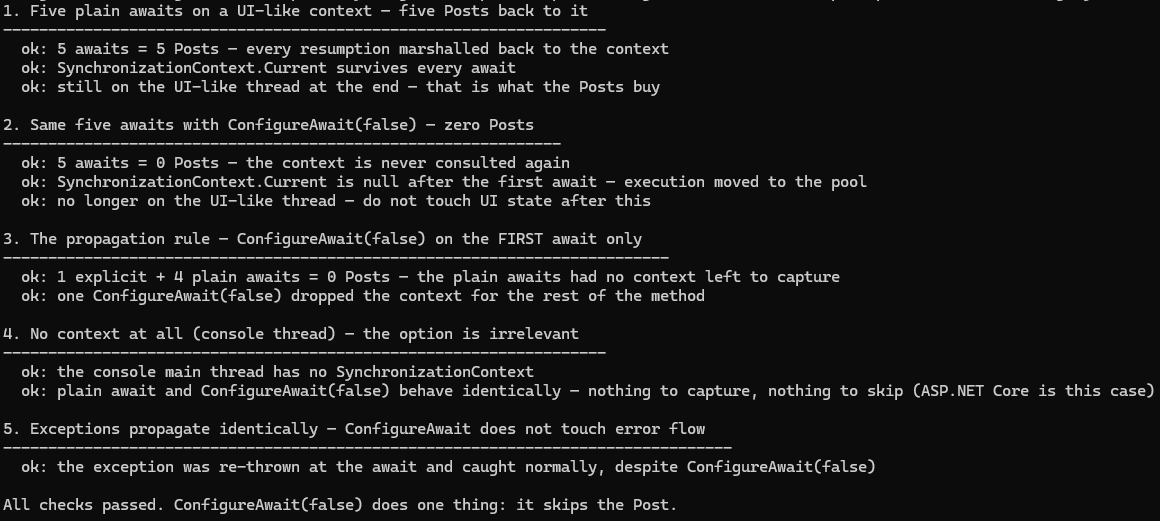
That flow description is checkable, because "post the continuation back" is one call to
SynchronizationContext.Post. samples/configureawait-false-csharp
installs a UI-like single-threaded context with a counter on Post and runs the same
method both ways — deterministic numbers, identical on every machine, unlike nanosecond
timings:
| Scenario (on the context thread) | Awaits | Posts counted | Also asserted |
|---|---|---|---|
| Plain awaits | 5 | 5 | context survives; still on the UI-like thread |
All ConfigureAwait(false) | 5 | 0 | Current is null after the first await; off the UI thread |
ConfigureAwait(false) on the first await only | 1 + 4 plain | 0 | the propagation rule below |
| No context at all (console thread) | 2 | n/a | both forms behave identically — the ASP.NET Core case |
One await, one Post; ConfigureAwait(false) skips exactly that. Everything else in
this article follows from those numbers.
The Classic Deadlock — Why ConfigureAwait(false) Matters
The most important reason to know this API is deadlock prevention in blocking-over-async patterns. Consider classic ASP.NET (.NET Framework) where a SynchronizationContext limits concurrency to one thread per request:
// Library method — does NOT use ConfigureAwait(false)
public async Task<string> GetDataAsync()
{
    await Task.Delay(500); // captures AspNetSynchronizationContext
    return "hello";
}

// Controller action — blocks synchronously (BAD practice, but it happens)
public ActionResult Index()
{
    // .Result blocks the request thread while holding the context lock
    string data = GetDataAsync().Result; // DEADLOCK
    return Content(data);
}
Why it deadlocks:
Index()callsGetDataAsync()and blocks the request thread by calling.Result.- The request thread holds the
AspNetSynchronizationContext. Task.Delaycompletes and tries to post the continuation back to that context.- The context is locked (the request thread is blocking on
.Result). - The continuation waits for the context. The blocked thread waits for the continuation. Deadlock.
Fix with ConfigureAwait(false):
public async Task<string> GetDataAsync()
{
    // Does NOT try to return to AspNetSynchronizationContext
    await Task.Delay(500).ConfigureAwait(false);
    return "hello"; // runs on a thread-pool thread — no context needed
}
Now when Task.Delay completes, the continuation runs on a thread-pool thread instead of trying to re-enter the held context. The deadlock is broken.
The deadlock only occurs when someone calls .Result, .Wait(), or GetAwaiter().GetResult() on an async method that uses the default ConfigureAwait(true). The real fix is to make the entire call chain async. ConfigureAwait(false) is a safety net, not a license to block.
WinForms / WPF Deadlock — Same Pattern
// WPF: button click handler that calls .Result (never do this in real code)
private void BadButton_Click(object sender, RoutedEventArgs e)
{
    // UI thread blocks, holds DispatcherSynchronizationContext
    string result = SomeLibraryMethod().Result; // deadlock if library uses ConfigureAwait(true)
    myLabel.Content = result;
}

// Library — correct: uses ConfigureAwait(false) throughout
public async Task<string> SomeLibraryMethod()
{
    var data = await HttpClient.GetStringAsync("https://example.com")
        .ConfigureAwait(false); // won't try to post back to Dispatcher
    return data.ToUpper();
}
When ConfigureAwait(false) Is Irrelevant
ASP.NET Core
ASP.NET Core deliberately has no SynchronizationContext. When there is no context to capture, ConfigureAwait(true) and ConfigureAwait(false) behave identically — both resume on a thread-pool thread.
// ASP.NET Core controller — ConfigureAwait(false) has zero effect here
[HttpGet("data")]
public async Task<IActionResult> GetData()
{
    // Identical behavior with or without ConfigureAwait(false)
    var result = await _service.FetchAsync();
    return Ok(result);
}
Console Applications (.NET 5+)
Console apps also have no SynchronizationContext. Any await already resumes on the thread pool. Adding ConfigureAwait(false) is a no-op.
static async Task Main(string[] args)
{
    // No SynchronizationContext present — ConfigureAwait(false) is redundant
    var data = await File.ReadAllTextAsync("input.txt").ConfigureAwait(false);
    Console.WriteLine(data);
}
Why Library Code Should Always Use ConfigureAwait(false)
A library author cannot know who will call their code. The caller might be:
- A WPF application with a
DispatcherSynchronizationContext - A classic ASP.NET application with
AspNetSynchronizationContext - A Blazor app with its own context
- A unit test runner that installs a custom context
If the library uses ConfigureAwait(true) (the default) and the caller blocks on .Result, the deadlock scenario becomes possible. If the library uses ConfigureAwait(false), it opts out of the caller's context entirely and cannot contribute to the deadlock.
// Good library code — context-agnostic throughout
public class DataClient
{
    private readonly HttpClient _http;

    public DataClient(HttpClient http) => _http = http;

    public async Task<UserDto> GetUserAsync(int id)
    {
        // ConfigureAwait(false) on every await — library does not own the context
        var response = await _http.GetAsync($"/users/{id}").ConfigureAwait(false);
        response.EnsureSuccessStatusCode();

        var json = await response.Content.ReadAsStringAsync().ConfigureAwait(false);
        return JsonSerializer.Deserialize<UserDto>(json)!;
    }

    public async Task<IReadOnlyList<OrderDto>> GetOrdersAsync(int userId)
    {
        var response = await _http.GetAsync($"/users/{userId}/orders").ConfigureAwait(false);
        response.EnsureSuccessStatusCode();

        await using var stream = await response.Content.ReadAsStreamAsync().ConfigureAwait(false);
        var orders = await JsonSerializer.DeserializeAsync<List<OrderDto>>(stream).ConfigureAwait(false);
        return orders ?? [];
    }
}The rule of thumb: if you are writing a NuGet package or shared library, add ConfigureAwait(false) to every await. If you are writing application code targeting ASP.NET Core or a console app, it is optional and adds visual noise for no benefit.
The Context Propagation Rule
Once you use ConfigureAwait(false) on a single await in a method, all subsequent awaits in that same method may also run without the context, regardless of their own ConfigureAwait setting. This is because SynchronizationContext.Current becomes null on the thread-pool thread where execution continues.
public async Task ExampleAsync()
{
    // Still on original context
    await FirstOperation().ConfigureAwait(false);

    // Now on thread-pool thread — SynchronizationContext.Current is null
    // This ConfigureAwait(true) is effectively the same as ConfigureAwait(false)
    // because there is no context to return to
    await SecondOperation().ConfigureAwait(true); // redundant — no context present
    await ThirdOperation(); // also fine — no context to capture
}
This does not mean you should be inconsistent. Write ConfigureAwait(false) on every await in library code to be explicit and avoid confusion.
The sample asserts this rule by count: one ConfigureAwait(false) followed by four plain
awaits produced zero Posts — the plain awaits had no context left to capture.
Roslyn Analyzers
Manually adding ConfigureAwait(false) to every await is tedious and error-prone. Several Roslyn analyzers enforce this automatically.
Microsoft.VisualStudio.Threading.Analyzers
Install via NuGet:
dotnet add package Microsoft.VisualStudio.Threading.AnalyzersThis package provides rule VSTHRD111 (UseConfigureAwait) which warns on any await that lacks ConfigureAwait:
// VSTHRD111 warning: Use .ConfigureAwait(false) when awaiting a task
var result = await SomeTaskAsync(); // ⚠ VSTHRD111
Configure in .editorconfig to treat it as an error in library projects:
[*.cs]
dotnet_diagnostic.VSTHRD111.severity = error
Roslynator
dotnet add package Roslynator.AnalyzersRule RCS1090 (UseConfigureAwaitFalse) provides similar enforcement.
.editorconfig Approach
You can also configure the built-in CA2007 analyzer (available in .NET SDK analyzers):
[*.cs]
# CA2007: Consider calling ConfigureAwait on the awaited task
dotnet_diagnostic.CA2007.severity = warning
Note: CA2007 is only triggered when building with <EnableNETAnalyzers>true</EnableNETAnalyzers>, which is the default for new SDK-style projects targeting .NET 5+.
.NET 8: ConfigureAwaitOptions
First, clearing up a myth this article itself used to repeat: there is no project-wide
ConfigureAwait(false) default in .NET — no MSBuild property, no
RuntimeHostConfigurationOption, no assembly-level attribute. An earlier version of this
article described such a mechanism; it does not exist — Stephen Toub's
ConfigureAwait FAQ addresses
directly why the team has repeatedly declined to add a global switch. The only
project-wide lever remains analyzer enforcement (below).
What .NET 8 actually added is an overload: ConfigureAwait(ConfigureAwaitOptions), a
flags enum that generalizes the boolean:
// ConfigureAwaitOptions.None == ConfigureAwait(false)
await task.ConfigureAwait(ConfigureAwaitOptions.None);

// ConfigureAwaitOptions.ContinueOnCapturedContext == ConfigureAwait(true)
await task.ConfigureAwait(ConfigureAwaitOptions.ContinueOnCapturedContext);

// New: complete the await even if the task faulted or was canceled — no exception
// rethrown. Only valid on non-generic Task (a Task<T> would have no result to give you).
await task.ConfigureAwait(ConfigureAwaitOptions.SuppressThrowing);

// New: always yield, even when the task already completed — the await never
// continues synchronously. Useful to force fairness or escape a lock-held path.
await task.ConfigureAwait(ConfigureAwaitOptions.ForceYielding);

// They are flags, so they combine:
await task.ConfigureAwait(
    ConfigureAwaitOptions.SuppressThrowing | ConfigureAwaitOptions.ForceYielding);
The overload exists on Task and Task<TResult> (not ValueTask in .NET 8), and
SuppressThrowing on a Task<TResult> throws ArgumentOutOfRangeException at the
ConfigureAwait call — the misuse fails fast rather than silently handing back a
default result.
The Actual Project-Wide Solution: Enforce It
Since no default exists, the practical repo-wide approach is making the analyzer rule an
error in Directory.Build.props:
<!-- Directory.Build.props — applies to all projects in the directory tree -->
<Project>
  <PropertyGroup>
    <!-- Treat missing ConfigureAwait as a build error across the entire repo -->
    <WarningsAsErrors>$(WarningsAsErrors);CA2007</WarningsAsErrors>
    <EnableNETAnalyzers>true</EnableNETAnalyzers>
    <AnalysisMode>All</AnalysisMode>
  </PropertyGroup>
</Project>
Common Misconceptions
Misconception 1: ConfigureAwait(false) Improves Performance
The measurement above puts a precise shape on this: what ConfigureAwait(false) saves is
one Post per await — and in ASP.NET Core or a console app, zero, because there is no
context to post to. A context post is cheap; the reason to use ConfigureAwait(false) is
deadlock-proofing library code, not speed. Do not add it to application code for
performance reasons — the noise it adds outweighs any theoretical gain.
// Do NOT do this for "performance" in ASP.NET Core — it adds noise with no benefit
public async Task<string> GetDataAsync()
{
    return await _cache.GetAsync("key").ConfigureAwait(false); // pointless in ASP.NET Core
}
Misconception 2: ConfigureAwait(false) Affects Error Handling
Exception propagation works identically regardless of ConfigureAwait. Exceptions thrown inside an awaited task are still captured and re-thrown at the await point, regardless of which thread that continuation runs on. (The sample's final check asserts this: a method that throws after a ConfigureAwait(false) await is caught by an ordinary try/catch at the call site. The one .NET 8 exception to the rule is opt-in: ConfigureAwaitOptions.SuppressThrowing, covered above.)
public async Task DemonstrateExceptionAsync()
{
    try
    {
        // Exception thrown inside FetchAsync is re-thrown here regardless of ConfigureAwait
        await FetchAsync().ConfigureAwait(false);
    }
    catch (HttpRequestException ex)
    {
        // Still caught — ConfigureAwait does not affect exception flow
        _logger.LogError(ex, "Fetch failed");
        throw;
    }
}
Misconception 3: ConfigureAwait(false) Makes Code Thread-Safe
ConfigureAwait(false) only changes which thread the continuation runs on. It has no effect on thread safety, shared state, or data races. You still need proper synchronization primitives when accessing shared mutable state.
Misconception 4: You Need ConfigureAwait(false) in async void Methods
async void methods are event handlers and fire-and-forget scenarios. They still capture the SynchronizationContext and still benefit from ConfigureAwait(false) if they call library code that might be blocked. But the same rules apply — you only need it to prevent deadlocks or to avoid unnecessary context switches in frameworks that have a context.
Practical Patterns
Pattern 1: HttpClient Wrapper Library
public class WeatherApiClient
{
    private readonly HttpClient _http;
    private readonly ILogger<WeatherApiClient> _logger;

    public WeatherApiClient(HttpClient http, ILogger<WeatherApiClient> logger)
    {
        _http = http;
        _logger = logger;
    }

    public async Task<WeatherForecast?> GetForecastAsync(
        string city,
        CancellationToken cancellationToken = default)
    {
        // Library code: ConfigureAwait(false) on every await
        var url = $"/api/weather?city={Uri.EscapeDataString(city)}";

        using var response = await _http
            .GetAsync(url, cancellationToken)
            .ConfigureAwait(false);

        if (!response.IsSuccessStatusCode)
        {
            _logger.LogWarning("Weather API returned {StatusCode}", response.StatusCode);
            return null;
        }

        await using var stream = await response.Content
            .ReadAsStreamAsync(cancellationToken)
            .ConfigureAwait(false);

        return await JsonSerializer
            .DeserializeAsync<WeatherForecast>(stream, cancellationToken: cancellationToken)
            .ConfigureAwait(false);
    }
}
Pattern 2: WPF ViewModel — Where NOT to Use ConfigureAwait(false)
public class MainViewModel : INotifyPropertyChanged
{
    private string _status = string.Empty;
    public string Status
    {
        get => _status;
        set { _status = value; OnPropertyChanged(); }
    }

    public async Task LoadDataAsync()
    {
        // Plain await, deliberately: this method sets UI-bound state afterwards, so it
        // must come back to the UI thread. The ConfigureAwait(false) calls belong
        // INSIDE _apiClient (library code) — the boundary between "context-free I/O"
        // and "context-bound UI update" is the API boundary, not a line in this method.
        var data = await _apiClient.GetForecastAsync("London");

        // Resumed on the UI thread — safe to touch bound state
        Status = data?.Summary ?? "No data";
    }
}A pattern you will find in the wild (and in an earlier version of this article): calling
TaskScheduler.FromCurrentSynchronizationContext() after an await ... ConfigureAwait(false)
to "get back" to the UI. That throws InvalidOperationException — after
ConfigureAwait(false) there is no current SynchronizationContext to capture
(the sample's demo 2 asserts exactly this: Current is null). If a method needs the UI
thread after its awaits, use plain await in that method and push ConfigureAwait(false)
down into the library it calls.
Pattern 3: Entity Framework Core Repository
public class UserRepository
{
    private readonly AppDbContext _context;

    public UserRepository(AppDbContext context) => _context = context;

    public async Task<User?> GetByIdAsync(int id, CancellationToken ct = default)
    {
        // EF Core supports ConfigureAwait(false) — safe to use in library code
        return await _context.Users
            .AsNoTracking()
            .FirstOrDefaultAsync(u => u.Id == id, ct)
            .ConfigureAwait(false);
    }

    public async Task<int> CreateUserAsync(User user, CancellationToken ct = default)
    {
        _context.Users.Add(user);
        await _context.SaveChangesAsync(ct).ConfigureAwait(false);
        return user.Id;
    }
}
Decision Table
| Scenario | Use ConfigureAwait(false)? | Reason |
|---|---|---|
| NuGet library / shared class library | Yes — always | Caller's context is unknown; prevents deadlocks |
| ASP.NET Core controller/service | No (optional) | No SynchronizationContext present |
| Console app (.NET 5+) | No (optional) | No SynchronizationContext present |
| WPF / WinForms — UI layer | Depends | Use false for I/O work; omit when updating UI state |
| WPF / WinForms — ViewModel I/O | Yes | I/O should not hold the UI context |
| Classic ASP.NET (.NET Framework) | Yes — always | AspNetSynchronizationContext deadlock risk |
| Blazor WebAssembly | Yes | Single-threaded; avoid context overhead |
| Unit tests (any runner) | No (optional) | Varies; generally safe without it in .NET 5+ |
async void event handlers | No | Must resume on UI thread to update controls |
How I tested this
I wanted a number for this article that would be identical on every machine, and nanosecond timings are not that. What ConfigureAwait(false) actually does is skip one call to SynchronizationContext.Post, so the sample in samples/configureawait-false-csharp installs a UI-like single-threaded context with a counter on Post and runs the same five-await method both ways on the .NET 10 SDK. Five plain awaits produce five posts; the same awaits with ConfigureAwait(false) produce zero; ConfigureAwait(false) on only the first await also produces zero, which is the propagation rule the article explains. The screenshot above is that run.
Writing the sample removed two things from this article. An earlier version described a project-wide ConfigureAwait default introduced in .NET 8; there is no such setting, and I had repeated it from somewhere without checking. The same version showed a pattern that used TaskScheduler.FromCurrentSynchronizationContext() after a ConfigureAwait(false) await, which cannot work because the context is null at that point. Both are gone. The ConfigureAwaitOptions section that replaced them is asserted by the sample.
To reproduce:
git clone https://github.com/jorgenhoc-org/dotnet-samples
cd dotnet-samples/samples/configureawait-false-csharp
dotnet run
Summary
ConfigureAwait(false) does one thing: it tells the awaiter not to capture and restore the current SynchronizationContext. The consequences are:
- Continuations run on the thread pool instead of being posted back to the original context.
- Deadlocks are prevented in frameworks that have a context and where someone is blocking on the task with
.Resultor.Wait(). - Performance impact is negligible — do not use it as an optimization.
- Error handling is unaffected — exceptions propagate exactly the same way.
The practical rule is simple: library code uses ConfigureAwait(false) on every await; ASP.NET Core and console application code does not need it. Use CA2007 or VSTHRD111 Roslyn analyzers to enforce the rule across a codebase automatically.