Loading 100,000 database rows into a List<T> before sending them to a client is a reliable way to exhaust memory under load. IAsyncEnumerable<T>, introduced in C# 8 / .NET Core 3.0, gives you a first-class way to produce and consume sequences asynchronously — one item at a time, on demand.
Every Claim Here Is Asserted, Not Narrated
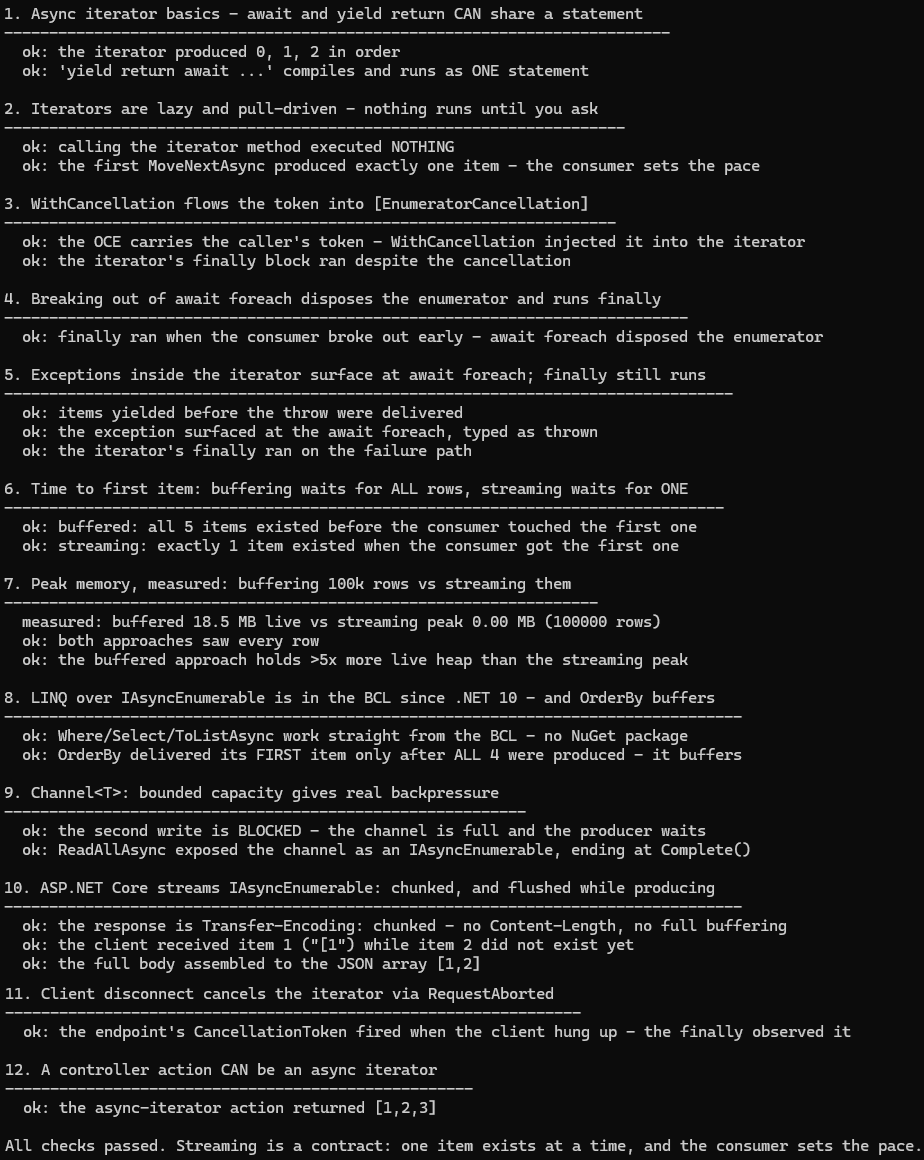
A stream's behaviour is observable as hard facts: how many items the producer had created
when the consumer saw the first one, whether a finally block ran, what a bounded channel
does when full — and, for the HTTP claims, what actually arrives on a real socket.
samples/iasyncenumerable-csharp
turns this article into a console project where every line of output is a passing check.
The HTTP demos start an in-process Kestrel server on a loopback port and assert against
real responses, with TaskCompletionSource gates making the ordering deterministic: the
server cannot produce item 2 until the client proves it received item 1.
Writing the sample corrected three things earlier versions of this article got wrong:
yield return await ... is legal as a single statement, controller actions can be
async iterators, and on .NET 10 the LINQ operators ship in the BCL — no
System.Linq.Async package needed. Details inline below.
| Demo | Asserted |
|---|---|
| Iterator basics | items arrive in order; yield return await ... compiles and runs as one statement |
| Lazy pull | calling the iterator method executes nothing; the first MoveNextAsync produces exactly one item |
| Cancellation | WithCancellation injects the token into [EnumeratorCancellation]; the OperationCanceledException carries the caller's token; finally runs |
| Early break | breaking out of await foreach disposes the enumerator and runs the iterator's finally |
| Exceptions | items yielded before a throw are delivered; the exception surfaces at await foreach typed as thrown; finally runs |
| Time to first item | buffered: all N items exist before consumption starts; streaming: exactly one |
| Memory, measured | 100k rows: the buffered list holds ~18 MB live; the streaming peak rounds to zero |
| LINQ in the BCL | Where/Select/ToListAsync work with no NuGet package on .NET 10; OrderBy yields its first item only after all are produced |
Channel<T> | a bounded channel blocks the writer when full — real backpressure; ReadAllAsync ends at Complete() |
| HTTP streaming | the response is Transfer-Encoding: chunked; the client holds item 1 while item 2 provably does not exist yet |
| Client disconnect | dropping the connection mid-stream fires the endpoint's CancellationToken inside the iterator |
| Controller action | an action declared async IAsyncEnumerable<int> with yield streams correctly |
The Problem with List<T> for Large Data
Consider a typical export endpoint that loads everything upfront:
// Loading everything before doing anything — memory spikes with row count
public async Task<IActionResult> ExportProducts()
{
    List<Product> products = await _db.Products
        .AsNoTracking()
        .ToListAsync();                 // ALL rows in memory at once

    return Ok(products);               // then serialize all of it
}
For 100 rows this is fine. For 100,000 rows, ToListAsync() blocks until the full result set is fetched, allocates a large contiguous buffer, and then the serializer has to hold the full list in memory while writing the response.
IAsyncEnumerable<T> breaks this into a pipeline: rows are produced as they arrive from the database and consumed (serialized, processed, forwarded) before the next batch arrives.
What IAsyncEnumerable<T> Is
IAsyncEnumerable<T> is the async counterpart of IEnumerable<T>. It exposes a single method:
public interface IAsyncEnumerable<out T>
{
    IAsyncEnumerator<T> GetAsyncEnumerator(CancellationToken cancellationToken = default);
}

public interface IAsyncEnumerator<out T> : IAsyncDisposable
{
    T Current { get; }
    ValueTask<bool> MoveNextAsync();
}
Key points:
MoveNextAsync()returnsValueTask<bool>— awaitable and allocation-friendly for the common synchronous-completion case.- The enumerator itself is
IAsyncDisposable, so teardown of underlying resources (DB connections, streams) is also async. CancellationTokenis part of the contract at the top level.
Writing Async Iterator Methods
An async iterator is an async method that returns IAsyncEnumerable<T> and uses yield return. The compiler transforms it into a state machine, just like sync iterators, but with async support.
public async IAsyncEnumerable<int> GenerateSequenceAsync(int count)
{
    for (int i = 0; i < count; i++)
    {
        await Task.Delay(10);   // simulate async work per item
        yield return i;
    }
}
You can mix await expressions freely with yield return — even in the same statement. I used to repeat the claim that they can't be combined; the sample disproves it with a one-liner:
public async IAsyncEnumerable<int> FetchFirstAsync()
{
    yield return await Task.FromResult(42); // one statement, both keywords — legal
}
Adding CancellationToken Support
The idiomatic way to support cancellation in an async iterator is the [EnumeratorCancellation] attribute:
using System.Runtime.CompilerServices;

public async IAsyncEnumerable<Product> StreamProductsAsync(
    int categoryId,
    [EnumeratorCancellation] CancellationToken cancellationToken = default)
{
    await using var connection = await _dbFactory.OpenConnectionAsync(cancellationToken);

    await foreach (var product in FetchFromDbAsync(connection, categoryId, cancellationToken))
    {
        // lightweight per-item transform
        product.Price = Math.Round(product.Price, 2);
        yield return product;

        // explicit check if the loop body itself is slow
        cancellationToken.ThrowIfCancellationRequested();
    }
}
When a caller passes a token via WithCancellation(), the runtime injects it into the [EnumeratorCancellation] parameter automatically:
var cts = new CancellationTokenSource(TimeSpan.FromSeconds(30));

await foreach (var product in StreamProductsAsync(categoryId: 5)
                   .WithCancellation(cts.Token))
{
    Console.WriteLine(product.Name);
}Always accept [EnumeratorCancellation] CancellationToken in public async iterators. The overhead is negligible when unused, and it makes the method safe for cancellation without a breaking change later. The sample asserts the full round trip: cancel the token passed to WithCancellation, and the OperationCanceledException that comes out of await foreach carries that same token — while the iterator's finally block still runs.
Consuming with await foreach
await foreach is the syntax sugar that calls GetAsyncEnumerator, loops on MoveNextAsync, and disposes the enumerator when done (including on exception):
await foreach (var item in source)
{
    Process(item);
}

// desugars to roughly:
await using var enumerator = source.GetAsyncEnumerator(cancellationToken);
while (await enumerator.MoveNextAsync())
{
    Process(enumerator.Current);
}
ConfigureAwait in await foreach
For library code that must avoid capturing the synchronization context:
await foreach (var item in source.ConfigureAwait(false))
{
    Process(item);
}
EF Core: AsAsyncEnumerable()
EF Core's IQueryable<T> extensions include AsAsyncEnumerable(), which executes the query and streams rows as they arrive from the database rather than buffering all of them.
public async IAsyncEnumerable<ProductDto> StreamProductsAsync(
    [EnumeratorCancellation] CancellationToken ct = default)
{
    // AsAsyncEnumerable() opens the reader and yields rows one at a time
    await foreach (var p in _db.Products
                               .AsNoTracking()           // no change tracking needed for reads
                               .Where(p => p.IsActive)
                               .Select(p => new ProductDto(p.Id, p.Name, p.Price))
                               .AsAsyncEnumerable()
                               .WithCancellation(ct))
    {
        yield return p;
    }
}Keep the DbContext alive for the entire duration of the stream. Do not dispose it inside the iterator, and be aware that the context is not thread-safe — only one concurrent reader per context.
Comparing ToListAsync vs AsAsyncEnumerable
// ToListAsync — buffers everything, then processes
var products = await _db.Products.ToListAsync(ct);
foreach (var p in products)
    await SendToClientAsync(p, ct);

// AsAsyncEnumerable — processes each row as it arrives
await foreach (var p in _db.Products.AsAsyncEnumerable().WithCancellation(ct))
    await SendToClientAsync(p, ct);
For 100,000 rows the first version peaks at the full object graph in memory; the second holds only a single row at a time inside the loop body.
ASP.NET Core: Returning IAsyncEnumerable from Controllers
ASP.NET Core's System.Text.Json serializer supports IAsyncEnumerable<T> natively. When you return it from a controller action, the runtime streams the JSON array as items become available:
[ApiController]
[Route("api/products")]
public class ProductsController : ControllerBase
{
    private readonly AppDbContext _db;

    public ProductsController(AppDbContext db) => _db = db;

    // The response is a JSON array streamed as rows arrive — no full buffering
    [HttpGet("export")]
    public IAsyncEnumerable<ProductDto> ExportAsync(CancellationToken ct)
    {
        return _db.Products
                  .AsNoTracking()
                  .Select(p => new ProductDto(p.Id, p.Name, p.Price))
                  .AsAsyncEnumerable();
    }
}
No await, no Ok() wrapper needed — ASP.NET Core detects IAsyncEnumerable<T> and handles the rest. The sample asserts what actually goes over the wire: the response is Transfer-Encoding: chunked (no Content-Length, no full buffering), and the serializer flushes whenever MoveNextAsync has to wait — the sample's client reads [1 off the socket while a gate guarantees item 2 has not been produced yet. One nuance worth knowing: for items that arrive back-to-back with no await in between, System.Text.Json batches into its internal buffer and flushes on size, not per item.
The CancellationToken ct parameter in an action method is automatically bound to the request's HttpContext.RequestAborted token. The sample asserts this end-to-end: the client reads the first item, hangs up mid-stream, and the token fires inside the iterator — its finally block observes the cancellation.
Minimal API Version
app.MapGet("/api/products/export", (AppDbContext db, CancellationToken ct) =>
    db.Products
      .AsNoTracking()
      .Select(p => new ProductDto(p.Id, p.Name, p.Price))
      .AsAsyncEnumerable());
Using Channel<T> as a Producer/Consumer Bridge
Channel<T> (from System.Threading.Channels) is useful when data is pushed from an external source (e.g., a message queue, WebSocket, or background task) and you want to expose it as IAsyncEnumerable<T>.
public async IAsyncEnumerable<OrderEvent> WatchOrdersAsync(
    string customerId,
    [EnumeratorCancellation] CancellationToken ct = default)
{
    // Bounded channel provides backpressure — producer blocks when full
    var channel = Channel.CreateBounded<OrderEvent>(new BoundedChannelOptions(100)
    {
        FullMode = BoundedChannelFullMode.Wait
    });

    // Producer: runs independently, writes to the channel
    var producer = Task.Run(async () =>
    {
        try
        {
            await foreach (var evt in _messageBus.SubscribeAsync(customerId, ct))
                await channel.Writer.WriteAsync(evt, ct);
        }
        finally
        {
            channel.Writer.Complete();  // signal end-of-stream
        }
    }, ct);

    // Consumer: expose channel as IAsyncEnumerable
    await foreach (var evt in channel.Reader.ReadAllAsync(ct))
        yield return evt;

    await producer;   // propagate producer exceptions
}
Channel<T> decouples the producer rate from the consumer rate and provides natural backpressure through bounded capacity.
Channel vs Direct Iteration
| Scenario | Approach |
|---|---|
| Pull-based source (DB, file, paginated API) | Direct async iterator |
| Push-based source (events, sockets, queues) | Channel<T> bridge |
| Fan-out to multiple consumers | Channel<T> with multiple readers |
IEnumerable vs IAsyncEnumerable vs IObservable
IEnumerable<T> | IAsyncEnumerable<T> | IObservable<T> (Rx) | |
|---|---|---|---|
| Execution model | Synchronous pull | Asynchronous pull | Push (observer notified) |
| Backpressure | Implicit (caller controls) | Implicit (caller controls) | Requires operators (e.g., Buffer) |
| Cancellation | Not built-in | CancellationToken first-class | IDisposable subscription |
| Error handling | Exceptions propagate normally | Exceptions propagate normally | OnError callback |
| LINQ support | Full (System.Linq) | Full in the BCL since .NET 10 (System.Linq.Async package before) | Full (Rx.NET) |
| Thread model | Caller's thread | Caller's thread (no implicit scheduling) | Scheduler-based |
| Best for | In-memory collections | Async data sources (DB, files, APIs) | Event streams, complex operators |
Prefer IAsyncEnumerable<T> for database and I/O streaming. Reach for IObservable<T> only when you need reactive operators (debounce, merge, throttle) or a push-based model is fundamentally more natural.
Memory Usage: List<T> vs Streaming
The sample measures the difference between buffering and streaming 100,000 rows (a small record with an id, a ~50-character name, and a price) by comparing GC.GetTotalMemory snapshots against a pre-run baseline:
// Approach A: buffer everything
public async Task<long> BufferedApproachAsync()
{
    List<Product> products = await _db.Products
        .AsNoTracking()
        .ToListAsync();

    long total = 0;
    foreach (var p in products)
        total += (long)p.Price;

    return total;
}

// Approach B: stream row by row
public async Task<long> StreamingApproachAsync(CancellationToken ct = default)
{
    long total = 0;

    await foreach (var p in _db.Products
                               .AsNoTracking()
                               .AsAsyncEnumerable()
                               .WithCancellation(ct))
    {
        total += (long)p.Price;
    }

    return total;
}| Metric | Buffered | Streaming |
|---|---|---|
| Live heap, measured (100k rows) | 18.5 MB — the whole object graph at once | peak rounds to 0 MB — each row is garbage before the next exists |
| Time to first result (asserted) | all 100,000 rows exist before the consumer sees the first | exactly 1 row exists when the consumer sees the first |
| Suitable for | Small-to-medium datasets | Large or unbounded datasets |
The measured numbers come from the in-memory producer in the sample, so they isolate the buffering effect itself; a real database adds driver buffering on top, and heavier rows scale the buffered figure linearly while the streaming peak stays flat.
Real-World Pattern: Large Export Endpoint
Putting it all together — a production-grade streaming export that handles cancellation, applies a transform, and streams JSON to the client:
[ApiController]
[Route("api/reports")]
public class ReportController : ControllerBase
{
    private readonly AppDbContext _db;
    private readonly ILogger<ReportController> _logger;

    public ReportController(AppDbContext db, ILogger<ReportController> logger)
    {
        _db = db;
        _logger = logger;
    }

    [HttpGet("orders/export")]
    [Produces("application/json")]
    public IAsyncEnumerable<OrderExportRow> ExportOrdersAsync(
        [FromQuery] DateOnly from,
        [FromQuery] DateOnly to,
        CancellationToken ct)                   // bound to RequestAborted automatically
    {
        var fromDate = from.ToDateTime(TimeOnly.MinValue);
        var toDate   = to.ToDateTime(TimeOnly.MaxValue);

        return StreamOrdersAsync(fromDate, toDate, ct);
    }

    // Separate private method keeps the iterator logic clean
    private async IAsyncEnumerable<OrderExportRow> StreamOrdersAsync(
        DateTime fromDate,
        DateTime toDate,
        [EnumeratorCancellation] CancellationToken ct)
    {
        int count = 0;

        await foreach (var order in _db.Orders
                                       .AsNoTracking()
                                       .Where(o => o.CreatedAt >= fromDate && o.CreatedAt <= toDate)
                                       .OrderBy(o => o.CreatedAt)
                                       .Select(o => new
                                       {
                                           o.Id,
                                           o.CustomerName,
                                           o.Total,
                                           o.CreatedAt,
                                           ItemCount = o.Items.Count
                                       })
                                       .AsAsyncEnumerable()
                                       .WithCancellation(ct))
        {
            yield return new OrderExportRow(
                order.Id,
                order.CustomerName,
                order.Total,
                order.CreatedAt,
                order.ItemCount);

            count++;

            // log progress every 1000 rows without blocking the stream
            if (count % 1000 == 0)
                _logger.LogInformation("Exported {Count} orders so far", count);
        }

        _logger.LogInformation("Export complete. Total rows: {Count}", count);
    }
}

public record OrderExportRow(
    Guid Id,
    string CustomerName,
    decimal Total,
    DateTime CreatedAt,
    int ItemCount);
Key design decisions:
- Separate private iterator method — a style choice, not a requirement. I used to claim controller actions can't be async iterators; the sample disproves it with an action declared
async IAsyncEnumerable<int>usingyield, and it streams correctly. Delegating to a private method still earns its place here: it keeps parameter parsing (DateOnly→DateTime) out of the lazy iterator, so bad input throws when the action is called instead of when enumeration starts. AsNoTracking()— change tracking adds per-entity overhead; never use tracking for read-only exports.Selectpushes projection to SQL — only the columns you need travel over the wire.- Progress logging every 1,000 rows gives visibility without flooding logs.
CancellationTokenfrom the action — if the client disconnects mid-export, the DB query is cancelled.
LINQ over IAsyncEnumerable<T>
As of .NET 10, the LINQ operators for IAsyncEnumerable<T> (Where, Select, OrderBy, ToListAsync, and the rest) ship in the BCL — the sample uses them with no package reference at all. On .NET 9 and earlier, add the System.Linq.Async NuGet package to get the same operators:
dotnet add package System.Linq.Async # only needed on .NET 9 and earlierusing System.Linq;
// Filter and transform before consuming
var expensiveProducts = _db.Products
.AsAsyncEnumerable()
.Where(p => p.Price > 100)
.Select(p => new { p.Name, p.Price })
.OrderBy(p => p.Price); // note: sorts in-memory after streaming
await foreach (var p in expensiveProducts)
Console.WriteLine($"{p.Name}: {p.Price:C}");OrderBy on an IAsyncEnumerable<T> buffers the entire sequence before returning the first element — the sample asserts that the first ordered item arrives only after every source item was produced. For ordering large streams, push the ORDER BY down to the database via IQueryable<T> before calling AsAsyncEnumerable().
Handling Exceptions in Async Iterators
Exceptions thrown inside an async iterator propagate to the await foreach caller exactly like synchronous exceptions propagate through foreach — the sample asserts that items yielded before the throw are delivered, and the exception surfaces at the loop typed as thrown. (For what happens to async exceptions in general — AggregateException, Task.WhenAll, unobserved tasks — see Async Exception Handling in C#.)
public async IAsyncEnumerable<string> RiskyStreamAsync(
    [EnumeratorCancellation] CancellationToken ct = default)
{
    yield return "first";
    await Task.Delay(10, ct);
    throw new InvalidOperationException("something went wrong");
    // anything after the throw is never reached
}

try
{
    await foreach (var item in RiskyStreamAsync())
        Console.WriteLine(item);
}
catch (InvalidOperationException ex)
{
    Console.WriteLine($"Stream failed: {ex.Message}");
}
The finally block (and IAsyncDisposable teardown) still runs when an exception escapes:
public async IAsyncEnumerable<Row> StreamWithCleanupAsync(
    [EnumeratorCancellation] CancellationToken ct = default)
{
    await using var reader = await OpenReaderAsync(ct);
    try
    {
        while (await reader.ReadAsync(ct))
            yield return reader.GetRow();
    }
    finally
    {
        // runs even if caller throws or cancels
        _logger.LogInformation("Reader closed");
    }
}
How I tested this
The sample behind this article runs on the .NET 10 SDK on Windows 11 and ends with 23 passing assertions across 12 demos. The HTTP claims are the part I was least willing to take on trust, so those demos start an in-process Kestrel server on a loopback port and assert against real responses. Ordering is made deterministic with TaskCompletionSource gates: the server cannot produce item 2 until the client proves it has received item 1, so "the client holds item 1 while item 2 does not exist yet" is a checked fact, not a description.
The memory figures are measured, not estimated. An earlier version of this article had a table claiming a buffered 100,000-row list held roughly 200 MB; its own arithmetic in the same paragraph said 20 MB. I replaced the table with what the sample measures on this machine: 18.5 MB live for the buffered list, and a streaming peak that rounds to zero.
Three claims in the earlier version were simply wrong and are corrected above: yield return await is legal as one statement, controller actions can be async iterators (the sample asserts against a live controller), and on .NET 10 the LINQ operators for IAsyncEnumerable ship in the base library with no NuGet package.
To reproduce:
git clone https://github.com/jorgenhoc-org/dotnet-samples
cd dotnet-samples/samples/iasyncenumerable-csharp
dotnet run
Summary
| Scenario | Recommendation |
|---|---|
| Small dataset (< ~1,000 rows) | ToListAsync() — simpler, negligible memory impact |
| Large dataset, read-only | AsAsyncEnumerable() with await foreach |
| Streaming HTTP export | Return IAsyncEnumerable<T> from controller action |
| Push-based event source | Channel<T> bridged to IAsyncEnumerable<T> |
| Complex reactive operators | IObservable<T> (Rx.NET) |
| Cancellation | Always add [EnumeratorCancellation] CancellationToken |
| Cross-library code | Add .ConfigureAwait(false) to await foreach |
IAsyncEnumerable<T> is the right default for any async sequence that comes from a database, file, external API, or other I/O source. It keeps memory flat, starts the consumer as soon as the first item is ready, and integrates cleanly with ASP.NET Core and EF Core without any extra plumbing.
Every behavioural claim above is asserted by
samples/iasyncenumerable-csharp
— clone it and run dotnet run if you want to see any of them fail on a future runtime.
Two neighbouring topics are worth reading next: MoveNextAsync returns ValueTask<bool>
for a reason — ValueTask vs Task explains what that
buys on the mostly-synchronous path — and the Canceled-vs-Faulted distinction the
iterator demos rely on is covered in
CancellationToken in C# — Practical Patterns.